Copy Settings
237
System Settings
11
System Settings]>[System Settings]>[Copy Settings]
Stamp Location Auto Settings
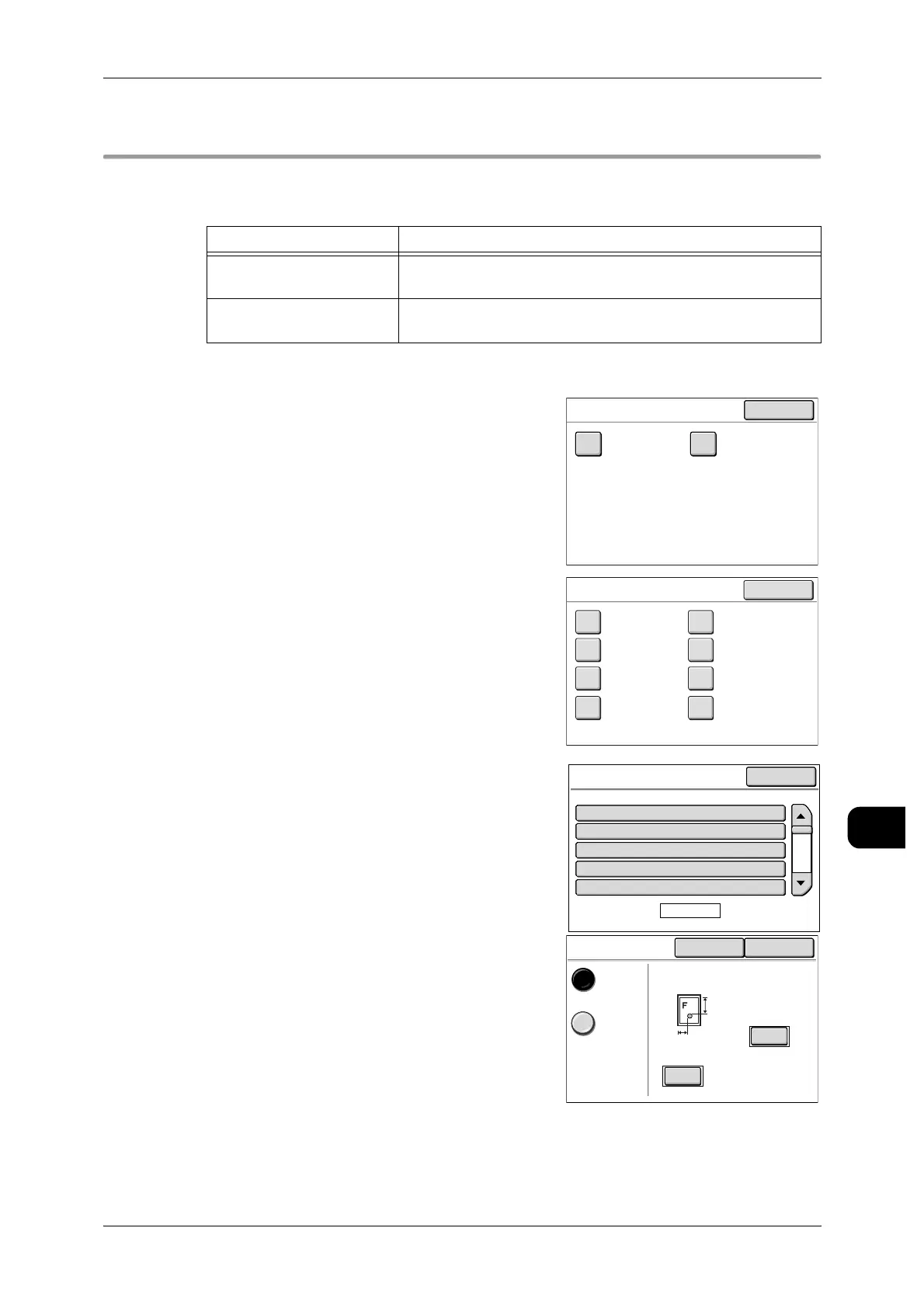
This screen allows you to set the stamp position by media size.
Two options are available.
1 Select [Stamp Location Auto Settings] with [Sys-
tem Settings]>[Common Settings]>[Copy Set-
tings].
2 Select [Stamp 1 Location] or [Stamp 2 Location].
3 Select the media size series to configure.
4 Select the orientation and size of the media.
5 Select the stamp location.
6 Press [Save], and then press [Close] until the
[Menu] screen appears.
Items Notes
Top of the Page The position can be specified for x-direction and y-direction rel-
ative to the top-left corner of the media.
Bottom of the Page The position can be specified for x-direction and y-direction rel-
ative to the bottom-left corner of the media.
Close
Stamp Location Auto Settings
Stamp 1
Location
Stamp 2
Location
Stamp 1
Location
Close
ISO/JIS A Special-2
Arch-1
ISO B
JIS B
Arch-2
Special-1
ANSI
Stamp 1 Location
ISO/JIS A
Page
1 of 3
Y:
Y:
Y:
Y:
Y:
10mm
10mm
10mm
10mm
10mm
X:
X:
X:
X:
X:
5mm
5mm
5mm
5mm
5mm
1.ISO A0 Portrait
2.ISO A1 Portrait
3.ISO A2 Portrait
4.ISO A3 Portrait
5.ISO A4 Portrait
Close
Items Current Settings
Location
Cancel Save
Top of
the Page
Bottom of
the Page
Y
(0-999)
X
(0-9999)
5
mm
10
mm


 To Next Page
 Loading...