SS1807-N002 Instruction of System - 9/106
2.1.1 Screen Display Setup
Specifies the items to be displayed in the screen.
Move the cursor to the desired menu item using the ↑ and ↓ keys and then press the Enter key.
In the displayed pop-up menu, select the desired setting using the ↑ and ↓ keys and then press
the Enter key to finalize the setting.
Also refer to the pages shown the “Remarks” column for details.
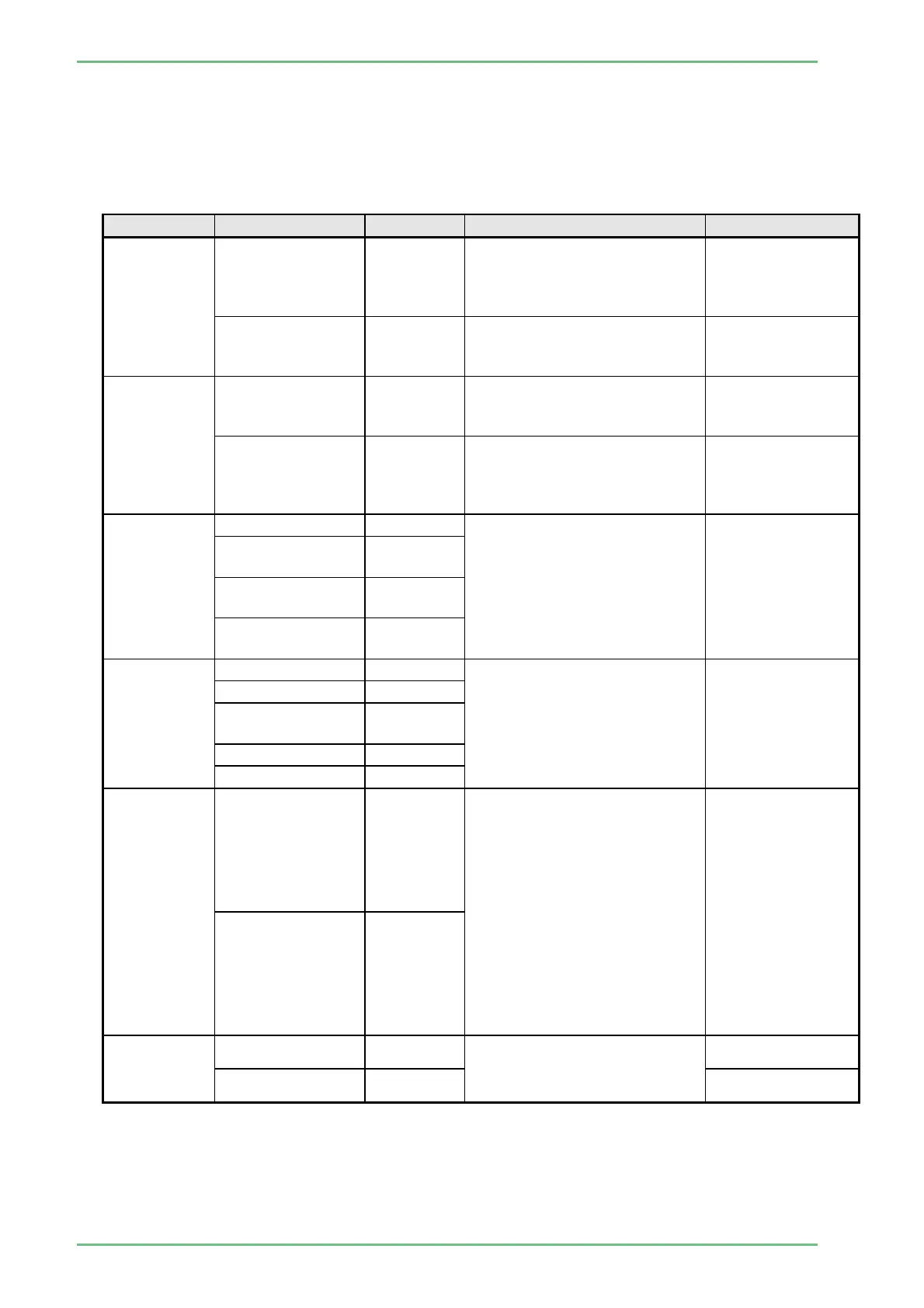
Menu item Setting Defalt Descripthon Remafks
Initial Screen
Observation
Screen
○
When the power is turned
on,the observation screen
appears. (No item is
displayed)
Patient List
When the power is turned
on,the Patient List screen
appears.
Patient
Information
Screen
Patient
Info.+Scope Info
○
When patient information is
switched,patient information
are displayed in the screen.
"2.1.1.1 Patient
Information
Screen"
Scope Info Only
When patient information is
switched only scope
information is display in the
screen.
Data Display
Type(PC)
Full Display ○
Specifies the items to be
displayed in the monitor
connected to the DVI terminal
or HD-SDI terminal set as "PC
Output"(progressive scan).
"2.1.1.2 Data
Display Type(PC)"
Hide Structure /
Color Emphasis
Shooting Counter
Only
Status Counter
Only
Data Display
Type(TV)
Full Display ○
Specifes the items to be
displayed in the monitor
connected to the RGB TV/PC
terminal set as "TV
Output"(NTSC/PAL) or RGB
TV/VIDEO/S-VIDEO terminal.
"2.1.1.3 Data
Display Type(TV)"
Patient Info.Only
Shooting Counter
Only
Status Only
Status Only
TV Screen
Resolution
NTSC *
Specifies the video output
signal modification of the RGB
TV terminal, video terminal, or
S-video terminal.
* This items is
specified to
NTSC when
destination
setting is set to
"Japan", "USA"
or "LA", and is
specified to PAL
as default when
destination
setting is set to
"EU", "China" or
"AP".
PAL *
TV screen
brightness
100IRE ○
Specifies the brightness level
of the RGB TV terminal, video
terminal, or S-video terminal.
120IRE


 To Next Page