SS1807-N002 Instruction of System - 48/106
2.5.4 Config file
2.5.4.1 Store all configuration data in external memory
When saving a config Data, a “ep6000” folder is created in the external memory and the
configuration file “feRamDat.dat” is saved in the “data” folder in the “ep6000” folder.
◆Note◆
・ Use an external memory for EP-6000.
If an external memory saved by another device other than EP-6000 is used, configuration data
may not be normally saved.
(1) Move the cursor to “Store config data in Ext. Mem” using the [↑] and [↓] keys and then press
the [Enter] key.
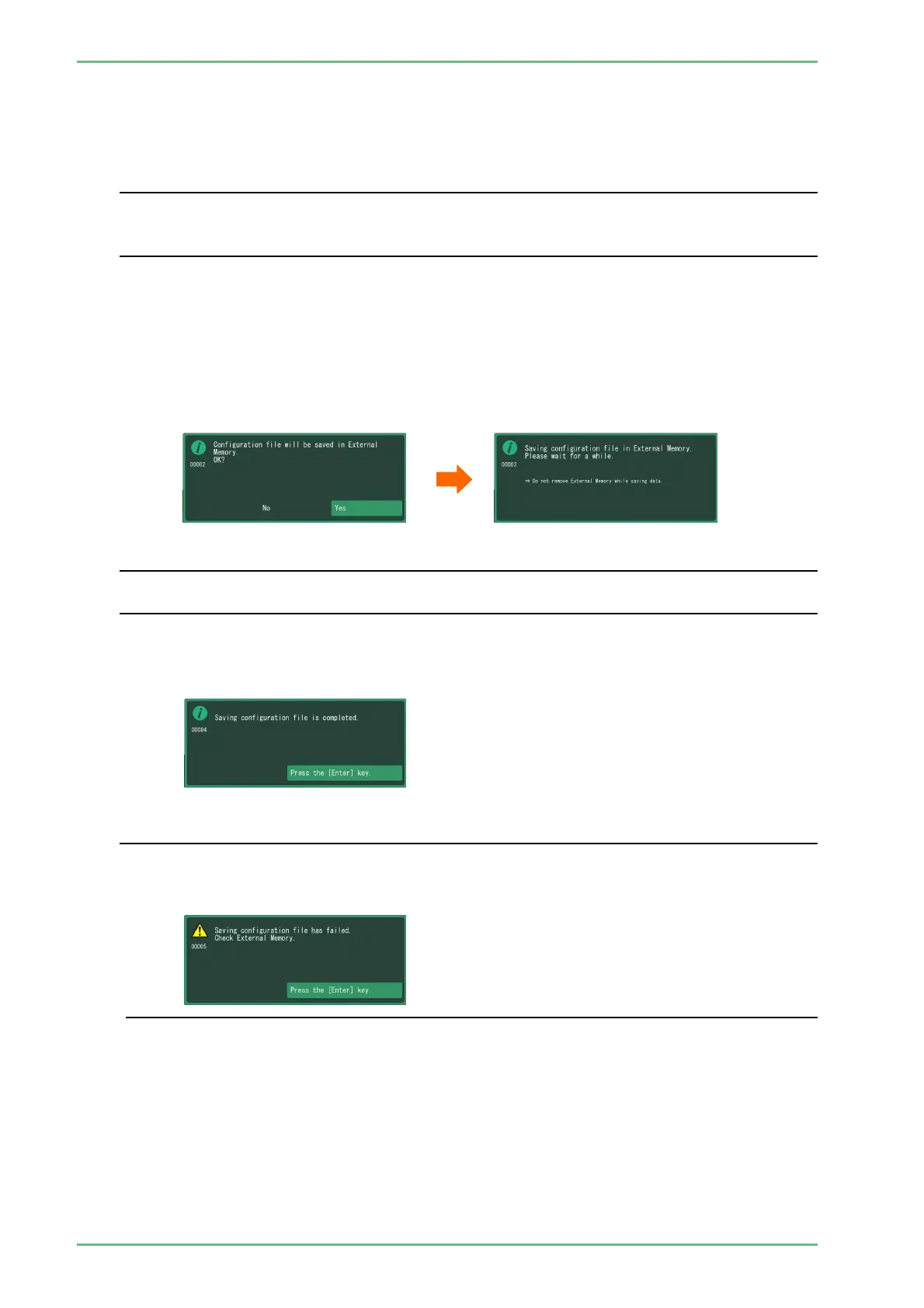
(2) The message "Configuration file will be saved in External Memory." appears.
Move the cursor to "Yes" and press the [Enter] key.
The message "Saving configuration file in External Memory." appears, and saving the
configuration starts.
◆Note◆
Do not touch the processor until the message "Saving configuration file is completed" appears.
If you turn off the power while saving config data, configuration file may not properly be saved.
(3) When the message "Saving configuration file is completed" appears, press the [Enter] key to
close the menu.
◆Note◆
If saving the configuration file has failed, the message at the right-hand side appears.
Confirm that the external memory is inserted correctly.
If this message appears again, replace the external memory.


 To Next Page