SS1807-N002 Instruction of System - 41/106
2.4.3 Optical Zoom Setup
Performs the settings for optical zoom operations when the optical zoom scope is connected.
Move the cursor to the desired menu item using the [↑] and [↓] keys and then press the [Enter]
key.
In the displayed pop-up menu, select the desired item using the [↑] and [↓] keys and then press
the [Enter] key to finalize the setting.
Also refer to the pages shown in the table for details.
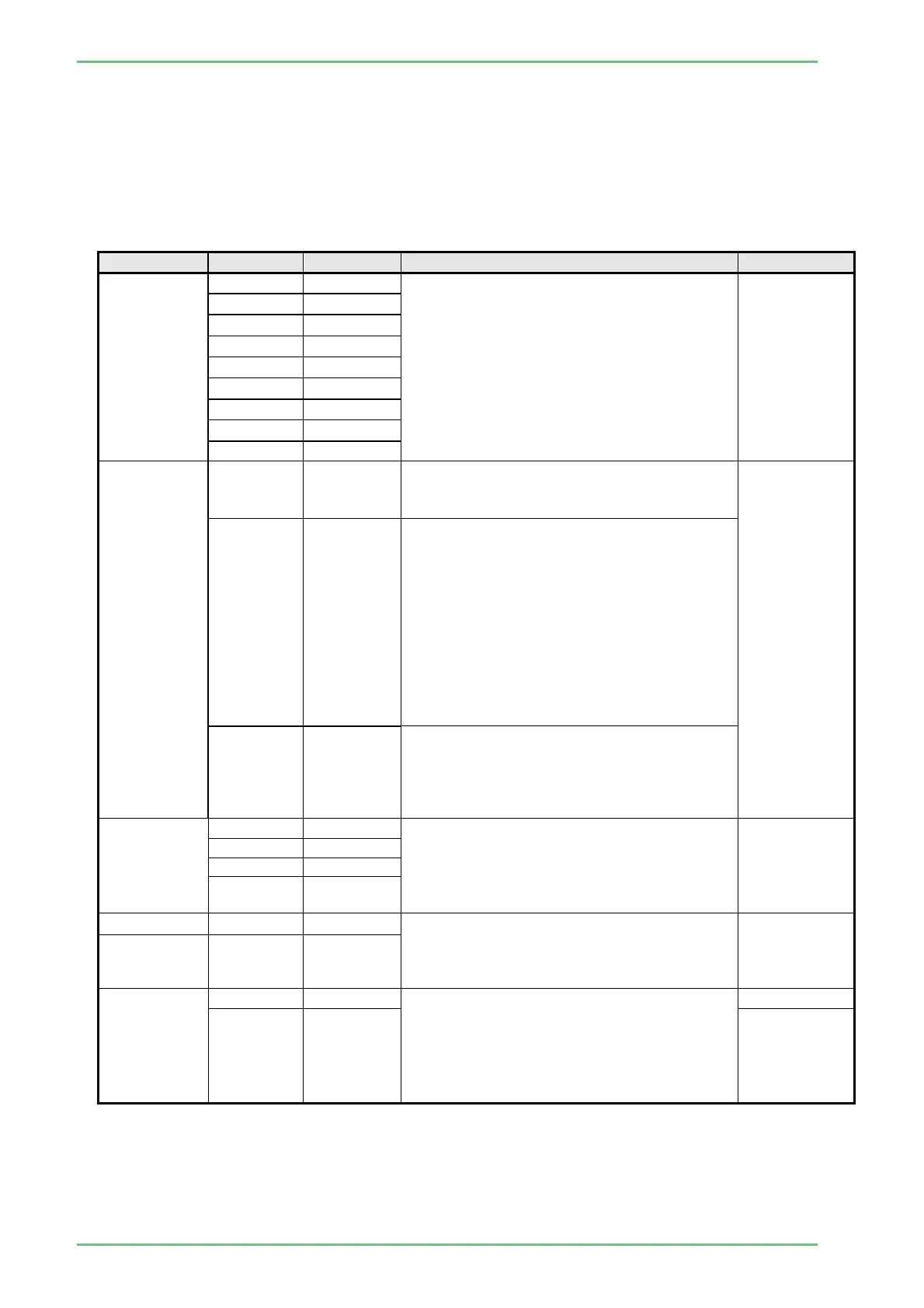
Menu item Setting Default Description Remarks
Focusing
Speed
8
The focusing speed can be selected from
among the nine steps ("8"to"0"). With "8",
the operating speed of the zoom function
becomes the fastest.
Press the [Enter] key to display the sider,
select the value by pressing the [←] and [→]
keys and then press the [Enter] key to
finalize the setting.
7
6
5
4 ○
3
2
1
0
Shutter
Speed
Auto
When the optical zoom is in maximum, the
shutter speed is changed to the speed set
for the optical zoom.
When the
switching
method is
Auto or Auto
2 and an
optical zoom
scope is
connected, if
the zoom
switch is
pressed while
the optical
zoom ratio is
in maximum,
the zoom
changes to
the electronic
zoom
automatically.
Auto 2 ○
In a general observation (when not using
the optical zoom), the shutter speed is a
standard speed.
When the position of the optical zoom is
placed in “Far Position” of “Optical Zoom
Setup”, the shutter speed is the speed set
for the optical zoom.
When the position of the optical zoom is
placed in “Near Position” of “Optical Zoom
Setup”, the shutter speed is the speed
according to the OM max. value.
Manual
When using the optical zoom, the shutter
speed does not change automatically. The
speed changes when the Shutter Speed
button is pressed.
OM Max.
Value
1/200 Select the shutter speed applied when the
optical zoom is maximized. This setting is
effective when "Auto 2" is selected for
"shutter Speed Switching for Zoomed
Image".
1/400 ○
1/600
1/800
Far Position 1~3 1
The zoom position where the shutter speed
changes can be specified when "Auto 2" is
selected for "shutter Speed Switching for
Zoomed Image".
Near
Position
5~7 7
OM Max.
Value for
BLI
Enabled This is a setting for BLI when "Auto2" is
selected for "Switching the Shutter Speed".
When the optical zoom position is at
"NearPosition" of Optical Zoom Setup, the
shutter speed is enabled to switch to "OM
Max. Value".
Disabled ○


 To Next Page