7
4
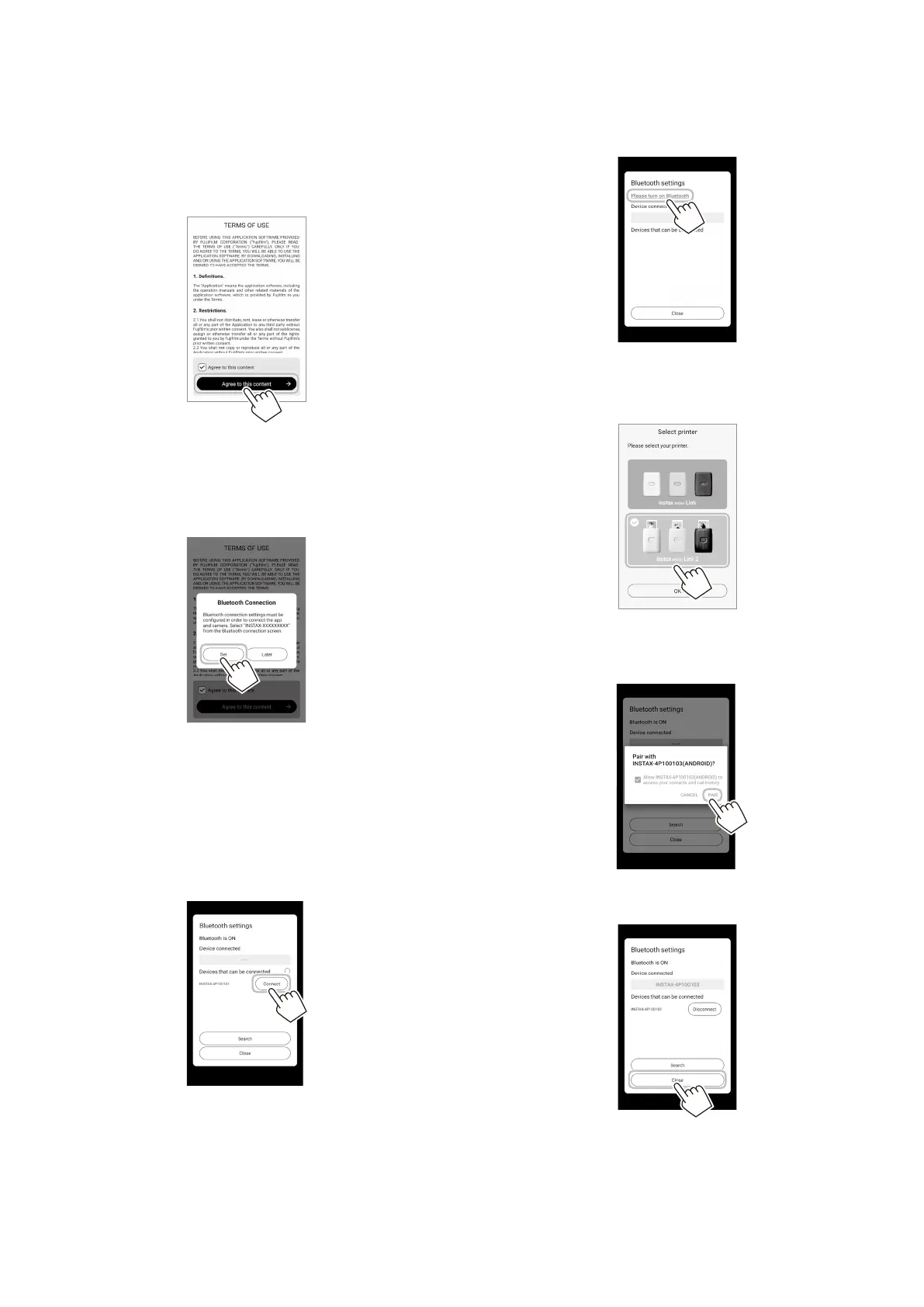
Read the Terms of Use, check the [Agree to this
content] box and tap the [Agree to this content →]
bar�
5
Set up the Bluetooth connection between your
Smartphone and the printer�
[Bluetooth connection] can also be set in the process of
printing.
6
When a printer is detected, tap [Connect]�
If multiple printers are detected, select the printer you
would like to connect to from the list.
Locate the printer’s identifier (device name) on the bottom
of the printer.
Make sure the printer is on during this step. If not, turn the
printer on by pressing and holding the Power button for 1
second.
Note
If your Bluetooth settings are switched off, tap [Please turn
on Bluetooth] to put the Bluetooth settings on.
Note
If your Bluetooth settings are switched off, the following
screen appears. In this case, select [INSTAX MINI LINK 2].
7
When the message is displayed, check the box and
tap [PAIR]�
8
When a printer is connected, tap [Close]�














 To Next Page