PARAMETERS
5
5-13
Basic setting parameter #07
No. Name Setting range Initial value Change
07 Auto tuning gain 1 to 20 (in 1 increments) 10 Always
Specify the response of the servomotor used in the auto tuning or semi-auto tuning mode.
Specify a larger value to reduce the command follow-up time and positioning setting time, but too large a
value cause the motor to vibrate.
* There is no need to set the parameter in the manual tuning mode.
n Setting method
There are two setting methods
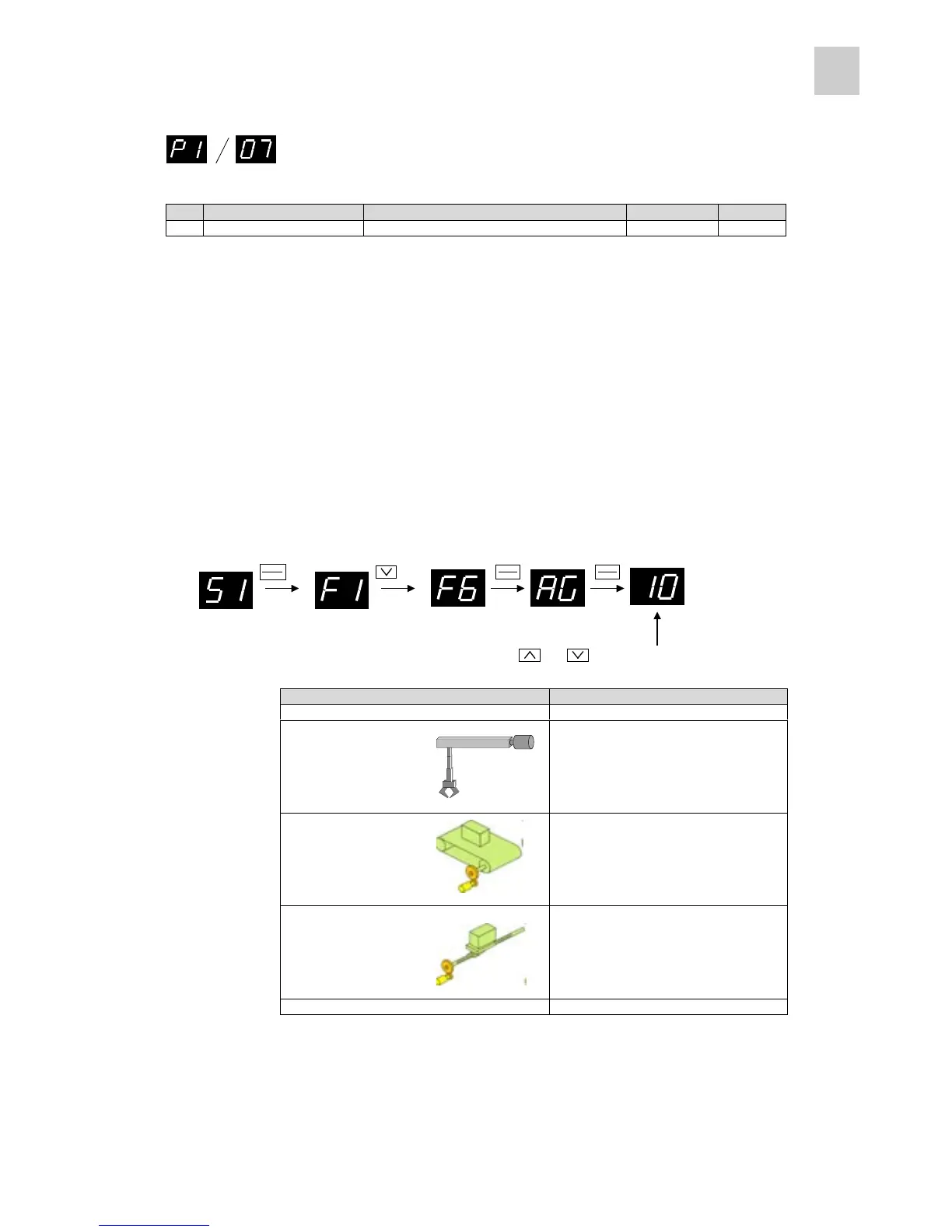
1) Setting parameter using PC loader and keypad panel (parameter setting mode)
After the parameter is established, the setting content is updated.
2) Setting through auto tuning gain setting from keypad panel (in test operation mode)
The setting is updated at real time when the value is changed.
n Approximate measure for setting
Configuration of machine Auto tuning gain (approximate)
Large transfer machine 1 to 6
Arm robot 5 to 10
Belt drive 7 to 13
Ball screw mechanism 10 to 15
Inserting, mounting or bonding machine 13 to 20
* If the gain cannot be increased up to the value specified as an approximate measure, there may be
mechanical resonance. Use a notch filter to suppress mechanical resonance. à Refer to page 5-52.
MODE
MODEMODE
MODE
ESC
ESCESC
ESC
SHIFT
SHIFTSHIFT
SHIFT
ENT
ENTENT
ENT
SHIFT
SHIFTSHIFT
SHIFT
ENT
ENTENT
ENT
×3 ×1
Press the or key to update the setting at real time.



 To Next Page