3. Explorer
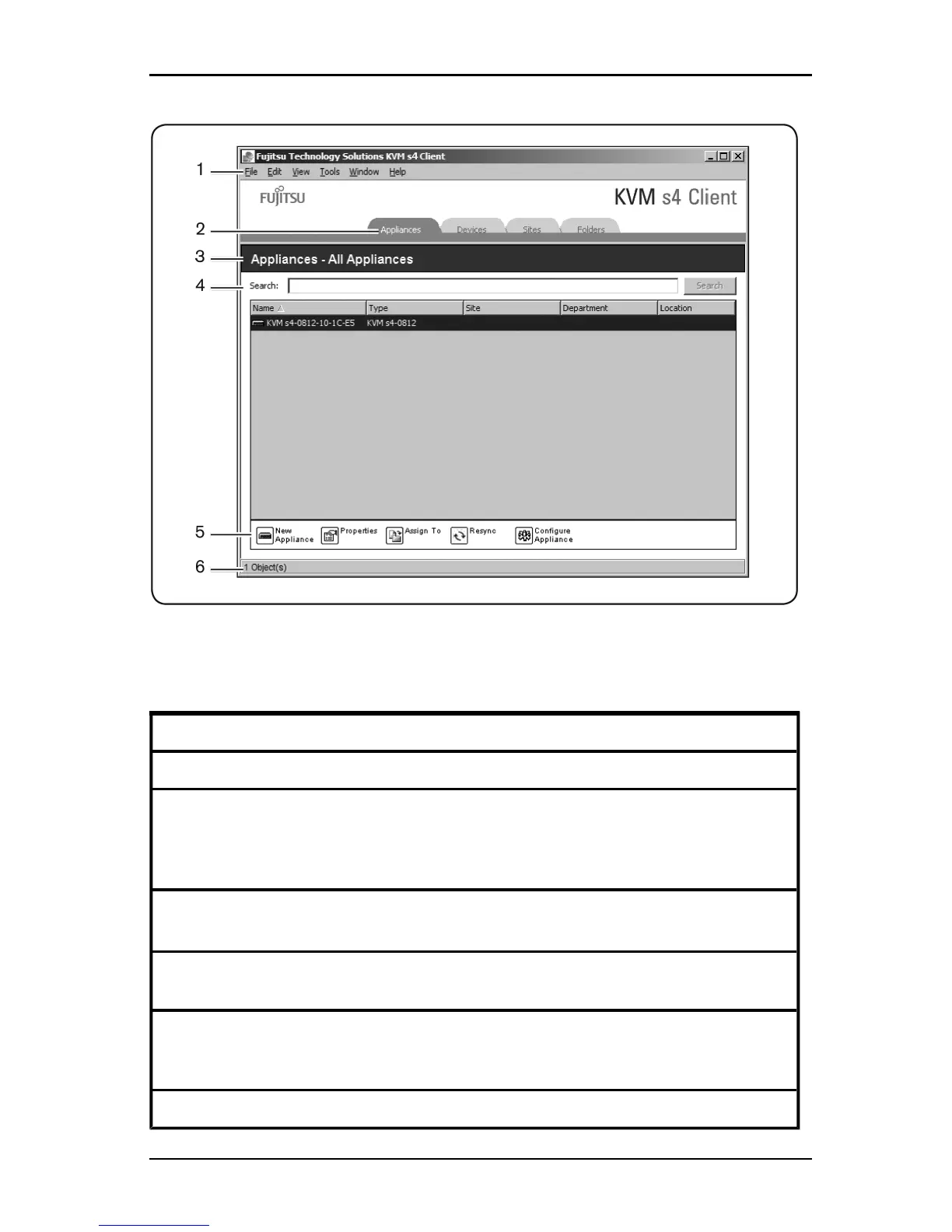
Figure 3.1. Explorer Window Areas
Area Description
1 Menu bar: Provides access to many of the features in the software.
2
View Selector pane: Contains View Selector buttons for choosing the
Explorer view. Clicking a button shows the switching system organized by the
button category: Appliances, Devices, Sites, or Folders. You can
configure which button is visible by default.
3
Unit Selector pane: Contains the Search bar, Unit list, and Task buttons
that correspond to the selected view or group.
4
Search bar: Gives you the ability to search the database for the text entered
in the Search field.
5
Task buttons: Represent tasks that can be executed. Some buttons are
dynamic, based on the unit selected in the Unit list, while other buttons are
fixed and always present.
6 Status bar: Displays the number of units shown in the Unit list.
Table 3.1: Explorer window areas
590-1059-640A
16



 To Next Page