2-12
Chapter 2 Installation Connecting to the Network
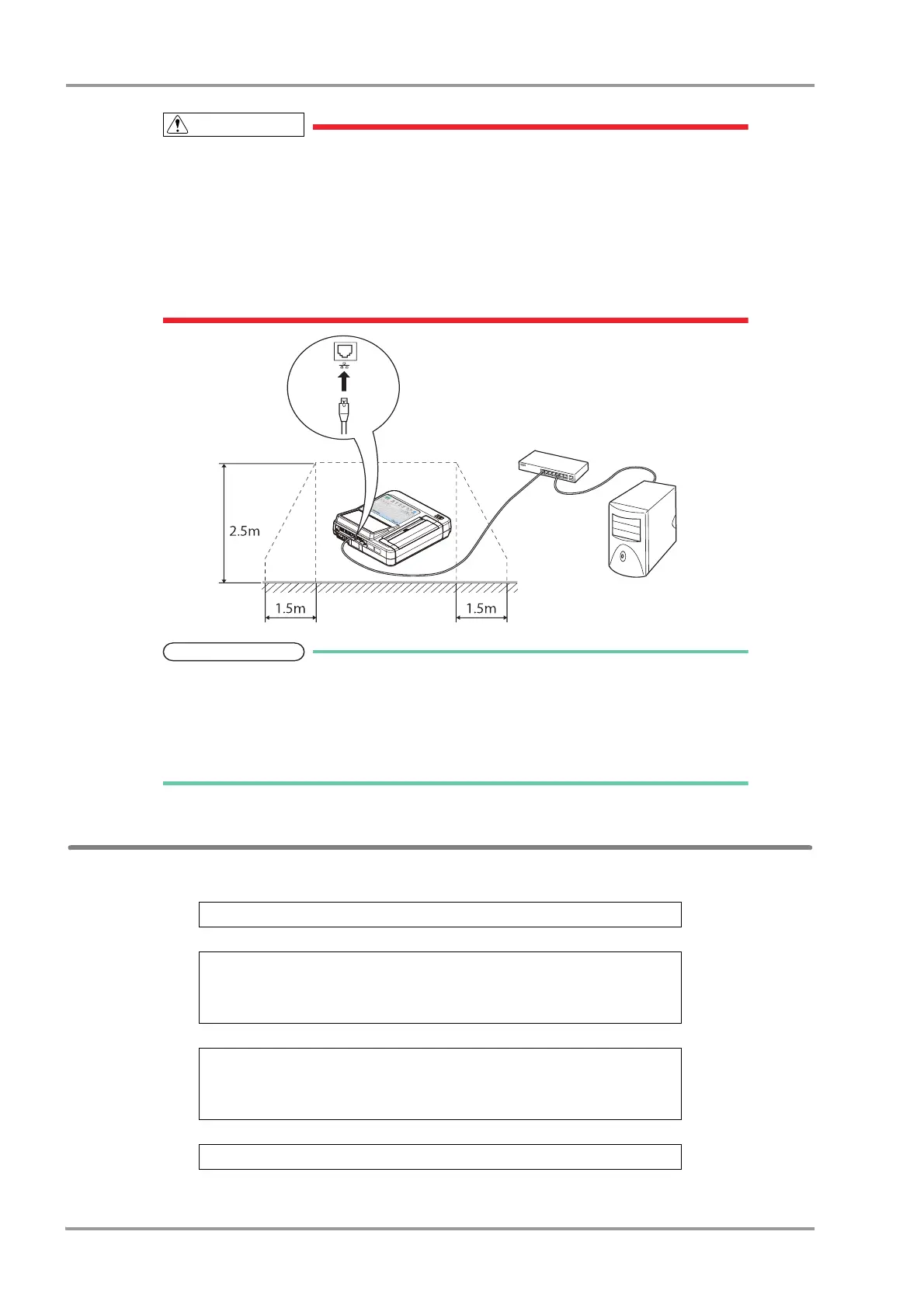
Configure and connect to the network as specified by Fukuda Denshi.
Use the Ethernet hub recommended by Fukuda Denshi (IEC 60950 compliant).
The devices connected to the network such as Ethernet hub and PC must be installed 1.5
meters away from the patient area (IEC 60601-1(2005) +A1(2012), ANSI AAMI / ES 60601-
1: A1: 2012+C1: 2009/(R)2012+ A2: 2010/(R)2012).
Make sure to ground the Ethernet hub when using it.
Use a LAN cable without any damage on the cable coating, etc.
The network must be used only for this device and must be separated from other hospital
networks.
When two or more devices are connected to the same network, assign a separate IP
address to each device. (
"Communication" P13-10)
The software such as EFS-250 is required to connect this device to a PC.
Configuring Network Settings
Steps for Configuring Network Settings
Enable communication
↓
Configure network settings on the device
Set the examination device name
Set the IP address
Set the gateway information
↓
Register the host
Host name
Enter the IP address
Enter the port number
↓
Select the host to be used


 To Next Page