5-9
Chapter 5 12-Lead Examination Recording/Printing Automatically
Function that can be used after measurement
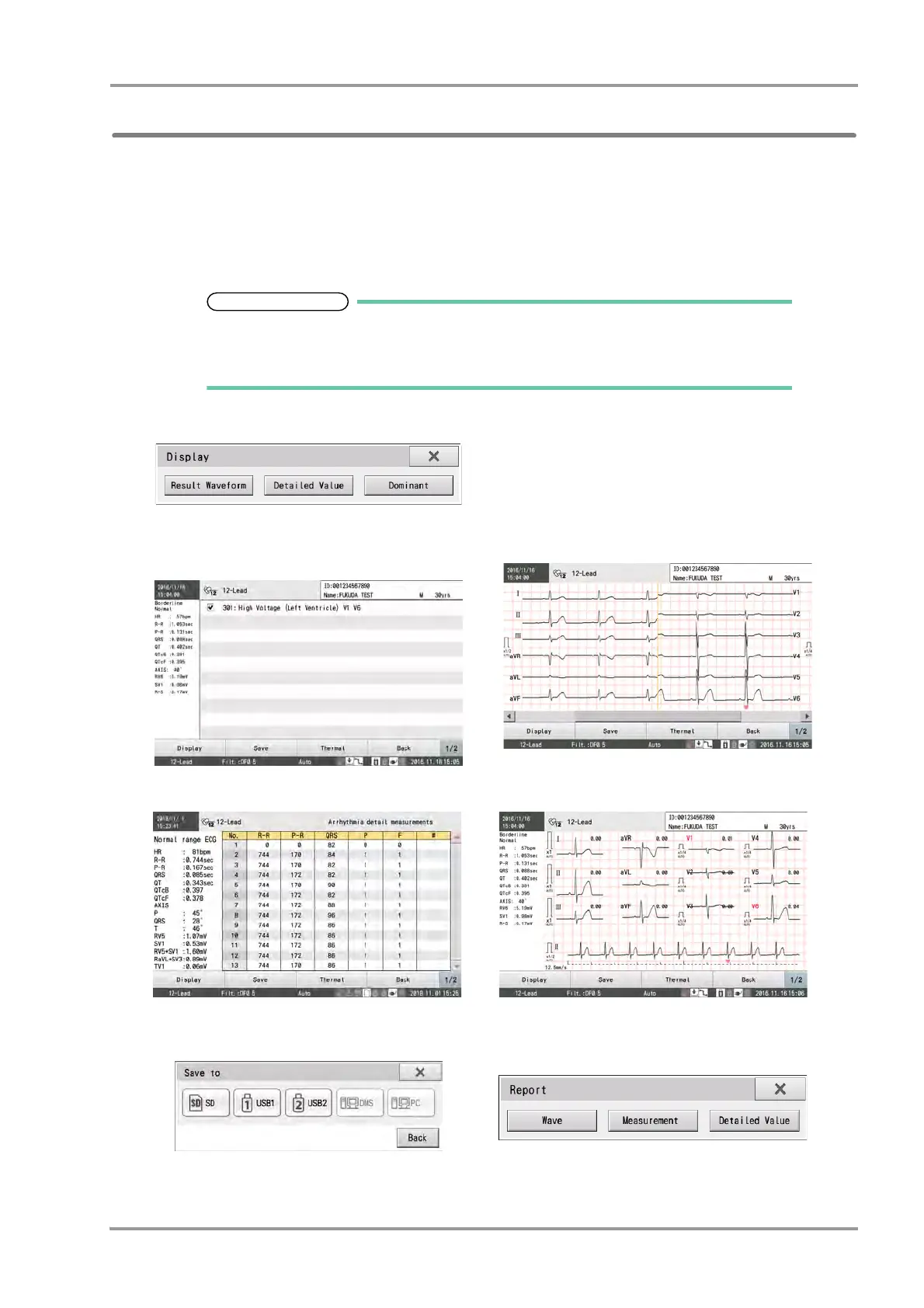
The following items can be confirmed in the Measurement Result window before printing a result report.
Flick left or right on the screen to switch display in the Measurement Result window.
It is also possible to select the window to be shown by touching [Window] and selecting the display from the Window
Selection window.
To zoom in on a waveform in the measured waveform or measurement result window, double click the area to be
examined to display an enlarged waveform.
The [Analysis Result] key will be displayed only when an optional software is installed.
Analysis report and commentary report can be printed only when an optional software is
installed.
● Display selection window
The desired measurement result window can be selected.
● [Analysis Result]
The Analysis Result appears. The analysis report and
commentary report of the checked commentary can be
output.
● [Result Waveform]
The result waveform can be verified.
● [Detailed Value]
Detailed measurements are displayed.
● [Dominant]
The dominant waveforms are displayed.
● [Save]
Touching this button displays the "Save to" window.
Select the media to save data.
● [Thermal]
The report can be printed to the internal thermal recorder.
Touch the report to output. Refer to
"Examples of Printing"
P5-6 for printing contents.


 To Next Page