5-13
Chapter 5 12-Lead Examination Printing Waveforms from Several Seconds Before (Review Recording/Printing)
Printing Waveforms from Several Seconds Before (Review Recording/Printing)
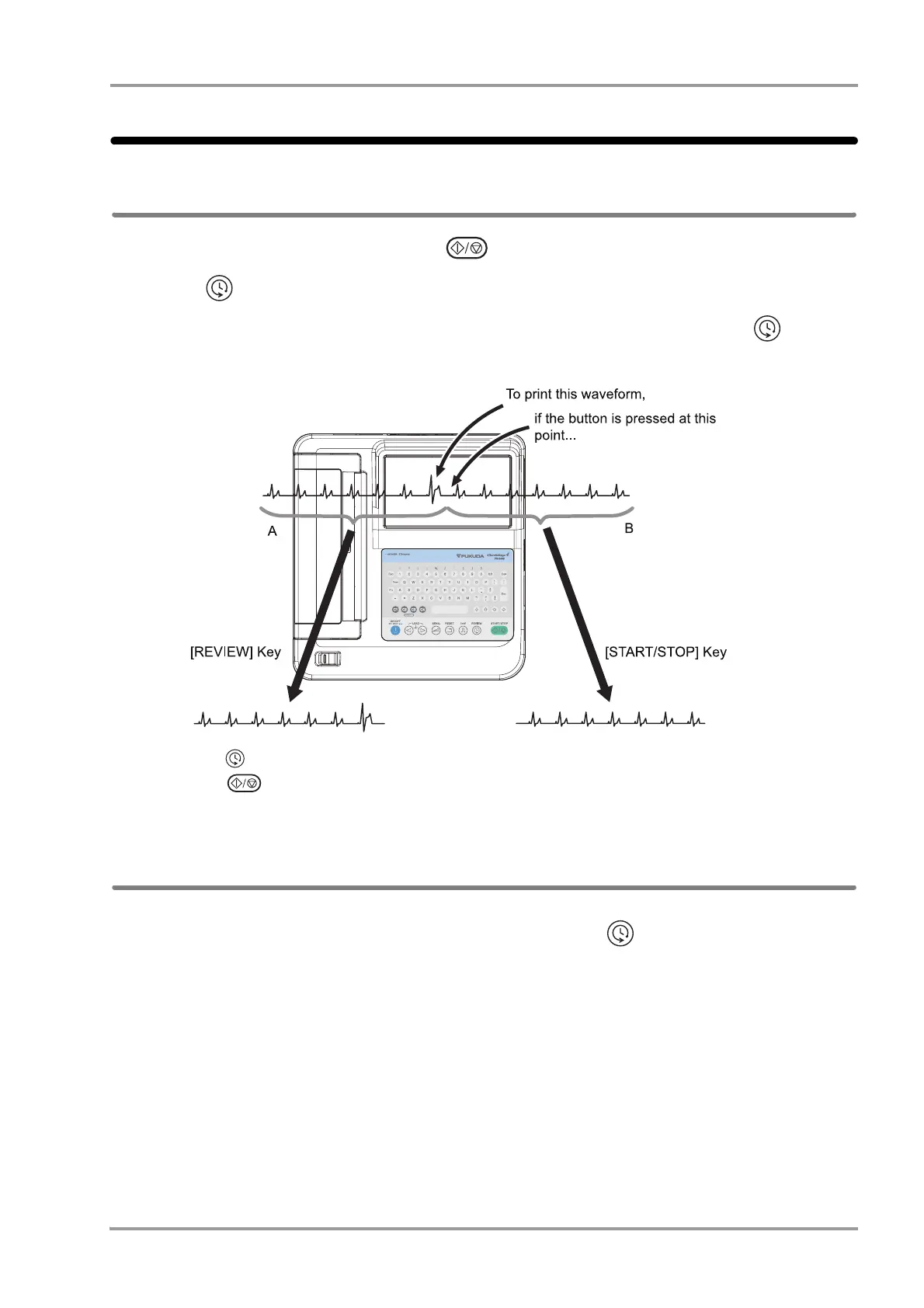
Principle of Review Printing
Usually, waveforms are printed by pressing the (START/STOP) key on the operation panel, which prints
waveforms for the specified period of time from the time the key was pressed.
When the (REVIEW) key is pressed, ECG of the specified time period will be printed up to the point when the
key was pressed.
While checking the waveforms on the screen, the desired waveform can be printed by pressing the (REVIEW)
key.
Pressing the (REVIEW) key prints part A of the waveform, allowing the desired waveform to be printed.
Pressing the (START/STOP) key prints part B of the waveform. The desired waveform is therefore not
printed.
How to Perform Review Printing
1When the waveform you want to print appears on the screen, press the (Review) key on the operation
panel.
The ECG up to the point when the key is pressed will be printed.
2The operations after this are the same as those for auto printing.(
"Recording/Printing Automatically" P5-4)


 To Next Page