4-1 FL14.10-A_DC
CABINET DISASSEMBLY INSTRUCTIONS
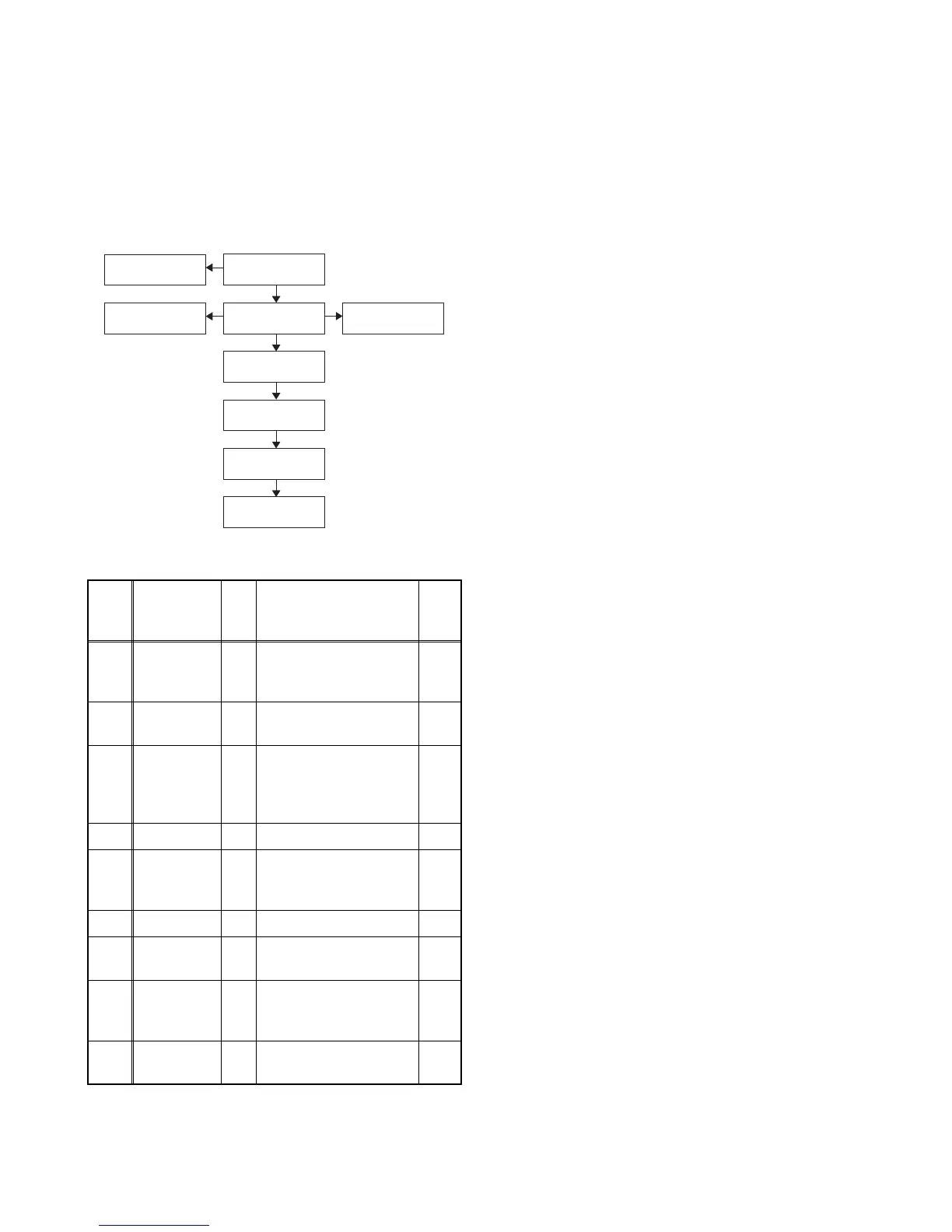
1. Disassembly Flowchart
This flowchart indicates the disassembly steps for the
cabinet parts and the CBA in order to gain access to
items to be serviced. When reassembling, follow the
steps in reverse order. Bend, route and dress the
cables as they were.
2. Disassembly Method
*1: TYPE A, TYPE B, TYPE C, TYPE D, TYPE E
*2: TYPE F
*3: TYPE G
Note:
(1) Order of steps in procedure. When reassembling,
follow the steps in reverse order. These numbers
are also used as the Identification (location) No. of
parts in figures.
(2) Parts to be removed or installed.
(3) Fig. No. showing procedure of part location
(4) Identification of parts to be removed, unhooked,
unlocked, released, unplugged, unclamped, or
desoldered.
P = Spring, L = Locking Tab, S = Screw,
H = Hex Screw, CN = Connector
e.g. 2(S-2) = two Screws of (S-2),
2(L-2) = two Locking Tabs of (L-2)
(5) Refer to the following “Reference Notes in the
Tabl e.”
Important precautions concerning the
LCD Panel Assembly:
1. When you disassemble/re-assemble the Front
Cabinet or Function CBA Unit
• Be careful not to break the hooks. If you pull with too
much force, the hooks may be damaged.
• Be careful not to scratch the display panel when
assembling.
• Be careful not to scratch the rear frame when
disassembling/re-assembling or when tightening the
screws.
• Make sure the Shield Plate is placed properly.
• The Function CBA Unit and Sensor Lens are fixed in
place by the hooks. Make sure these hooks are not
damaged. Make sure the Function CBA Unit and
Sensor Lens are securely in place when re-
assembling.
• The screw tightening torque must be 5.2lb·in
(6kgf·cm).
• Make sure the tact switches operate normally after
replacing the Front Cabinet, Function CBA Unit,
Sensor Lens, or Shield Plate.
• Make sure to replace the Control Plate to a new one
when replacing the Front Cabinet.
Step/
Loc.
No.
Part
Fig.
No.
Removal Note
[1]
Stand
Cover
Assembly
D1 3(S-1) ---
[2]
AC Cord
Cover
D1 2(S-2), (L-1) ---
[3] Rear Cover
D2
D5
4(S-3), (S-4),
4(S-5)
*1, *2
, 5(S-5)
*3
,
2(L-2), CN601,
CN3801
---
[4] Speaker D2 2(S-6), Hook ---
[5]
Digital Main
CBA Unit
D3
D5
5(S-7), CN1001,
CN3101, CN3102
*1
,
CN3103
*2, *3
---
[6] PCB Holder D3 3(S-8) ---
[7]
LCD Panel
Assembly
D4 --------------- ---
[8]
Front
Cabinet
D4
8(S-9), 2(L-3), Sensor
Lens, Shield Plate,
Control Plate, Hook
1
[9]
Function
CBA Unit
D4
D5
--------------- 1
(1)
(2)
(3)
(4)
(5)
[2] AC Cord
Cover
[3] Rear Cover
[9] Function
CBA Unit
[6] PCB Holder
[7] LCD Panel
Assembly
[4] Speaker
[8] Front Cabinet
[1] Stand Cover
Assembly
[5] Digital Main
CBA Unit



 To Next Page