20
1. Disable Heaters: Shuts off the print head, print bed, and blower if they are running.
2. Disable Motors: De-powers the stepper motors so that components can be moved by hand.
3. Load Filament: Script that will load filament into the print head.
4. Unload Filament: Script that will unload filament from the print head.
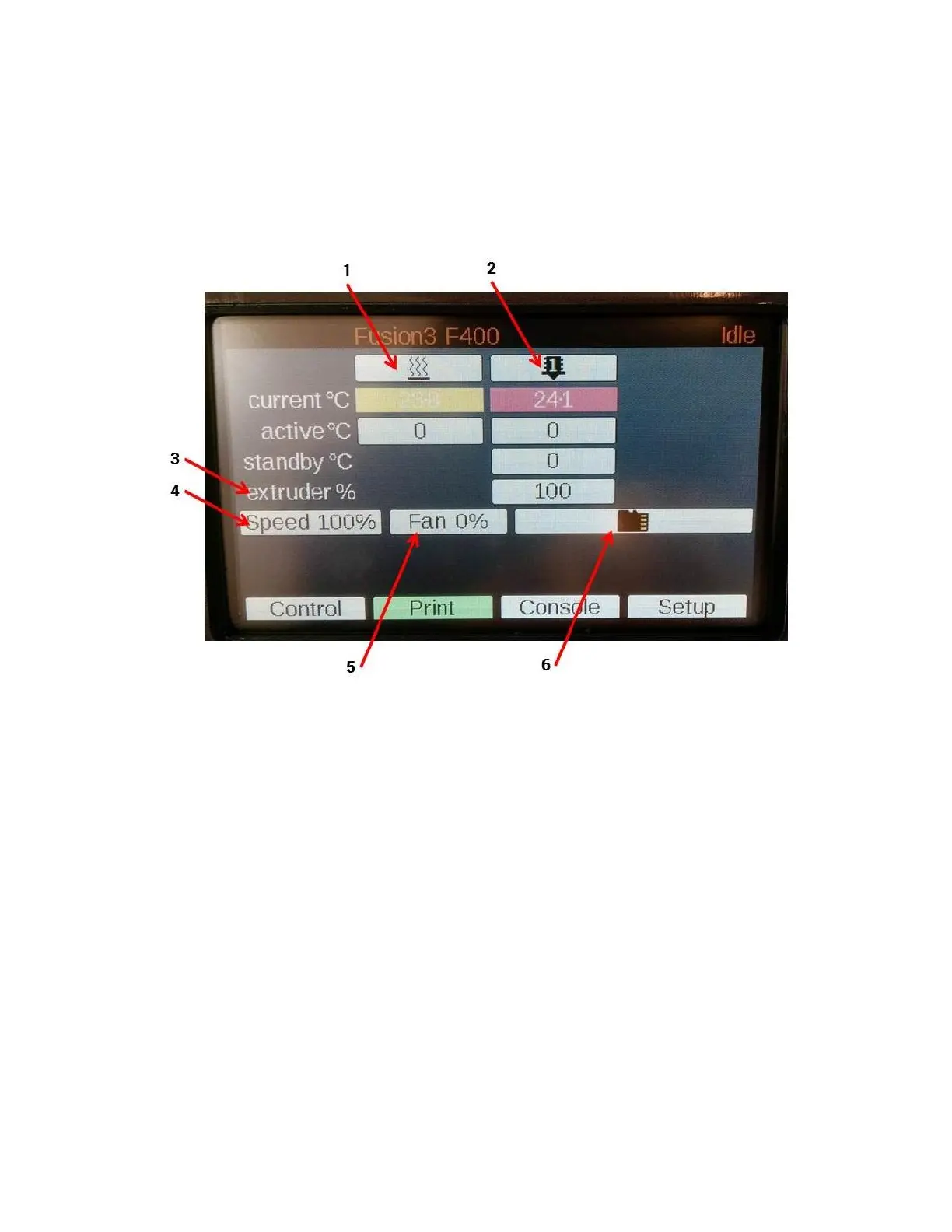
5.4 Print Tab
1. Bed heater controls (identical to “Control” tab)
2. Print head controls (identical to “Control” tab)
3. Extruder %: allows you to adjust the amount of plastic being extruded during a print.
4. Speed multiplier: allows you to adjust print speed in real time during a print.
5. Cooling blower control: allows manual control of the cooling blower on the print head.
6. File selection submenu: Press this to see a list of all files on the SD card.
5.5 Console Tab
This tab can be ignored for normal use of the printer.
This tab has two main functions:
Show messages generated by the controller (routine messages and error messages)
Allow you to send individual gcode commands directly to the controller. This is not needed in normal use
but can be useful for debugging or troubleshooting.
5.6 Setup Tab
This tab can be ignored for normal use of the printer. It has various setup options for the LCD itself.



 To Next Page