3E2364WeighScaleW810v2UserManual
Page62
previousnote,eithertraitoruserenterednotedata,willnotbe
displayed.
6. Ifyouwanttoviewthemostrecenttraitrecord,recordedforthisanimalin
moredetail,pressthe key.Whenthiskeyisreleased,the
displaywillreverttothepreviousscreen.
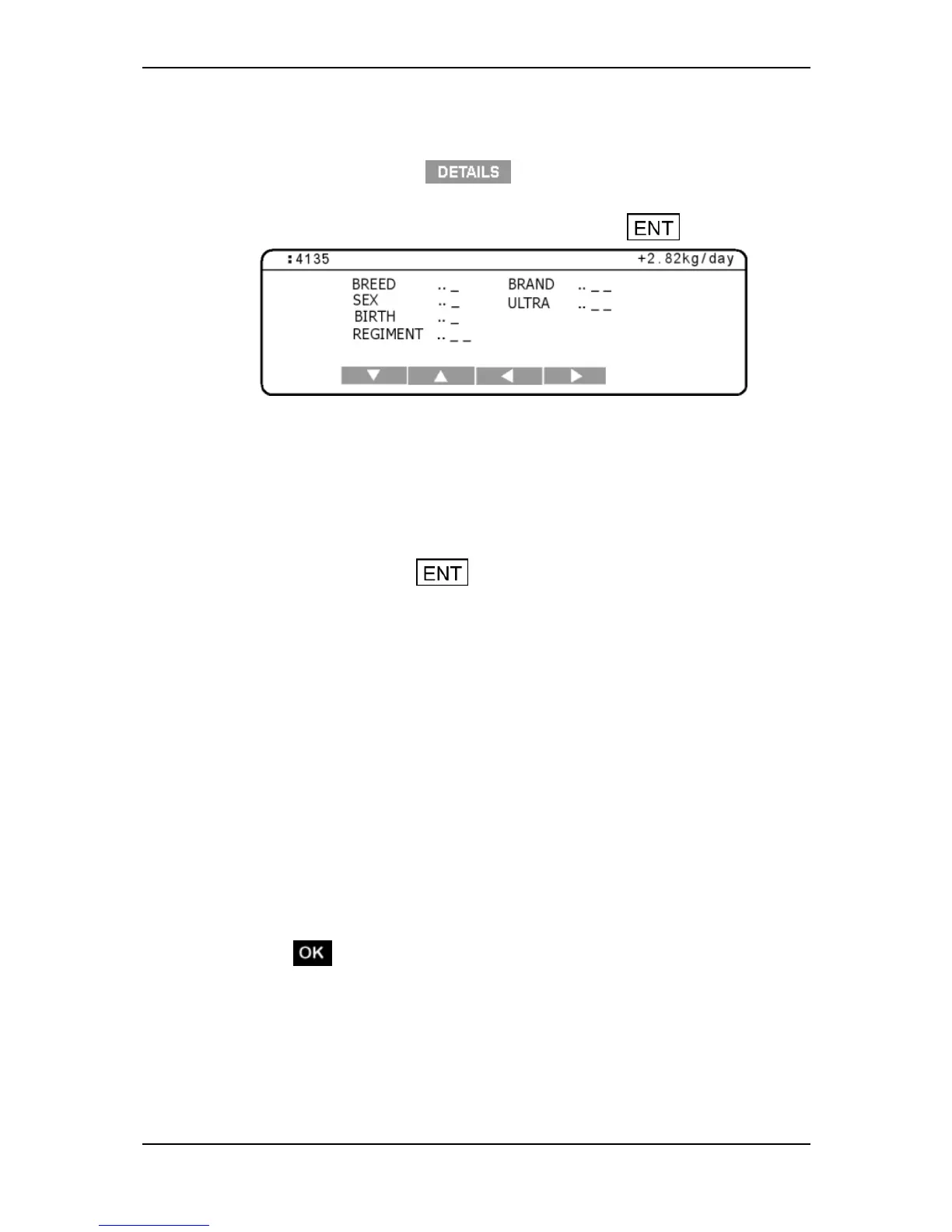
7. Ifthetraittableisnotalreadydisplayed,pressthe keytodisplayit.
Note:Theanimal'sElectronicIDorVisualTagNumberdisplaysinthetop
leftcornerofthetraittable.Theweightgain,ifonecanbecalculatedfor
thisanimal,displaysinthetoprightcornerofthetraittable.
8. Thecursorflashesinthefieldadjacenttothefirsttraitlabel.Thenumberof
charactersabletobeenteredagainsteachlabelisindicatedbytheblank
underlines.Usethearrowsoftkeystonavigatebetweenthetraitsandenter
thevaluesforthisanimal.
Note:Pressingthe keyalternatesthedisplaybetweentheVisual
TagNumberentryscreenandthetraittable.Youcannotreturntothe
statisticsorweightrecordscreensuntiltheweightisremovedfromthe
WeighScale.
9. Followtheinstructionsfortheweighingmodeyouhaveselected.
AutomaticModeWhentheWeighScalehasdeterminedanaccurate
weightfortheanimal,itlocksontotheweightandholdsitonthe
screen.Thetimetakentolockontotheweightvariesdependingonthe
movementoftheanimal.
ManualModePressthegreenweighbuttontostartweighingthe
animal.WhentheWeighScalehasdeterminedanaccurateweightfor
theanimal,itlocksontotheweightandholdsitonthescreen.The
timetakentolockontotheweightvariesdependingonthemovement
oftheanimal.
10. WhentheWeighScalehaslockedontotheweight:
the"WeightOK"lightilluminates;
displaysonthescreen;
theWeighScalebeeps;
Ifdraftingisturnedon,thegatenumberdisplaysindicatingthedrafting
category.



 To Next Page