3E2364WeighScaleW810v2UserManual
Page69
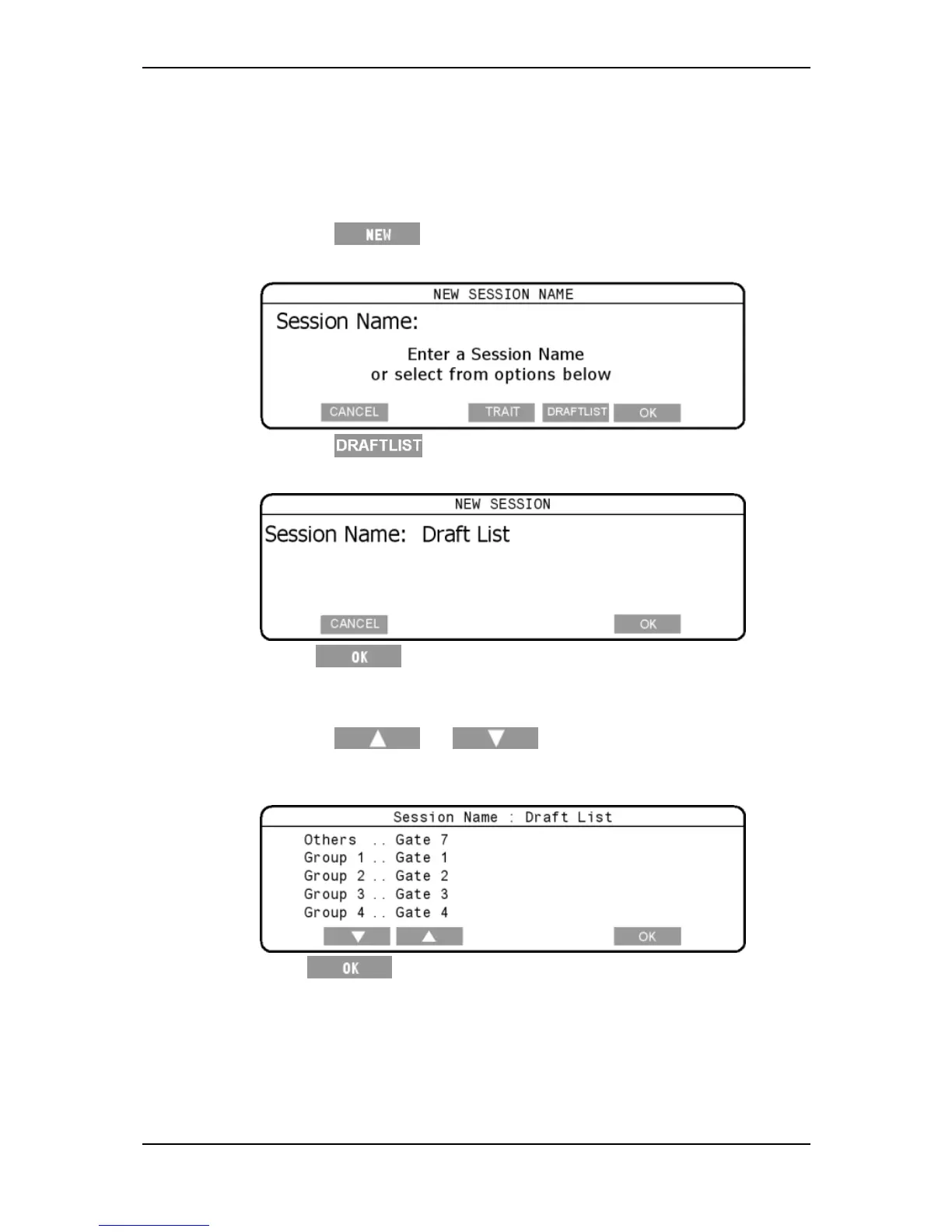
SelectingtheDraftListandsettinggates
ToselectaDraftListsession,completethefollowingsteps:
1. TurnthemodeselectswitchtoA(Automatic)ifloadbarsareconnectedor
M(Manual)ifyouarenotweighing.
2. Pressthe softkey.
TheNEWSESSIONscreendisplays.
3. Pressthe
softskey.
4. TheNEWSESSIONscreendisplays
5. Press .
Note:Thesessionnamecannotbechanged.
6. Settherequiredgatesforeachdisplayeddraftgroup.
Pressthe or softkeys,toselecttherequired
draftgroup.
Usethekeypadtosettherequiredgatenumber(s).
7. Press ,tosavetheDraftlistsessiondetails.
Note:Youdonotneedtochangethedraftlimit,asitisnotusedduringa
draftlistsession.



 To Next Page