3534
CHAPTER 5: F
¯
ENIX
™
2 CHAPTER 5: F
¯
ENIX
™
2
2. Select Down to
scroll to the running
dynamics data page to
view your metrics.
1. Go for a run using
a HRM Run heart rate
monitor.
1 2
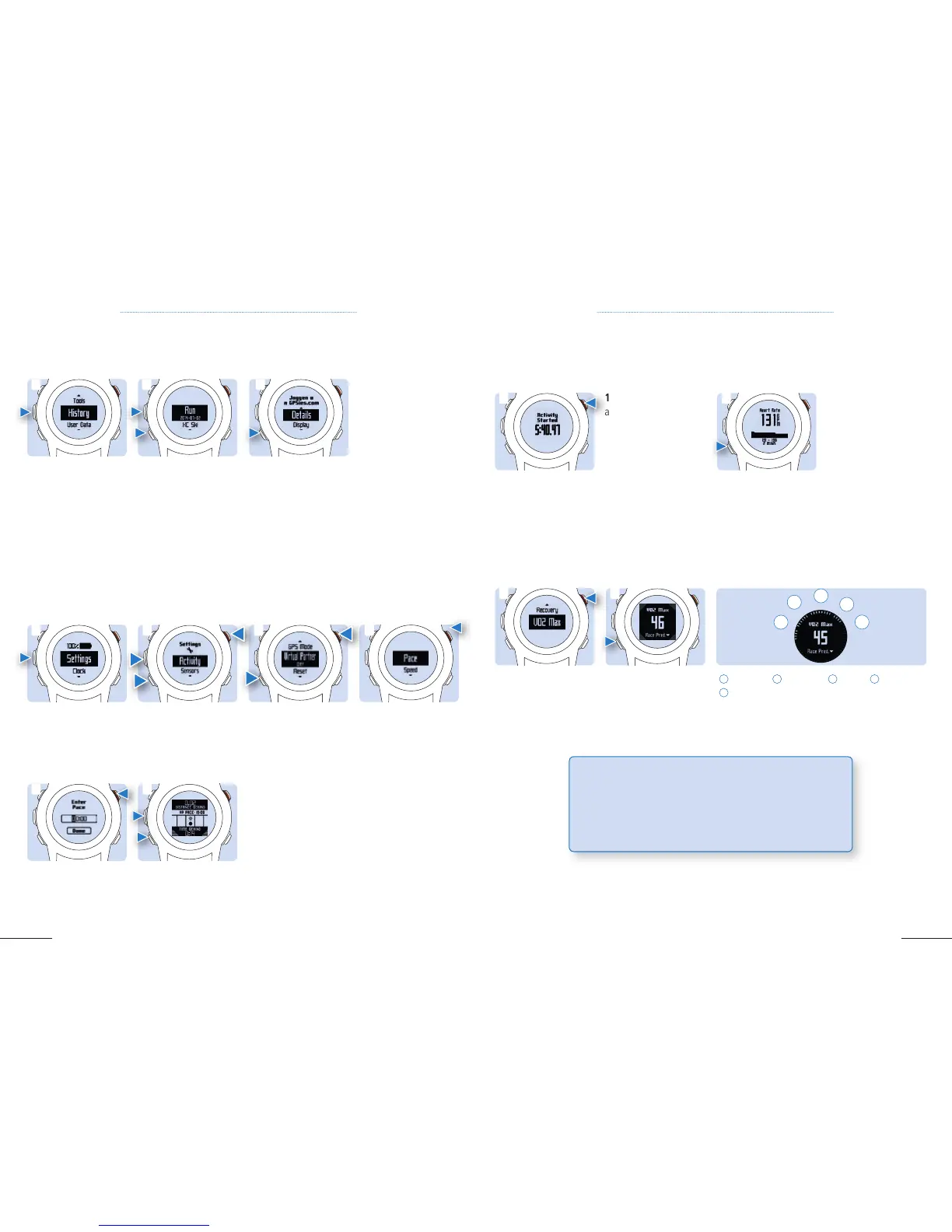
1. Hold Menu, then
select History and
scroll Up and Down
to see your saved
activities.
2. Select an activity
(here Run).
3. Select an option:
- To follow the track you traveled, select Go
- To view additional information, select Details
- To view the activity on the map, select View Map
- To follow the track in reverse, select Trackback
- To save the activity as a track, select Save as Track
- To delete the activity, select Delete
1 2 3
USING HISTORY
History contains a list of previous activities you have saved on your device.
Your Virtual Partner is a training tool, designed to help you keep the motivation by competing against a
constant pace, to meet your long and short terms goals.
The VO2 max is an indication of athletic performance and increases as your fitness level improves. Your
device uses the VO2 max estimate as well as statistical data to provide a target race time for 5k, 10k, 21k
and marathon, based on your current state of fitness. To obtain your VO2 max and a prediction of your
race time, you need to run at least 10 minutes with a HRM and a heart rate above 135 bpm.
Once paired with your heart rate monitor, your fe¯ nix
™
2 will provide you real-time feedback and be able
to calculate cadence, vertical oscillation and ground contact time.
a
2. Select Activity,
then select an activity
(Note: Virtual Partner
is not available for all
activities).
3. Scroll down to
Custom, select it. Then
scroll down to Virtual
Partner and select it.
4. Select Pace or
Speed.
1. Hold Menu, then
select Settings.
5.3 VIRTUAL PARTNER
1 3 4 2
6. Select Up or Down
to scroll during your
activity to the Virtual
Partner screen.
5. Enter your pace or
speed then select Done
to start your activity.
5 6
5.4 RUNNING METRICS
5.5 VO2 MAX
2. To access your race
time prediction, select
Race Predictor.
1. Hold Menu , then
select VO2 Max
.
1 2
1
Superior |
2
Excellent |
3
Good |
4
Fair |
5
Poor
1
2
3
4
5
TIP: Let your friends and family track your activities in real time
using Garmin Connect Mobile. LiveTrack gives your loved ones
peace of mind during workouts, while letting your fans cheer you
on every step of the way on race day. Please refer to chapter 4.5



 To Next Page