6 GPSMAP
®
400 Series Owner’s Manual
GettInG Started
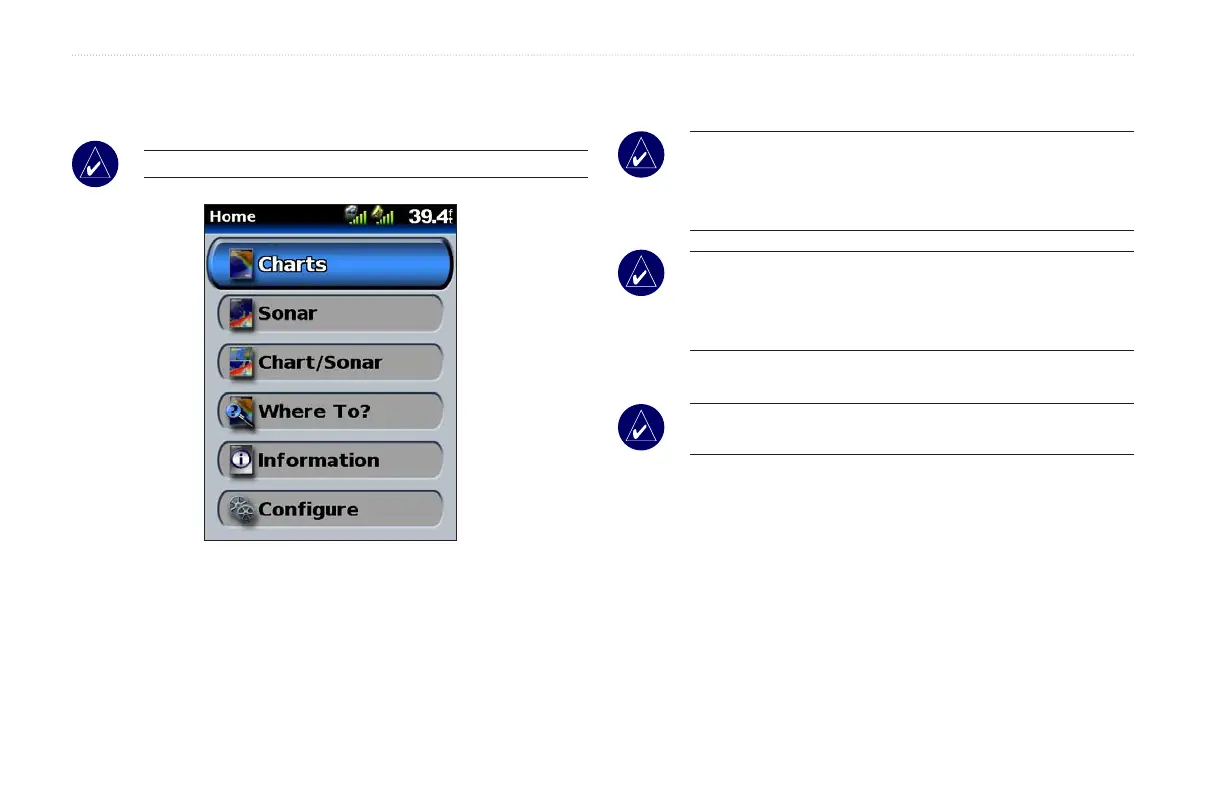
Understanding the Home Screen
Use the Home screen to access all other screens.
NOTE: Options on this screen vary based on the unit type.
• Charts—access Navigation, Fishing, Mariner’s Eye 3D, and
Fish Eye 3D charts (page 7).
NOTE: On the GPSMAP 420/420s, 440/440s/440x/440sx
units, you must insert an optional BlueChart
®
g2 Vision
™
preprogrammed SD card to access the Fishing and Fish Eye 3D
charts.
NOTE: The GPSMAP 430/430s/430x/430sx units do not need
additional cards to use the Fish Eye 3D charts, and do not have
the option to use the Fishing Chart (all depth contours and depth
soundings are available on the Navigation Chart).
• Sonar—access sonar information (page 35).
NOTE: This option is available only if you have a unit with a
built-in sounder or a Garmin sonar module connected.
• Chart/Sonar—set up the screen to view a chart and sonar in a
split screen (page 18).
•
Where To?—access navigation features (page 19).
•
Information—view information including tides, currents,
celestial data, user data, and information about other boats
(page 25).
•
Congure—access unit and system settings (page 29).













 To Next Page