GPSMAP
®
400 Series Owner’s Manual 21
Where to?
Creating and Using Waypoints
You can store up to 1,500 alphanumeric waypoints with a user-
denedname,symbol,depth,andwatertempforeachwaypoint.
When you create a waypoint, you can designate it as an MOB (Man
OverBoard). This marks the point and sets a course back to the
marked location. When an MOB is active, an MOB waypoint with
an international MOB symbol is created and the unit is on an active
navigation to that point.
To mark your location:
1. From any screen, press MARK.
2. Select Back to return to the chart, or select MOB to
designate the waypoint as an MOB point.
NOTE: Pressing the MARK key only creates a waypoint at
your present location.
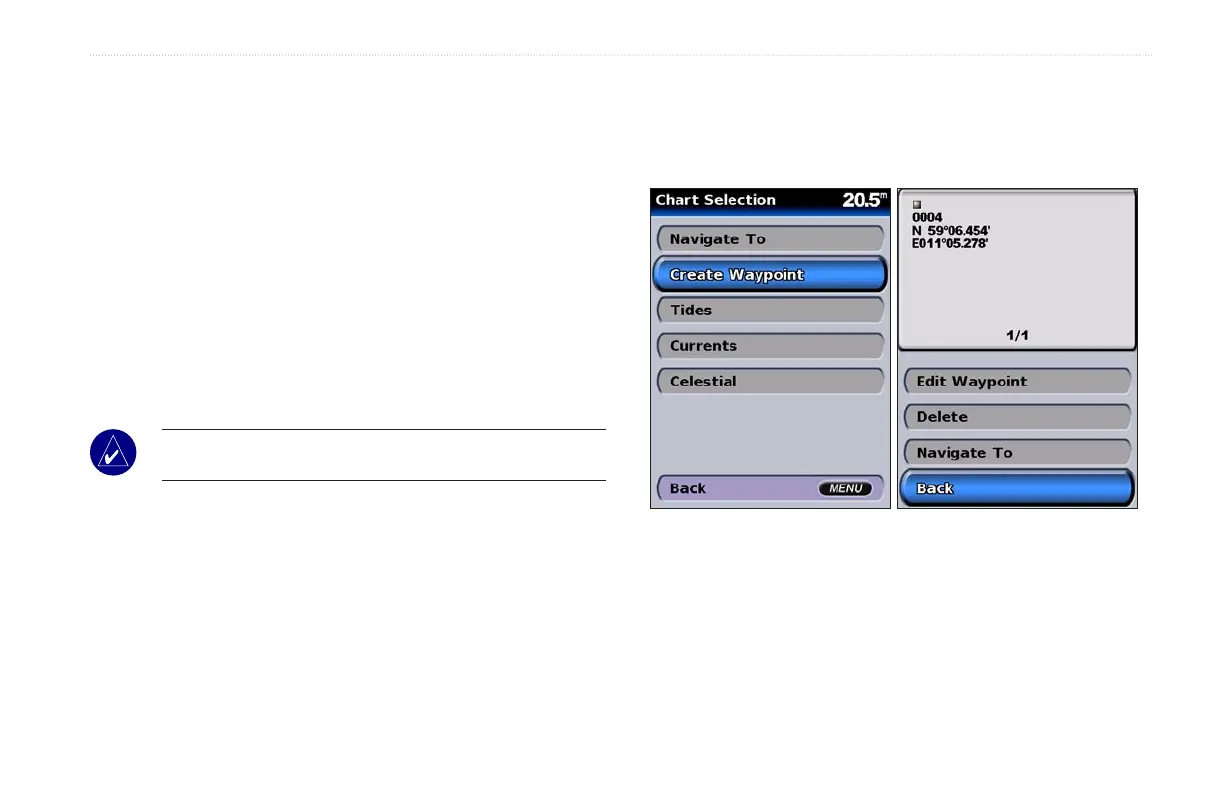
To create a new waypoint:
1. Move the map pointer to the location you want, and press
SELECT.
2. Select Create Waypoint.
3. Select one of the following:
• Edit Waypoint—customize the waypoint attributes.
• Delete—delete the waypoint.
• Navigate To—go to the waypoint.
• Back—return to the navigation chart.













 To Next Page