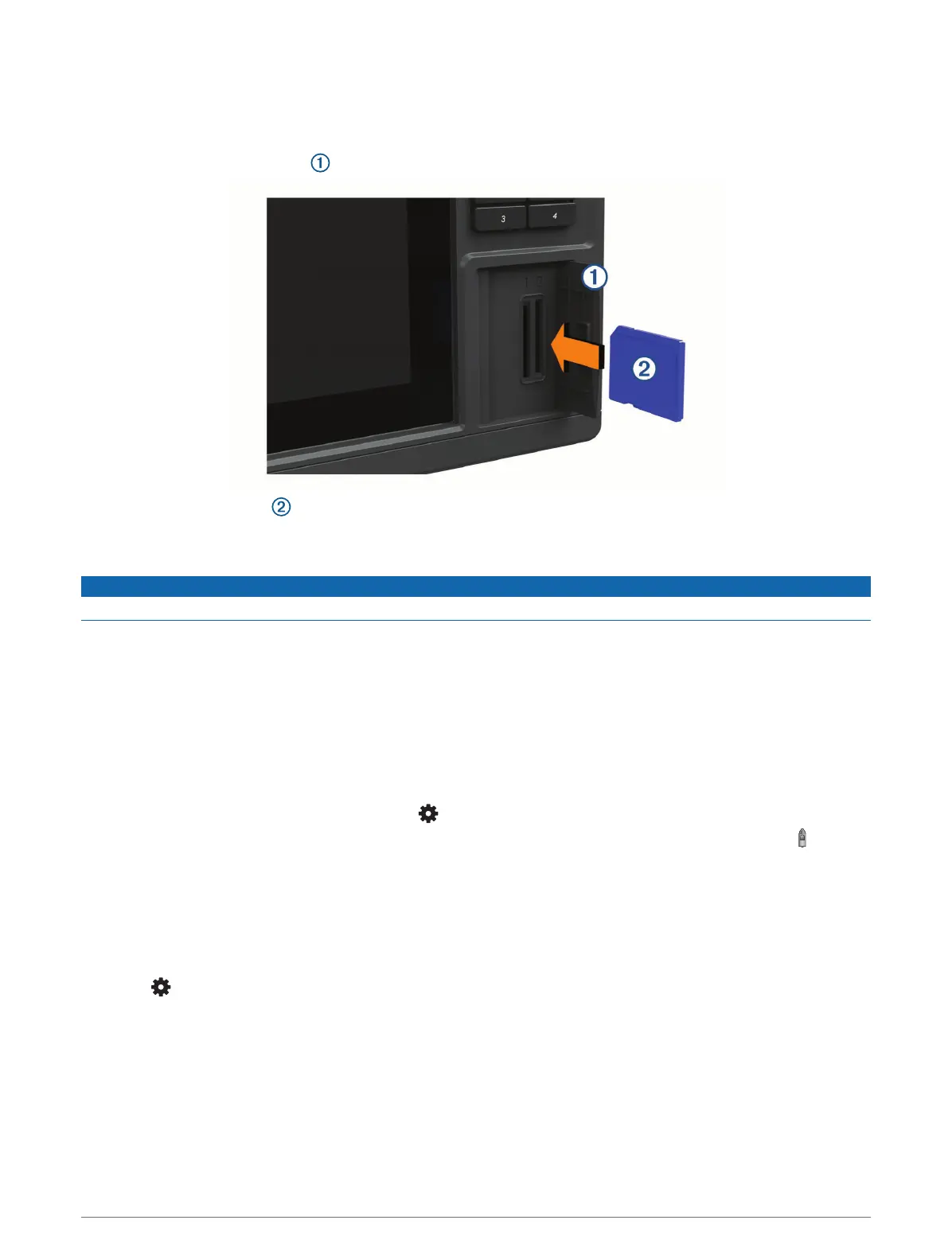
Inserting Memory Cards
This chartplotter supports up to a 32GB SD
®
memory card, formatted to FAT32 with speed class 4 or higher.
Use of an 8 GB or larger memory card with speed class 10 is recommended.
1 Open the access flap or door on the front of the chartplotter.
2 Insert the memory card .
3 Press the card in until it clicks.
4 Clean and dry the gasket and door.
NOTICE
To prevent corrosion, be sure the memory card, gasket, and door are thoroughly dry before closing the door.
5 Close the door.
Acquiring GPS Satellite Signals
The device may need a clear view of the sky to acquire satellite signals. The time and date are set automatically
based on the GPS position.
1 Turn on the device.
2 Wait while the device locates satellites.
It may take 30 to 60 seconds to acquire satellite signals.
To view the GPS satellite signal strength, select > System > Satellite Positioning.
If the device loses satellite signals, a flashing question mark appears over the boat position indicator ( ) on the
chart.
For more information about GPS, go to garmin.com/aboutGPS. For help acquiring satellite signals, see My
device will not acquire GPS signals, page190.
Selecting the GPS Source
You can select your preferred source for GPS data, if you have more than one GPS source.
1 Select > System > Satellite Positioning > Source.
2 Select the source for GPS data.
Introduction 5



 To Next Page