Sailboat Autopilot Operation
WARNING
You are responsible for the safe and prudent operation of your vessel. The autopilot is a tool that enhances your
capability to operate your boat. It does not relieve you of the responsibility of safely operating your boat. Avoid
navigational hazards and never leave the helm unattended
CAUTION
When engaged, the autopilot controls only the rudder. You and your crew remain responsible for the sails while
the autopilot is engaged.
In addition to heading hold, you can use the autopilot to maintain a wind hold. You can also use the autopilot to
control the rudder while tacking and gybing.
Wind Hold
You can set the autopilot to maintain a specific bearing relative to the apparent or true wind angle. You must
connect a compatible wind sensor the same NMEA 2000 network as the autopilot system to perform a wind
hold or wind-based steering maneuvers.
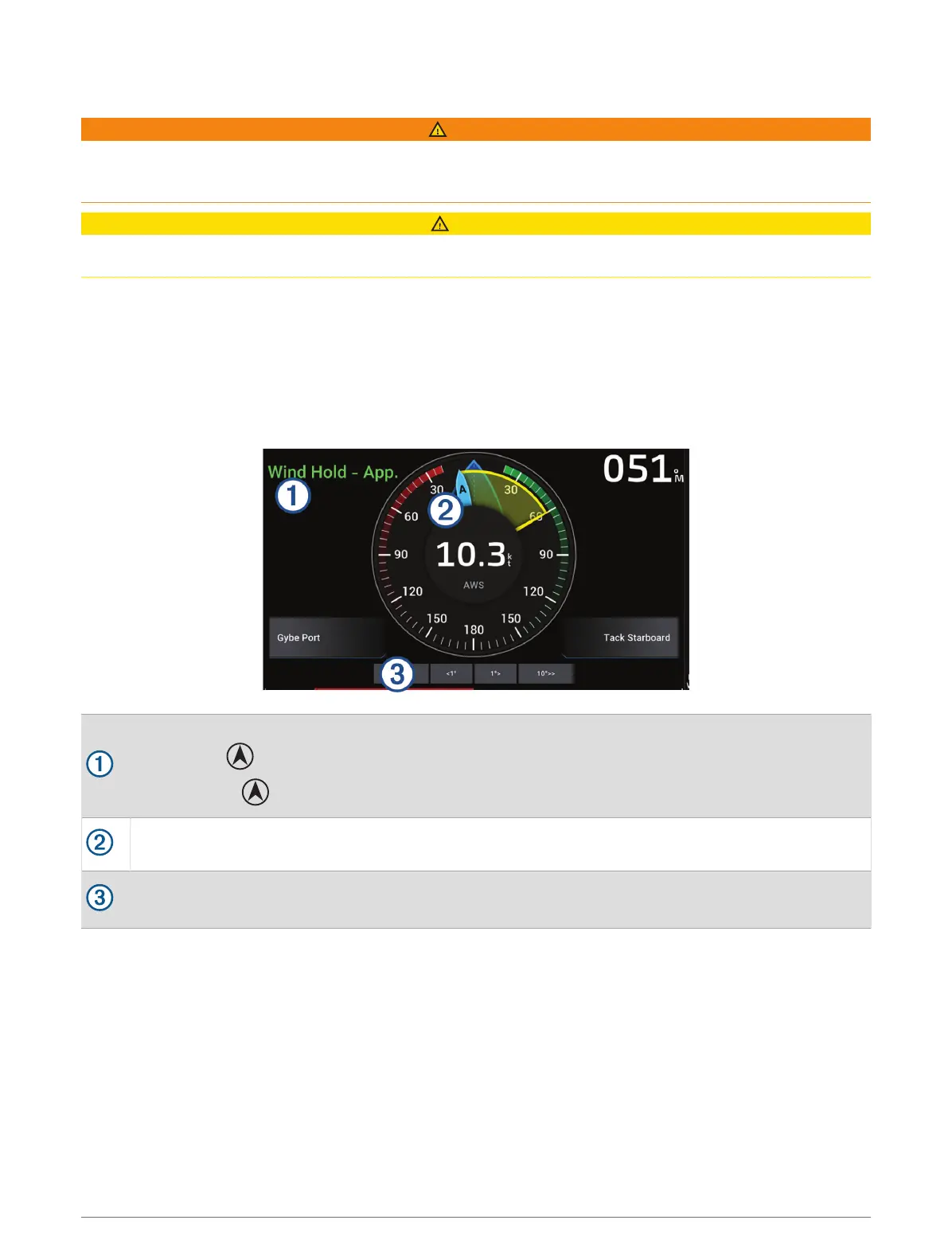
Autopilot status information
Standby and appear in gray when the autopilot is in standby mode.
Wind Hold and appear in green when the autopilot is engaged in wind hold.
Wind gauge
Shows the true wind speed (TWS) or apparent wind speed (AWS)
Rudder position indicator
NOTE: This functionality is available only when a rudder sensor is connected.
Changing the Wind Hold Type
With the wind hold engaged, select MENU > Wind Hold Type.
The wind hold type changes from Apparent to True, or vice versa.
Sailing Features 65



 To Next Page