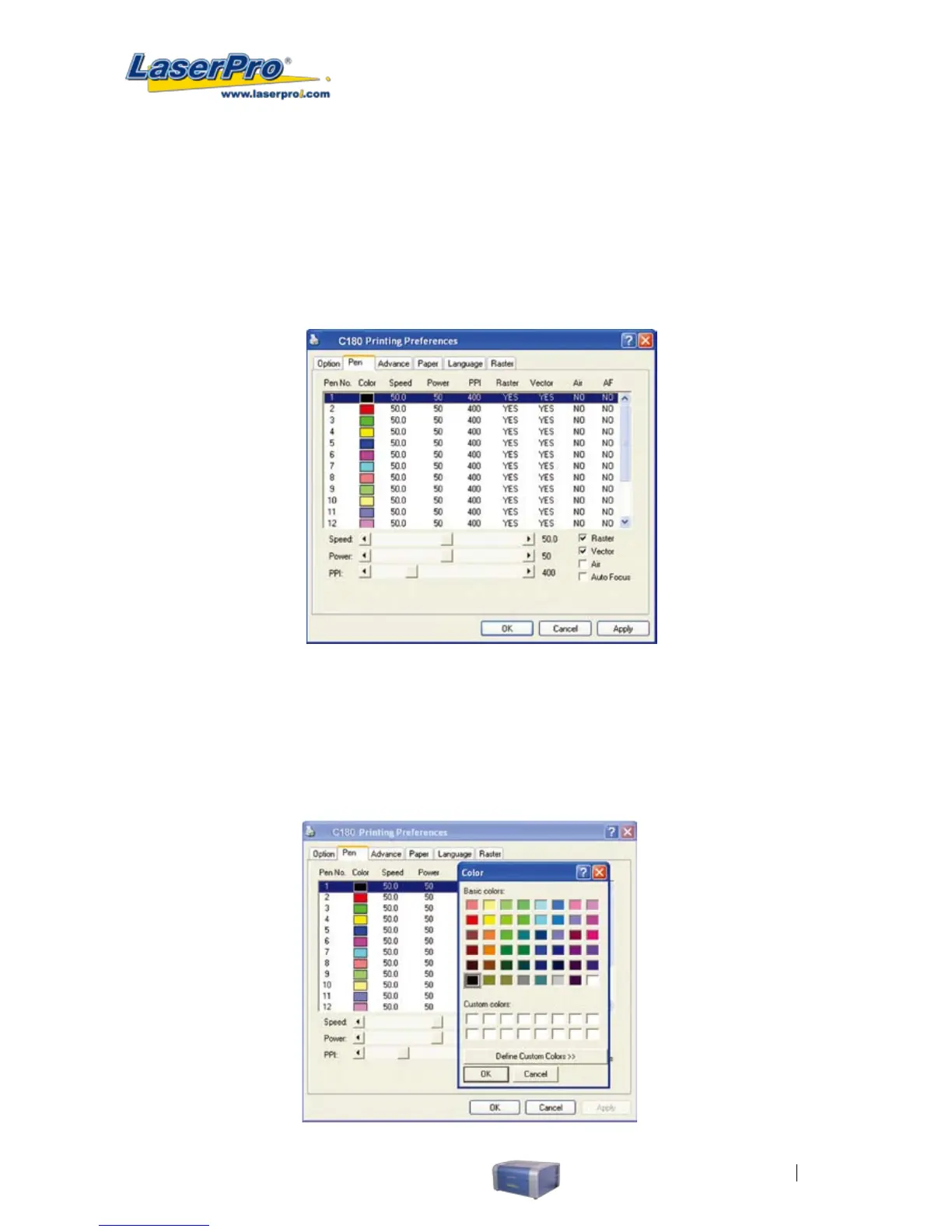
5.2.3.2 C180 Print Driver >> Pen Page
The LaserPro C180 incorporates the use of 16 different colors to represent 16 different laser power
and speed settings when cutting and engraving. These colors are referred to as “Pens”. Think of each
pen as a designated laser setting, rather than as a color. As an example, a black and white image will
use only one power and speed laser setting (Black). An image that is made up of black, red and blue
colors will be processed using the laser settings designated for each particular color. In order to utilize
up to 16 different pens (laser parameter settings), make sure your graphics software can recognize
and utilizes the 16 pen colors designated by the LaserPro C180 print driver.
If you would like to specify your own colors to designate to a particular laser setting, then all you have
to do is to double-click on that particular pen color from the pen menu and a color manager window will
open where you can select “dene custom colors” to dene your own color (shown in the picture
below). This is useful when your image is composed of colors that are not part of the pen menu’s
default color selection, and instead of modifying your image, you simply would like to assign the laser
settings based on the existing colors based on your current image.



 To Next Page