52 232001840G(08)
Main Work Page
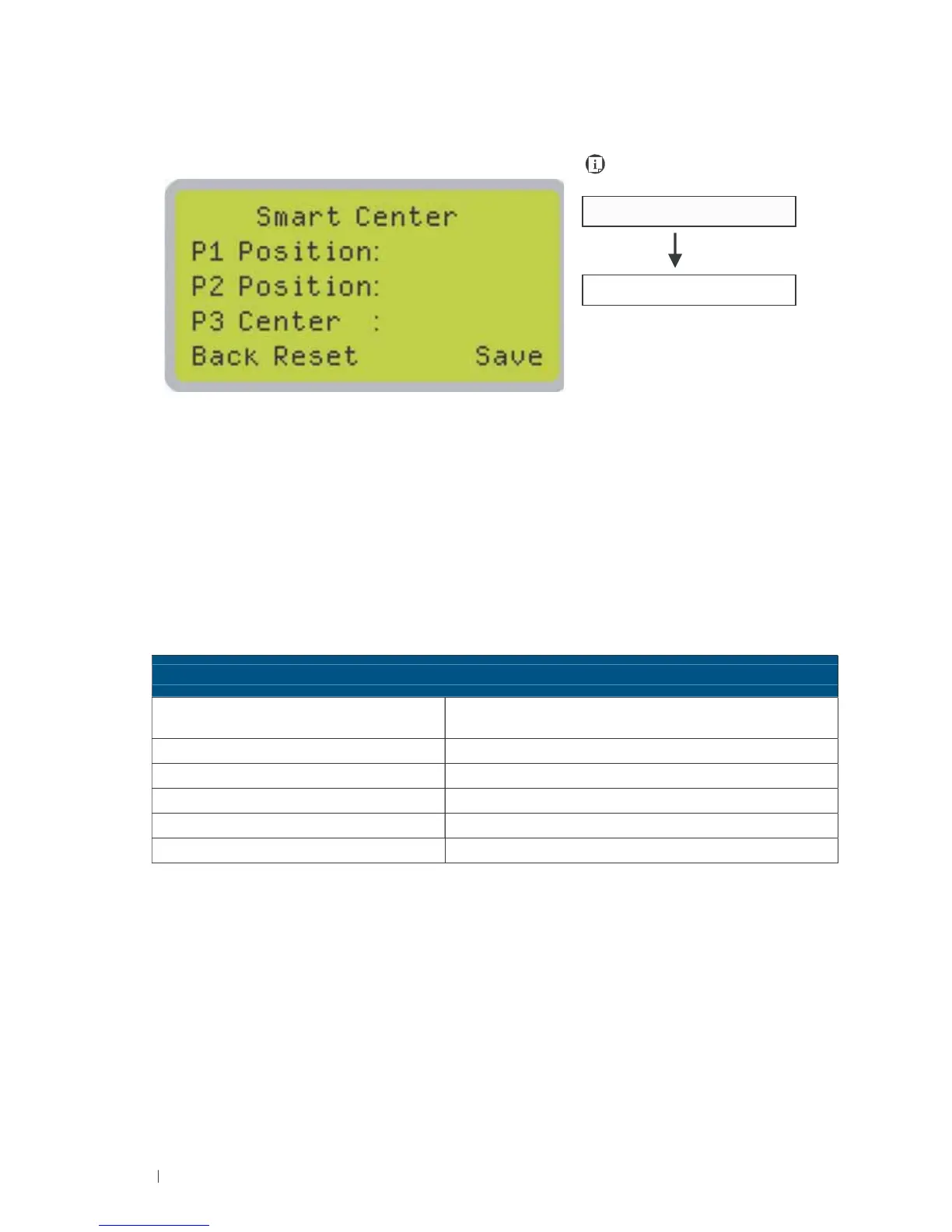
SmartCENTER
Page
Navigating to this page:
Main Work Page
press F3
SmartCENTER Page
Under SmartCENTER mode the job will begin after the system positions the carriage to the center
position between two points or four points indicated by the user. The SmartCENTER mode has to be
enabled through the driver.
Enter SmartCENTER page by pressing the F3 button. You will be prompted to indicate and store
the position points. The positions can be indicated by moving the carriage by hand and pressing
enter to save the positions indicated by the red pointer. After all points are set, the carriage will move
to the center
of the stored positions and the job will begin.
S
m
a
r
t
CENTER Pa
g
e
Re
l
e
v
a
n
t
B
u
tt
on
s
F
un
c
t
i
on
F1 (Back) Back to previous page
F2 (Reset) Reset all saved positions
F4 (Save) Save current lens carriage position
Auto Focus Initiate the auto focus function
▲/ ▼ Manual Focus Buttons Manually adjust the height of the work table (Z-axis)





 To Next Page