6–8 EPM 9450/9650 ADVANCED POWER QUALITY METERING SYSTEM – INSTRUCTION MANUAL
USING THE EPM P60N LCD EXTERNAL DISPLAY CHAPTER 6: USING THE EXTERNAL DISPLAYS
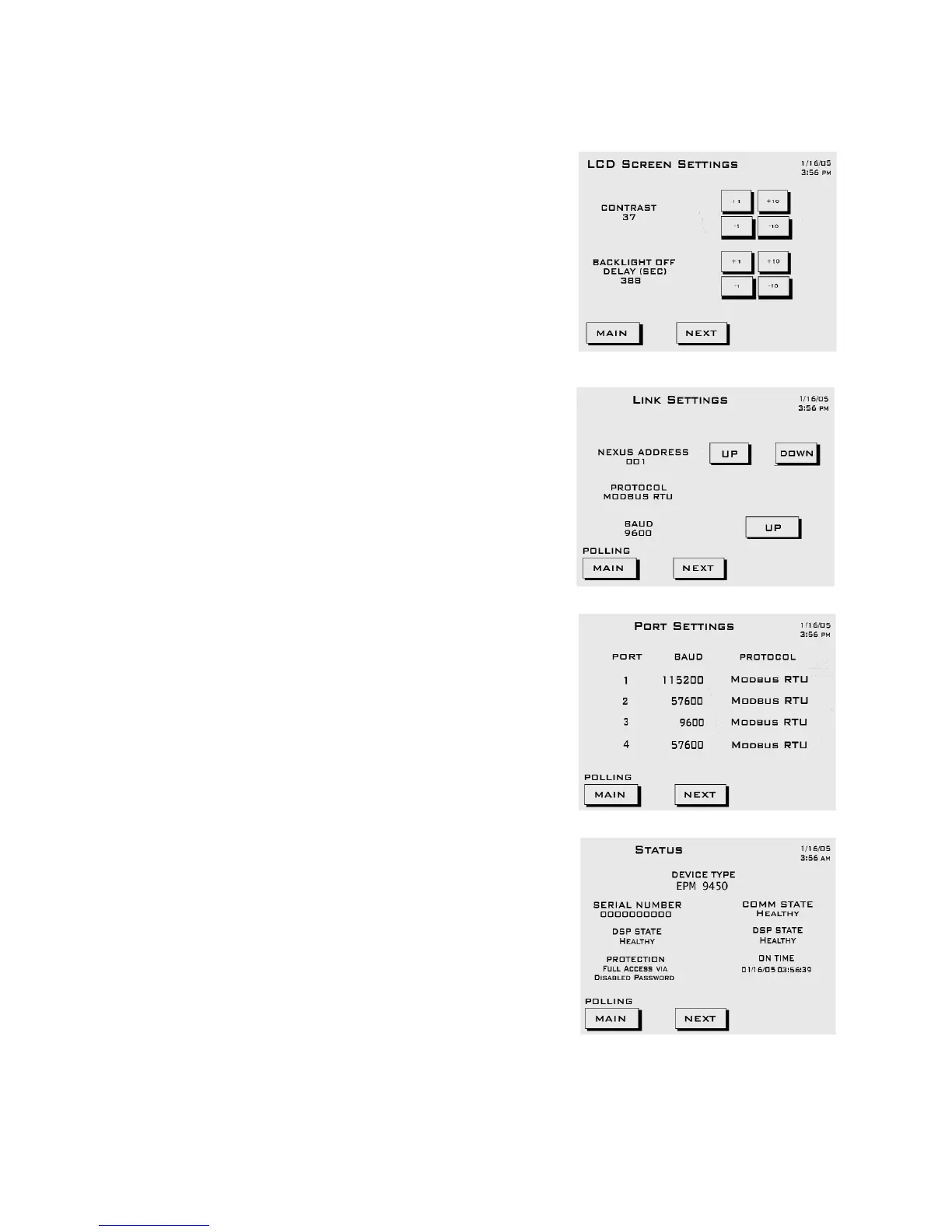
EPM P60N Display Settings
LCD Screen Settings:
• Contrast - Touch Up/Down buttons to
increase/decrease settings. A Contrast
of 37 is the optimum setting.
• Backlight Off Delay - number of seconds
after use that backlight turns off. Touch
Up/Down buttons to increase/decrease
settings.
Link Settings
• Address (000 - 255).
Touch Up/Down buttons to increase/
decrease settings.
• Protocol (selected).
• Baud (selected).
Click UP to add an address; click SAVE to
Save the new address.
Port Settings:
Port 1 (Baud and Protocol selected)
Port 2 (Baud and Protocol selected)
Port 3 (Baud and Protocol selected)
Port 4 (Baud and Protocol selected)
Meter Status:
• Device Type: meter type
• Serial Number: 10 digit number
• Comm State: Healthy or Unhealthy
•Nv Ram: 4 MB
• DSP State: Healthy or Unhealthy
• Protection: Password Enabled or
Disabled
• On Time: Current Date and Time


 To Next Page
 Loading...