CHAPTER 6: USING THE EXTERNAL DISPLAYS USING THE EPM P60N LCD EXTERNAL DISPLAY
EPM 9450/9650 ADVANCED POWER QUALITY METERING SYSTEM – INSTRUCTION MANUAL 6–7
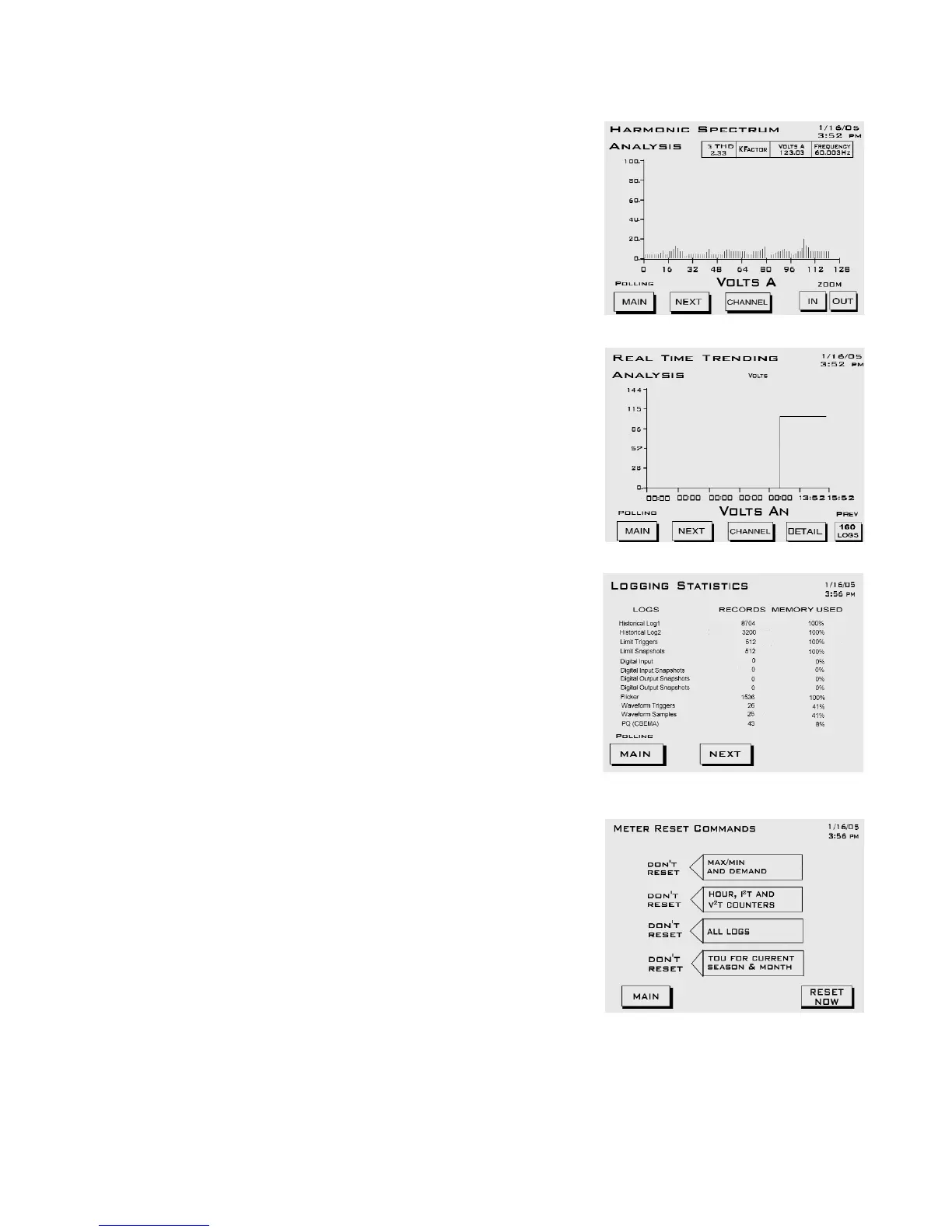
SPECTRUM: Harmonic Spectrum Analysis
Use Channel button to view graphs and
readings:
Zoom In or Out for detail.
• Channel Van/bn/cn
• Channel Ia/b/c
• % THD, KFactor, Frequency for selected
channel
TREND: Real Time Trending Analysis
Use Channel button to view different graphs
and readings and Detail button to view log
entries.
• Channel Van/bn/cn Vab/bc/ca
• Channel Ia/b/c
• Channel Frequency, Watts
LOGGING STATUS
Number of records stored and percent of
memory used for each log type.
RESET: Meter Reset Commands
To Change Settings:
Touch the screen to change Don’t Reset
to Reset.
Touch Reset Now button. OK will
appear.
Touch OK to refresh screen (go back to
original screen).
• Max/Min and Demand.
• Hour, I2T and V2T Counters.
•All Logs.
• TOU for Current Session and Month.


 To Next Page