CHAPTER 4: INTERFACES ADVANCED ENERVISTA 745 SETUP FEATURES
745 TRANSFORMER PROTECTION SYSTEM – INSTRUCTION MANUAL 4–31
The waveform file numbering starts with the number zero in the 745; therefore, the
maximum trigger number will always be one less then the total number triggers available.
Click on the Save to File button to save the selected waveform to the
local PC.
A new window will appear requesting for file name and path.
The file is saved as a COMTRADE file, with the extension ‘CFG’. In addition to the COMTRADE
file, two other files are saved. One is a CSV (comma delimited values) file, which can be
viewed and manipulated with compatible third-party software. The other file is a DAT File,
required by the COMTRADE file for proper display of waveforms.
To view a previously saved COMTRADE file, click the Open button
and select the corresponding COMTRADE file.
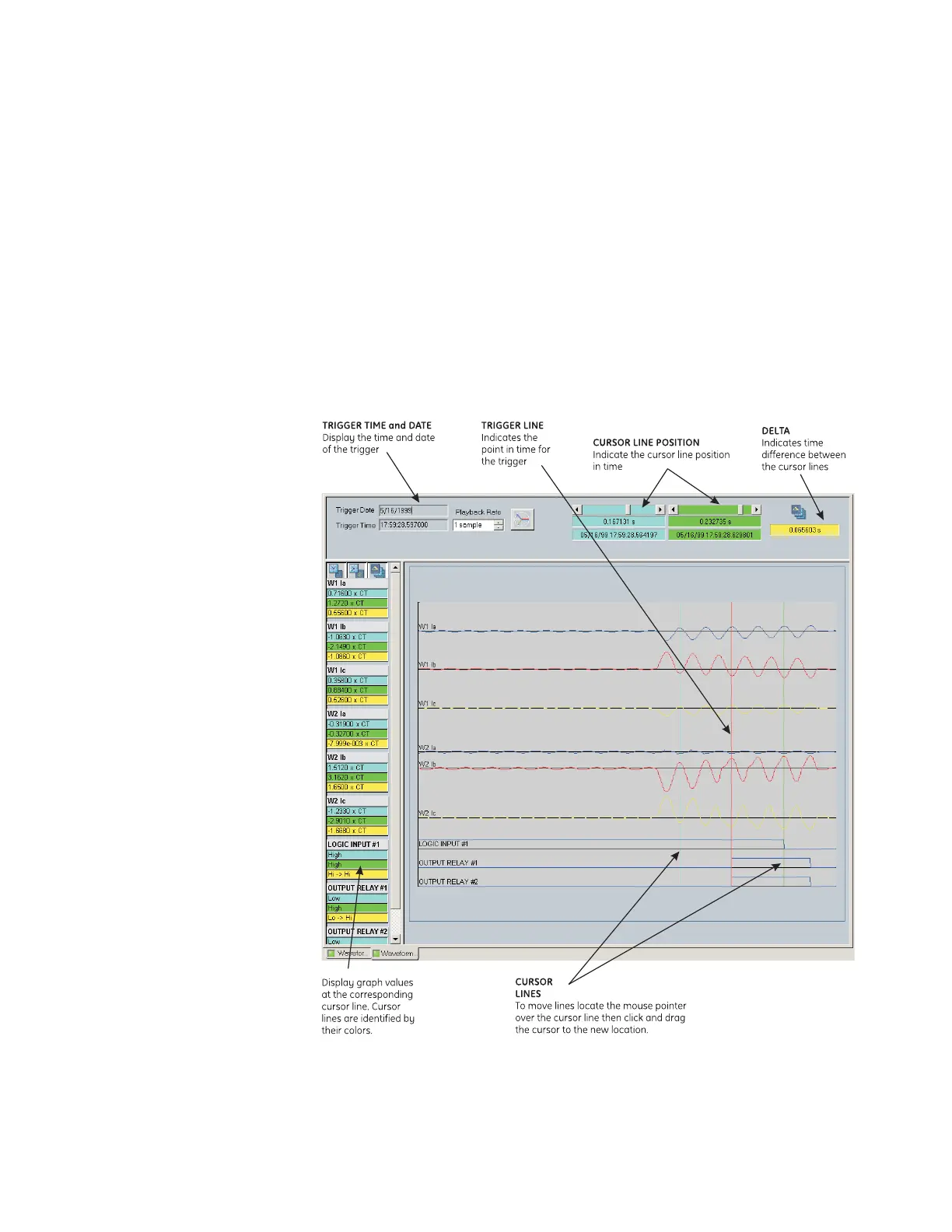
To view the captured waveforms, click the Launch Viewer button. A
detailed waveform capture window will appear as shown below:
FIGURE 4–6: Waveform capture window attributes
The red vertical line indicates the trigger point of the relay.



 To Next Page