4–32 745 TRANSFORMER PROTECTION SYSTEM – INSTRUCTION MANUAL
ADVANCED ENERVISTA 745 SETUP FEATURES CHAPTER 4: INTERFACES
The date and time of the trip is displayed at the top left corner of the window. To match the
captured waveform with the event that triggered it, make note of the time and date shown
in the graph. Then, find the event that matches the same time and date in the event
recorder. The event record will provide additional information on the cause and the system
conditions at the time of the event. Additional information on how to download and save
events is shown in Event Recorder on page 4–35.
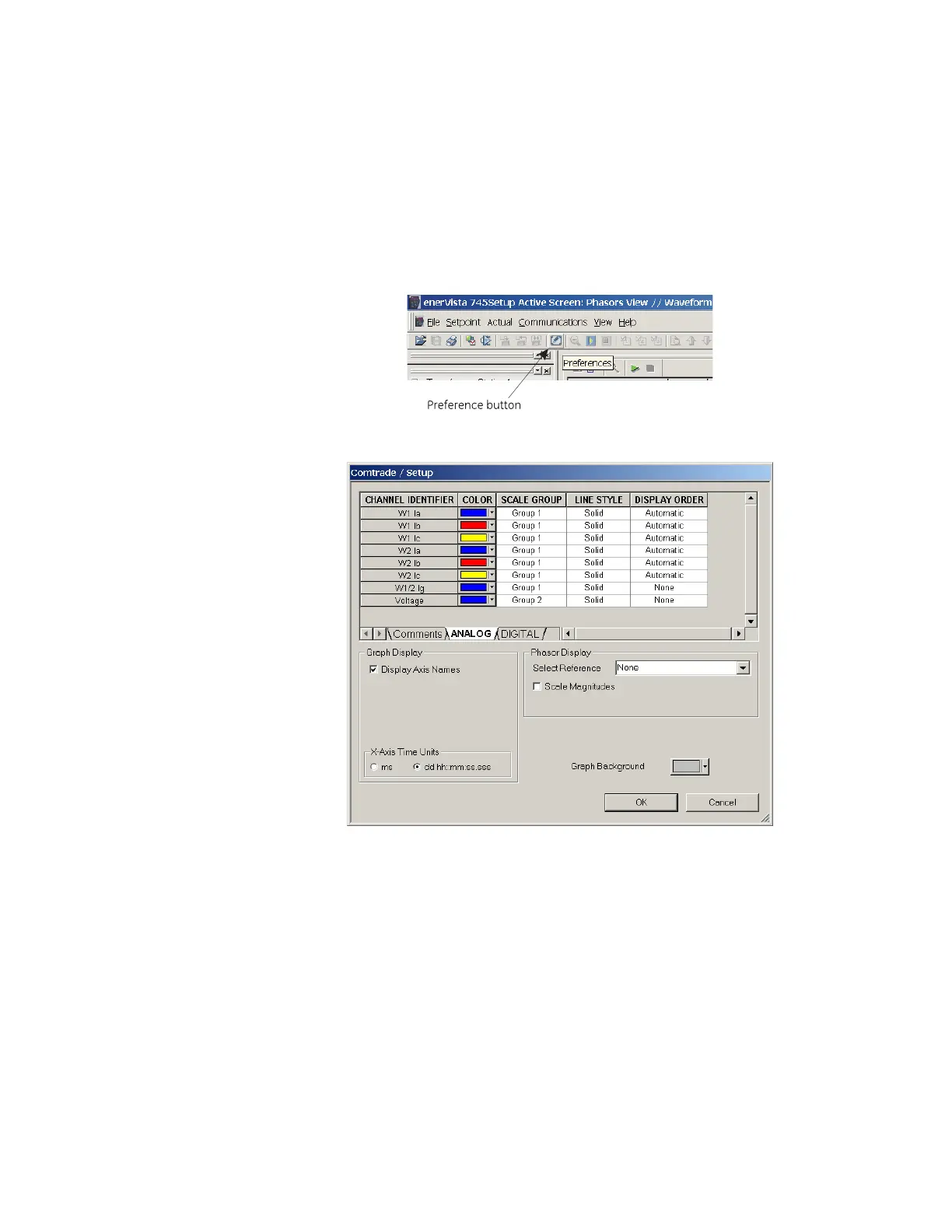
From the window main menu bar, press the Preference button to open
the Comtrade Setup page to change the graph attributes.
The following window will appear:
Change the Color of each graph as desired, and select other options as
required, by checking the appropriate boxes.
Click OK to store these graph attributes, and to close the window.
The Waveform Capture window will reappear with the selected graph attributes available
for use.
4.6.3 Trending (data logger)
The trending or data logger feature is used to sample and record up to eight actual values
at an interval defined by the user. Several parameters can be trended and graphed at
sampling periods ranging from 1 second up to 1 hour. The parameters which can be
trended by the EnerVista 745 Setup software are:



 To Next Page