GE COMPANY
D
IRECTION 5745295-1EN, REVISION 1 OPTIMA CT520 DOD IB UPGRADE INSTRUCTION
Page 30 Chapter 2 - Upgrade Procedure
1.) Connect the Keyboard and Mouse cables to NIO16 Console Z820 Host Computer.
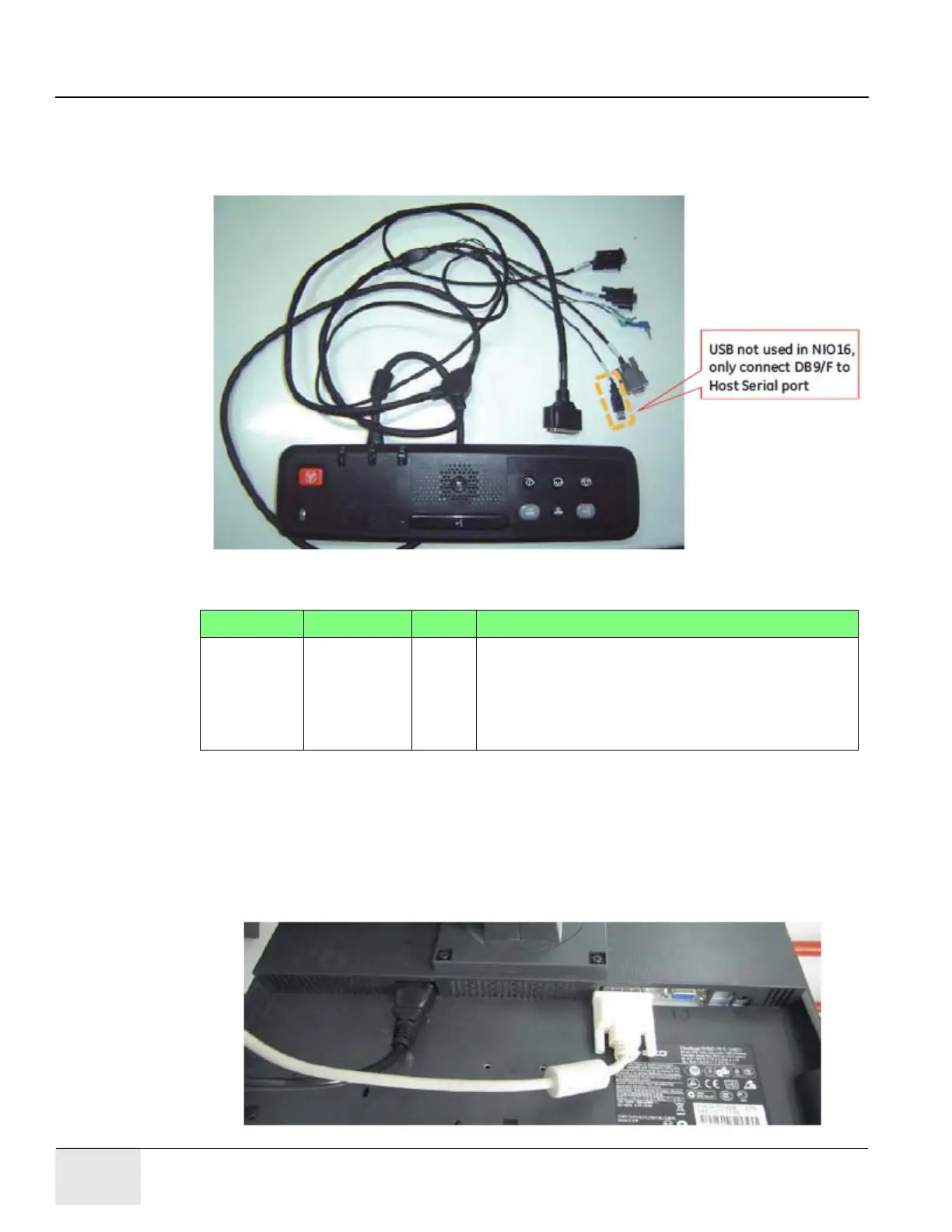
2.) Connect GSCB cable connectors to NIO16 Console AC Box and Z820 Host Computer
according to
Figure 2-9 and Table 2-2.
Figure 2-9 GSCB and Cable
Table 2-2 GSCB Cable Connectors
3.) Connect Media Tower cable connectors to NIO16 Console AC Box and Z820 Host Computer.
4.) Connect the LCD Monitors for Z820 Host Computer.
a.) Remove the old Video cable from the LCD Monitors.
b.) Connect the new Video cable (5408703, shipped with upgrade kit) between Z820 Host
Computer and LCD Monitor.
Figure 2-10 Video Cable and Power Cable for LCD Monitor
PN Description From To
5404262 GSCB Cable GSCB DB9/M Black - AC Box J56
Voice Blue - Host Computer Audio In
Voice Green - Host Computer Audio Out
DB9/F Gray - Host Computer RS232
DB9/F Black - Host Computer DIP





 To Next Page