– 29 –
The new oven conforms to the Star-K Jewish
Sabbath requirements with the Sabbath mode
cooking feature. Details of the Sabbath mode
feature are described below.
To Enter Sabbath Mode
Press the lower oven Options pad and turn the
selector dial to Sabbath and press to select. The
display will show “During Sabbath Mode the upper
oven is unavailable.” Press the selector dial to
continue. Any upper oven features running will exit,
and the lower oven will immediately transition into
Sabbath mode.
To Change Temperature
Once in Sabbath mode, in order to change the
oven temperature or start a bake feature, the user
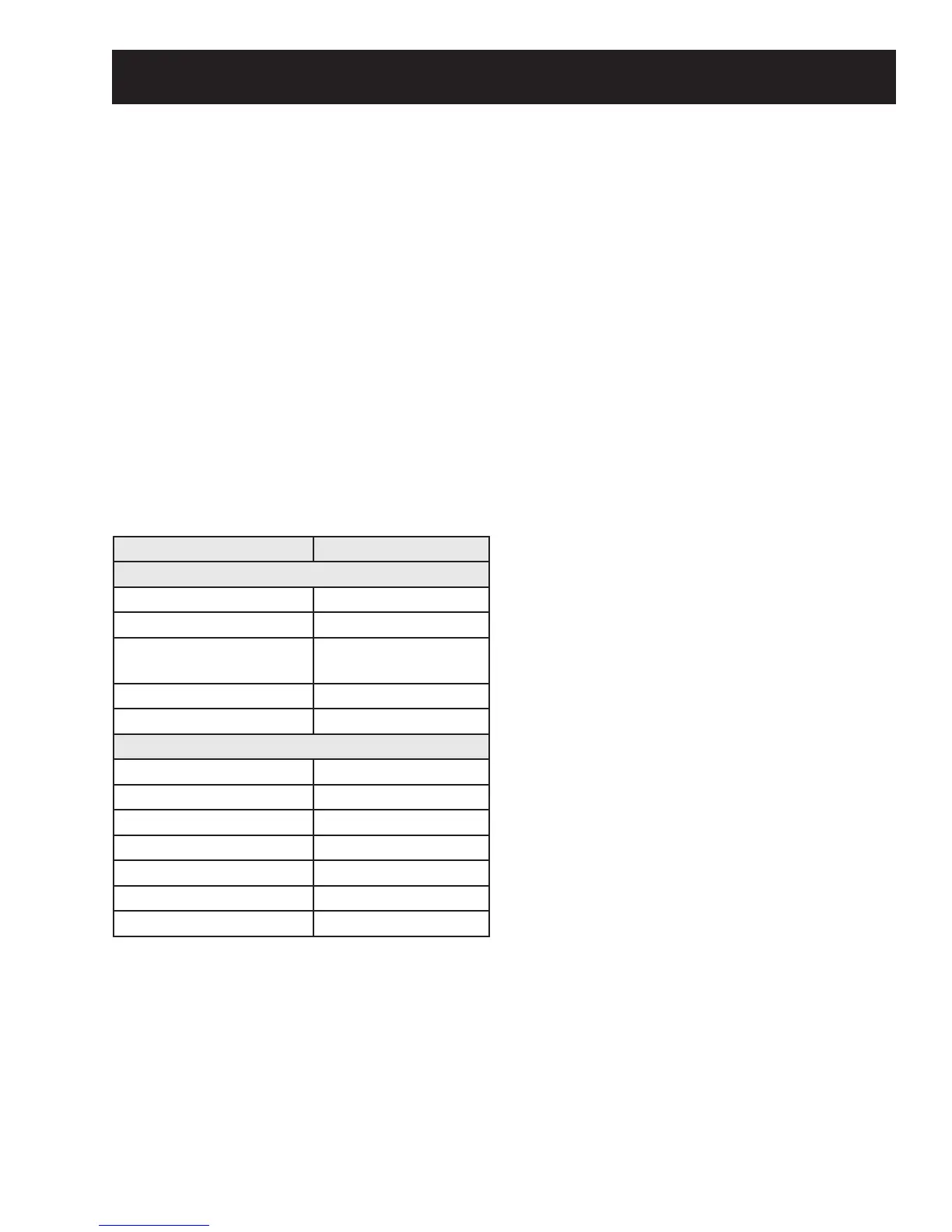
can change the temperature to one of 10 preset
temperatures as indicated below:
Changing to one of the above temperatures
requires the user to press the keypad associated
with the desired temperature and then press the
Start/Pause pad. For example, to set a Bake 350°F,
the user will press the Bake pad on the lower oven
and then press Start/Pause pad.
(Continued next page)
Sabbath Mode
UI Key Temp. (°F)
Left Side Keys (Upper Oven)
Microwave 170°F
Speedcook/ Defrost 200°F
Cooking Options/
Popcorn
225°F
Add 30 Sec 250°F
Convection Bake/Reheat 300°F
Right Side Keys (Lower Oven)
Back 0°F
&OHDU2Ⱥ Cancels immediately
Light 325°F
Bake 350°F
Broil 375°F
Convection Bake/Warm 400°F
Options 450°F
The Bake feature will start (or if already running, the
oven temperature will change) at a random time
between 30 – 60 seconds after the Start/Pause pad
is pressed, with the exception of pressing the Clear/
2ȺSDGZKLFKZLOOLPPHGLDWHO\FDQFHOWKHFRRNLQJ
settings. (The unit will remain in Sabbath mode.)
Change of temperature may be executed at any
time in the cooking cycle.
7R7XUQ2YHQ2ȹ
3UHVVWKH&OHDU2ȺSDGRU%DFNDQGWKHQ6WDUWSDGV
DWDQ\WLPH7KHRYHQZLOOLPPHGLDWHO\WXUQRȺEXW
will stay in Sabbath mode and return to the standby
Sabbath display screen.
To Exit Sabbath Mode
Press and hold the Back pad for 3 seconds. The
oven will shut down at a random time between 30 –
60 seconds after the Back pad is pressed and held.
NOTE: Do not press any other pads during this time,
or the Sabbath mode will be re-initialized and will
not exit. The oven will exit Sabbath mode and return
to its default screen.



 To Next Page