– 67 –
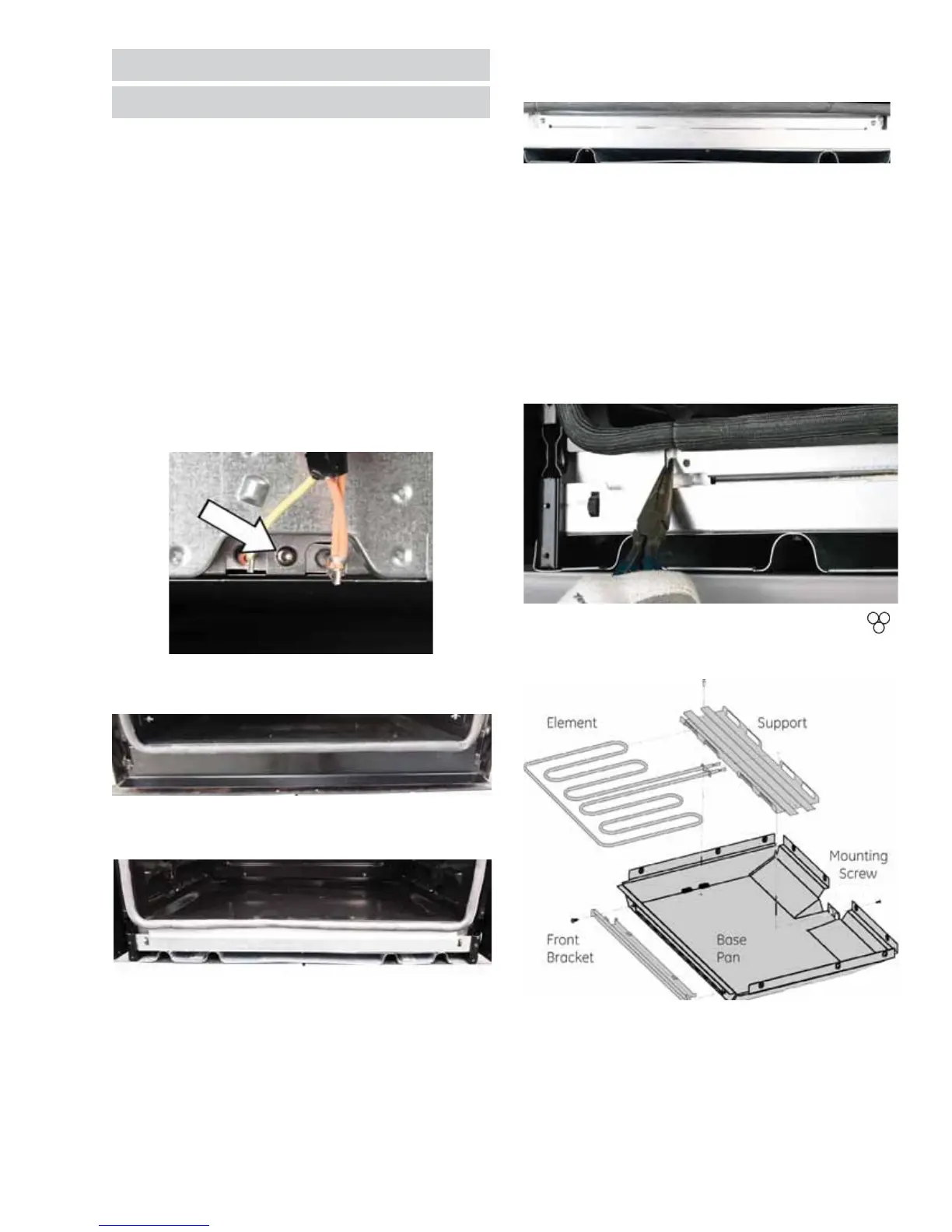
8. Remove two T20 Torx screws that secure the
hidden bake compartment cover in place.
9. With pliers, grasp the tabs on each side of the
screw locations and pull forward. This cover is
hooked under the element, so the element will
be pulled forward with the cover. The element
will have resistance to the pull as it slides
through the guides. The second pass of the
element may catch on the opening lip, and may
need to be lifted with a screwdriver to clear the
lip. The wire terminals in the rear may also catch
on the frame when pulling through the rear wall.
Elements
Hidden Bake
To enhance oven cleanability, and bake element
longevity, all wall ovens have hidden bake elements.
Hidden Bake (All Ovens) Removal
1. Disconnect power to the oven.
2. Safely remove the oven from the cabinet
installation.
3. Remove the rear wire cover.
4. Remove the wires from the bake terminals and
the T20 Torx screw securing the bake element to
the frame.
5. Remove the oven door and remove the two T20
Torx screws on the lower vent trim.
6. Remove the insulation panels.
7. On newer production models the foil covered
strip will not be present, and will be replaced
with just one piece of uncut insulation.



 To Next Page