57
EN
3.2.1 Check the Charge Level of the Lithium-ion Battery
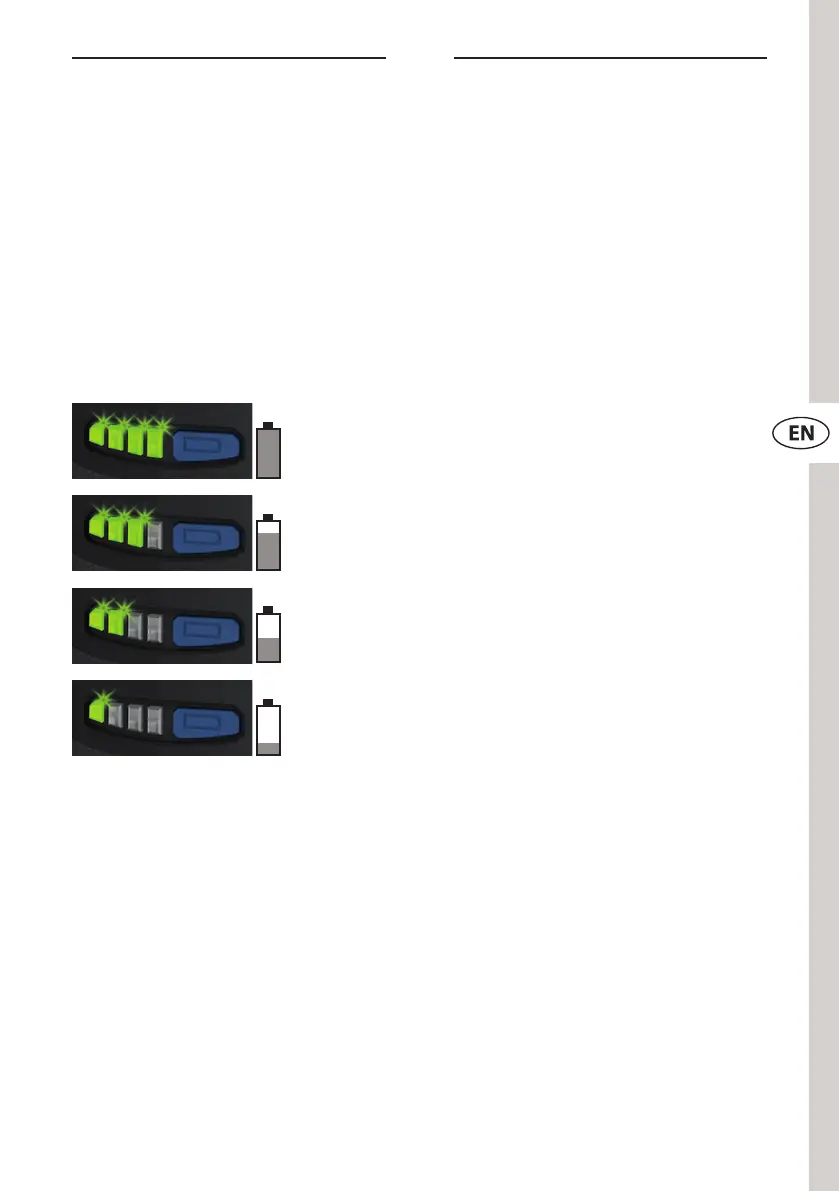
To check the charge level of the lithium-ion battery, press the button
for charge level indicator (N). Then the charge level indicator (M)
lights up. The number of illuminated elds indicates the charge level
according to the illustration below. If none of the elds light up, the
lithium-ion battery needs to be charged.
Lithium-ion batteries with low charge levels can lead to a deviation
of the torque. We therefore recommend always working with fully
charged lithium-ion batteries.
The charge level can also be
queried when the lithium-ion
battery is connected to the device.
However, the device should be
turned o at least one minute
before the query to get a reliable
result.
Declared battery capacity without
responsibility.
The device switches o automatically when the lithium-ion battery is
under-voltage. This is indicated by the ashing of the status LED (E2)
(see chapter 4.2).
At low temperatures, you can continue working with reduced power.
If the ambient conditions are too cold (see chapter 11), the lithium-
ion battery (B) switches o automatically.
80–100 %
60–80 %
40–60 %
0–40 %


 To Next Page