MU-A-RectiRail DL2-rev01a-Gb 16 / 44
4.4.2 Reconnecting the RectiRail
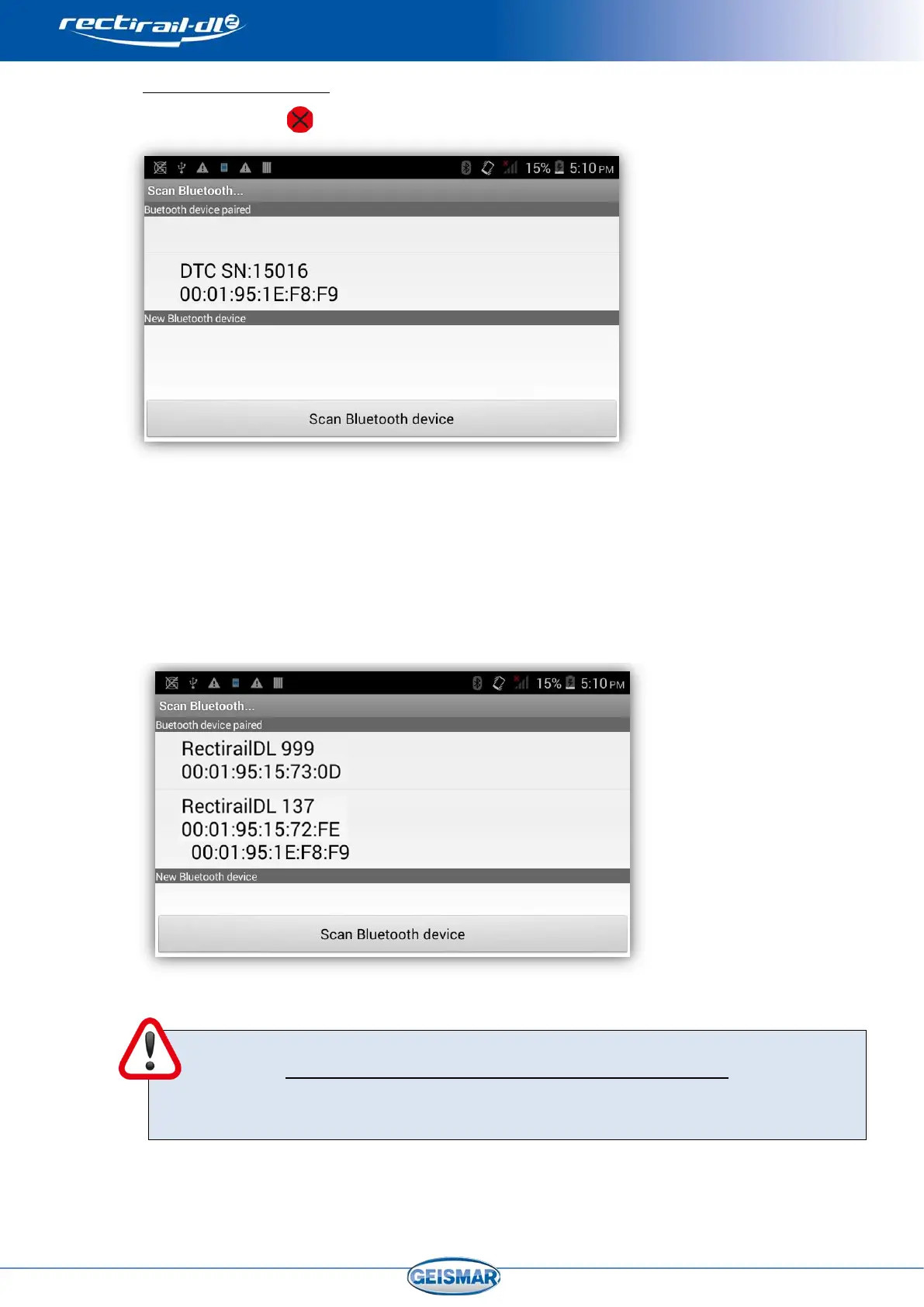
Click on the icon to bring up the screen below:
Two possibilities:
- The rule, identifiable from its serial number, is available in the list: in this case, check
that the rule is energised and click on the rule name. The software will automatically
connect to this rule.
- The rule is not in the list. You then need to pair the rule with the PDA.
- Click on “Bluetooth devices scan” and the rule will appear in “New Bluetooth
device”
Validate choice of rule by clicking on its name. Connection is now effective.
REMINDER: To prevent disruption by untimely interruptions of the Bluetooth
connection, the PDA automatic standby mode must be de-activated. This option is
normally accessible in the menu “Start -> Settings -> System -> Supply -> Advanced”
of the PDA. Refer to the PDA user manual for more details.


 To Next Page