MU-A-RectiRail DL2-rev01a-Gb 20 / 44
5 Settings
5.1 General settings
Users access this function by validating the “Settings” choice in the main
menu.
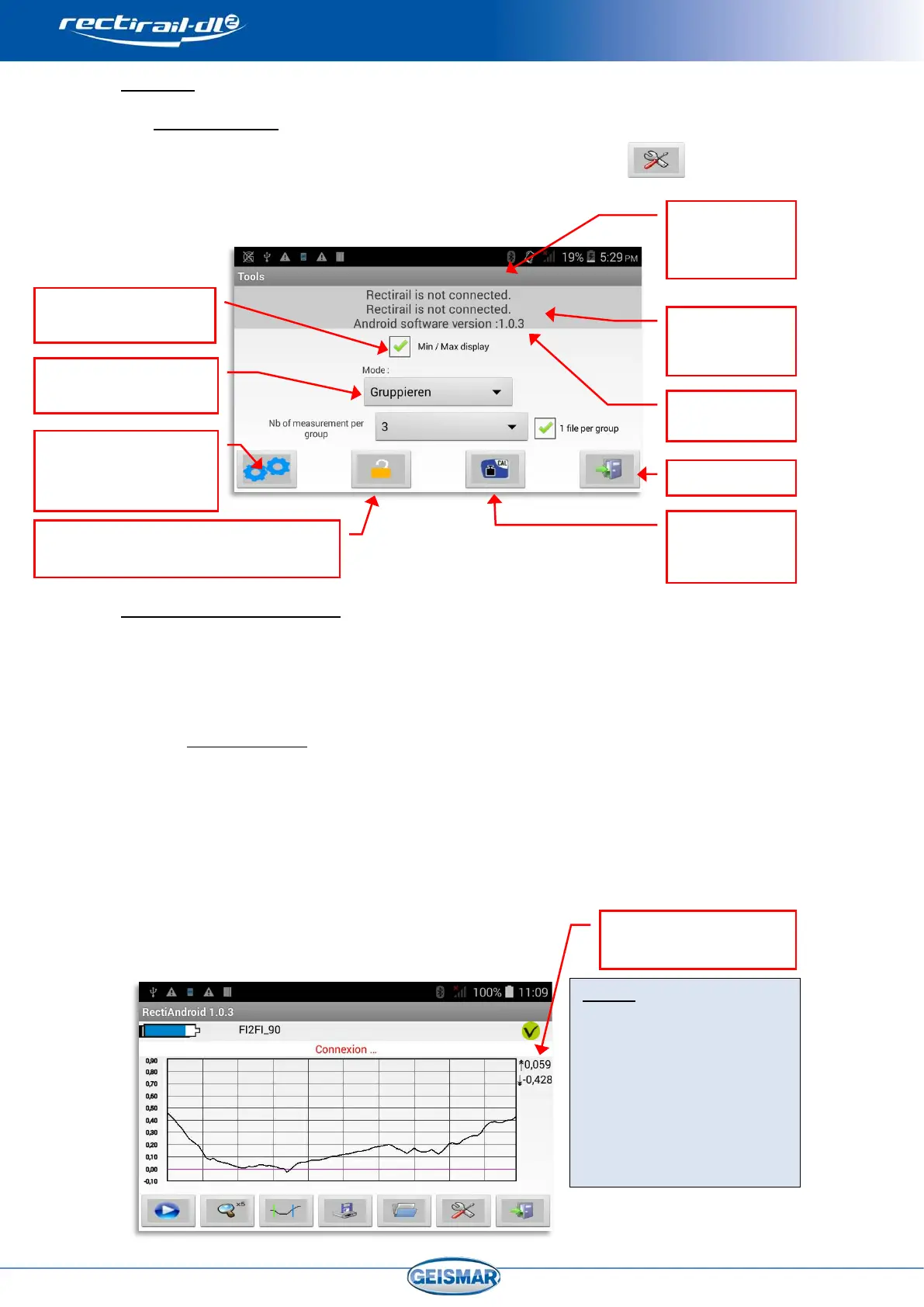
The following screen is then displayed:
There are 4 different buttons:
- An option access button. - A password change button
- A calibration button. - A menu exit button.
5.1.1 Min / Max display
This option activates / de-activates the display of minimum and maximum
values of each measurement. If the box is ticked, the values are then displayed
to the right of the main screen.
If several curves are displayed simultaneously (see §0),
the values are displayed with the same colour as the corresponding curve.
Notes:
When the min/max display
is activated, an area
dedicated to value display
is freed to the right of the
display area, thus leading
to a slight reduction in the
curve display area.
Display area:
min (↓) / max (↑)
(Password)
See §0
(Password)
Rule serial
number
See §0
See §0
software
Protection (Password management)
See §0


 To Next Page