MU-A-RectiRail DL2-rev01a-Gb 17 / 44
Files
on the disk
containing
4.5 Data management
4.5.1 General principles
The measurements taken by the RectiRail are backed up in a file with the “DA5”
extension.
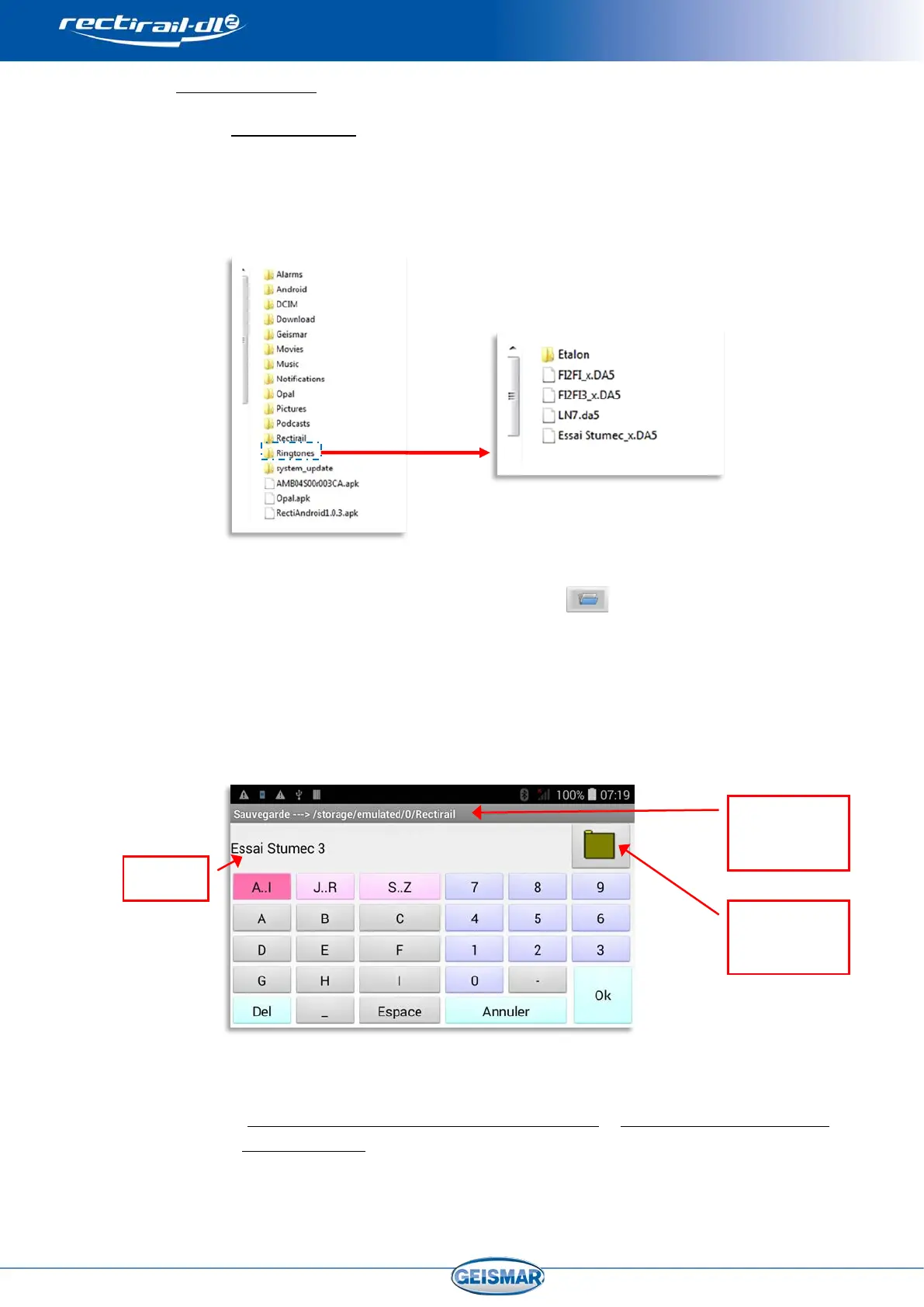
These “DA5” files are visible when browsing in the PDA tree from a PC to which
the PDA has first been connected (refer to the PDA user manual).
The measurements are not directly “visible”
in the Windows tree.
The measurements contained in a DA5 file are visible:
- In the software, via the “open” function , providing access to a choice
of DA5 files and to the files in this DA5.
- In RectiPC: refer to the RectiPC manual (Software for Windows)
The backup location or the location of a file you want to open is selected when
the following screen is displayed:
- By default, the DA5 files are backed up in the directory
“Ordinateur\B15Q\Stockage téléphone\Rectirail
” (“Computer\B15Q\Telephone
storage/Rectirail”) of the PDA.
- An existing DA5 in which you wish to consult or save the new measurements


 To Next Page