MU-A-RectiRail DL2-rev01a-Gb 34 / 44
7 Taking a measurement in grouped mode
7.1 Parameter setting
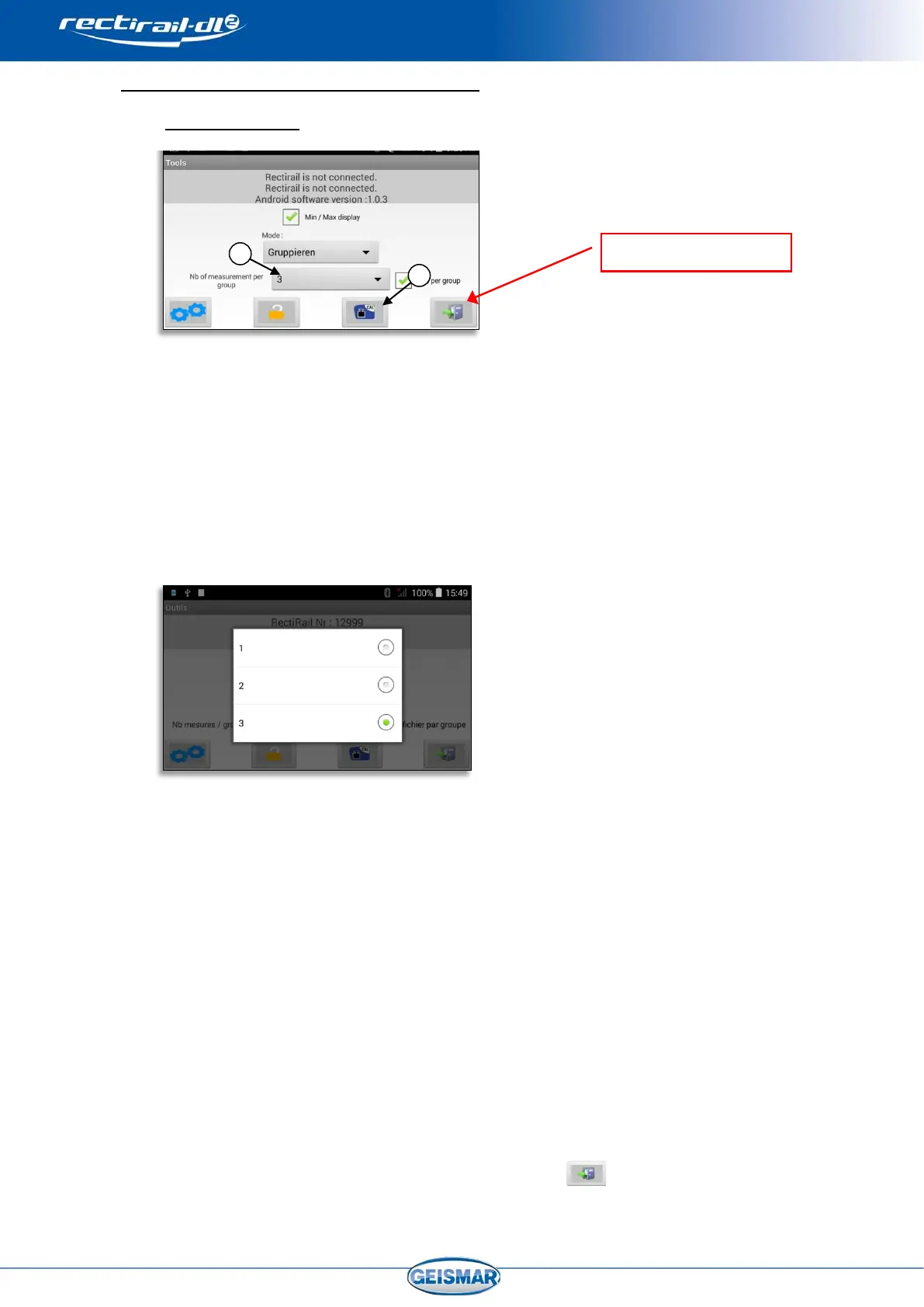
By selecting the “grouped” measurement mode, you can choose the file generated
when measurements are saved:
• 1 file per group (ticked box)
Ref ①
- In this mode, the 1, 2 or 3 measurements taken will be automatically
grouped in the same DA5 when saving.
- Open the drop-down menu
Ref ②
and select the number of measurements between 1 and 3
- This option is particularly suited to complete inspection of the profile
around a position (for example a weld), as it can display simultaneously
and save together the measurements corresponding to the various
positions 0°, 45° and 90°.
- This mode is described in the following sections.
• 1 file for several groups (unticked box)
Ref ①
In this mode, several measurements taken at the same point can be compared
by displaying them simultaneously on the screen. It is thus easy to compare two
measurements taken at two different times (for example before and after
grinding).
Refer to “
§0 7.8 Grouped mode, with several files per group” to discover the specific
features of this mode.
To validate the settings, exit the menu by clicking on
.


 To Next Page