MU-A-RectiRail DL2-rev01a-Gb 22 / 44
5.1.4 Measurement mode
Two measurement modes are available.
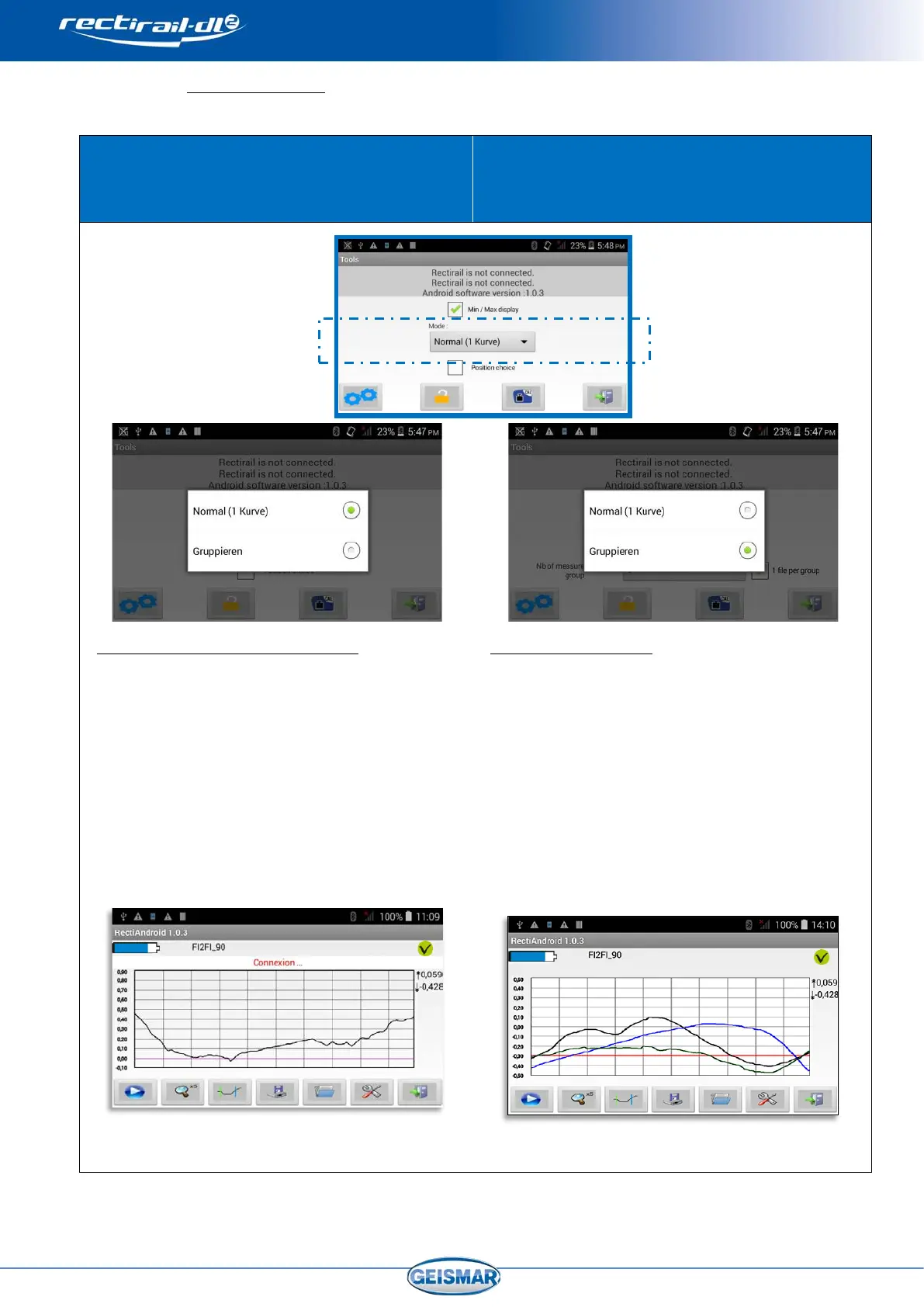
“NORMAL” mode
This mode can contain an unlimited number of
measurements
“GROUPED” mode
This mode can contain up to 3 measurements
Eg. Rail profile measurement (head)
Rail route management (side)
Fillet measurement at 45° (45° position)
This mode is accessible by
selecting the “Normal
(1 curve)” mode,
Such as shown below:
This is the classic operating mode:
- Taking a measurement
- Displaying a measurement on the
screen
- Reading measurements one by one
The “choose position” option allows the user to
select rule position (see §0).
Below is a copy of the main screen:
Refer to §0 6 Taking a measurement in
normal for a complete description of use.
This mode is accessible by
mode.
Such as shown below:
This mode is used to:
- take 2 or 3 measurements and display them
simultaneously on the screen
- save these measurements together or
separately
The “number of measurements / group” option
is used to select the maximum number of
measurements displayed simultaneously.
The “1 file per group” option is used to group
measurements in the same DA5 when saving.
Below is a copy of the main screen (after taking
3 measurements):
Refer to §0 7 for a complete description of use.


 To Next Page