MU-A-RectiRail DL2-rev01a-Gb 24 / 44
5.2.2 Threshold display
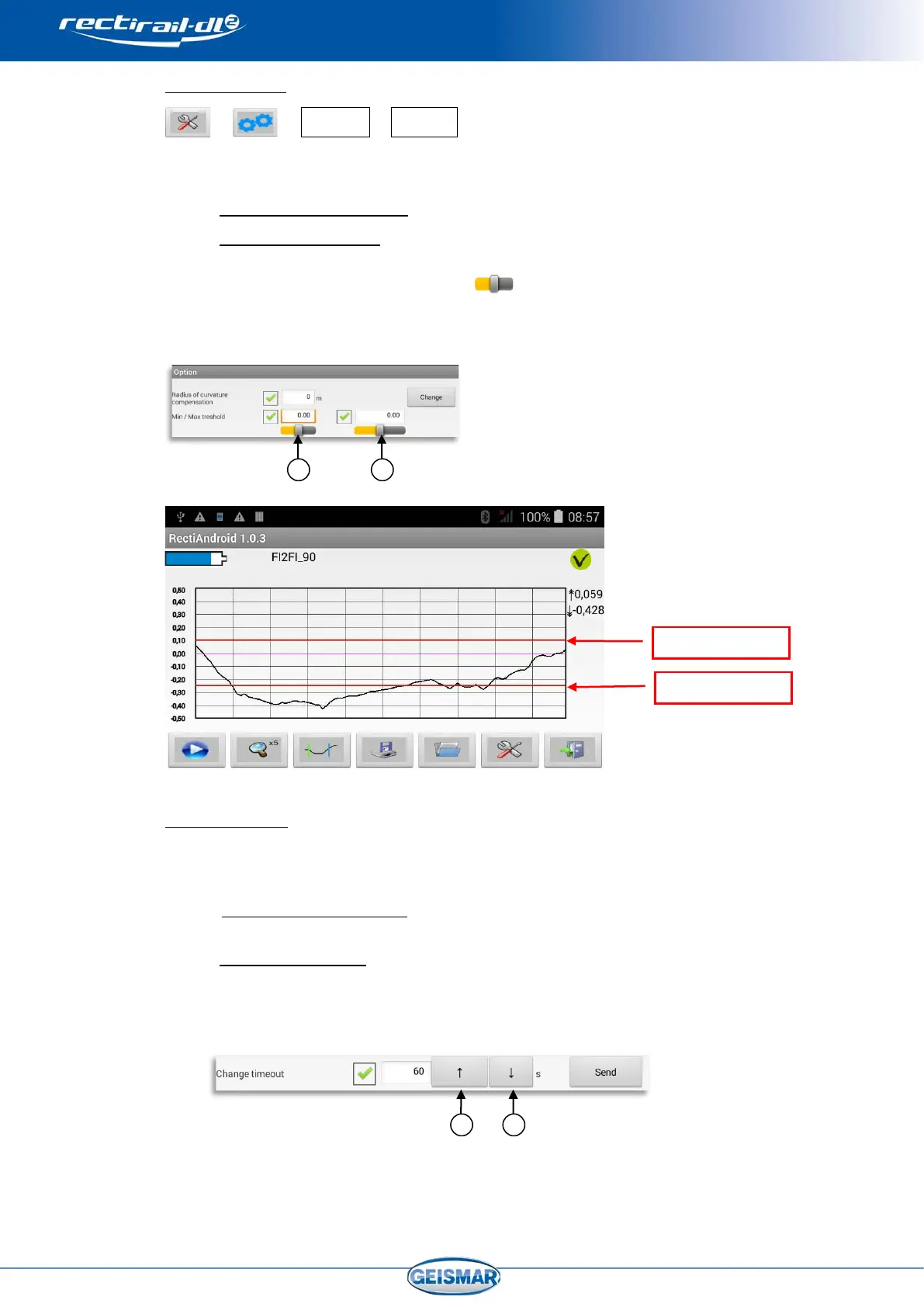
This option is used to display thresholds (= horizontal lines) on the measurement
graphs.
- If the option is not ticked: the thresholds are not displayed.
- If the option is ticked: the thresholds corresponding to the values entered
are displayed.
- Modify the values with the cursor
Minimum threshold Ref.① - Maximum threshold Ref.②
Threshold values must be between +5 and –5 mm.
The threshold display is saved in scan mode.
5.2.3 Switch off timeout
This option defines the time after which the rule will be automatically switched off,
if there is no action on it, so as to save the batteries.
- If Timeout is not ticked: timeout is disabled and the rule continues to be
energised as long as the connection with the PDA is maintained.
- If Timeout is ticked: the value entered defines the time in seconds before
the rule will be switched off.
- Modify the values with the arrows
Increase
Ref.③ - Decrease Ref.④
The timeout value can be set between 60 s and 250 s (i.e. 1 to roughly 4 minutes).
Password
Threshold
display


 To Next Page