To use the genesys xp as a stand alone unitPage46
owner's manual
genesys xp
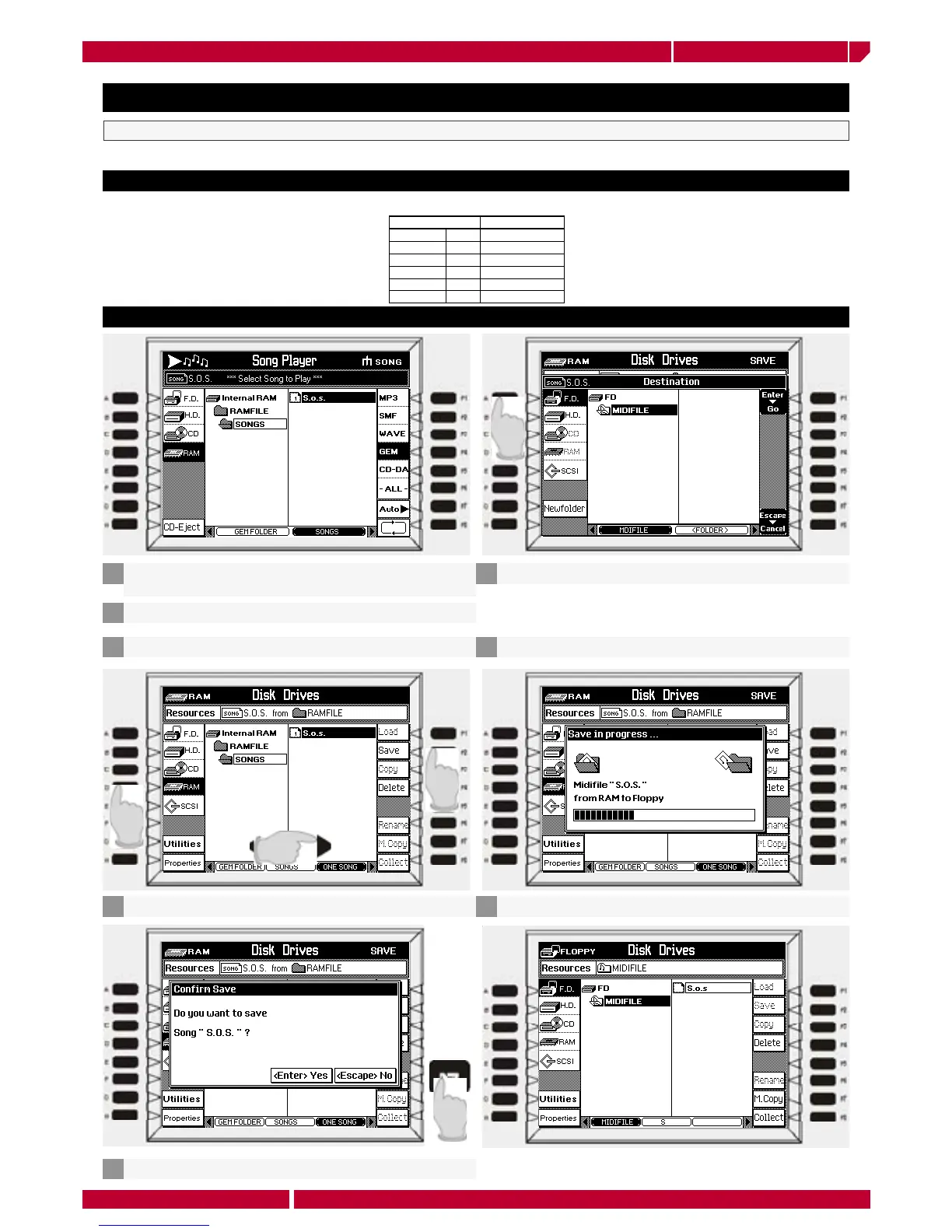
The Genesys xp has a special export function allowing the instrument to convert a GEM song file into a standard MIDI file.
A very special save function
APPENDIX TO THE EDIT AND DISK FUNCTION CHAPTER
Gem Song Standard midifile
Tracks 32 16
Sound 1600 127
Banks 16 1 GM
DSP Effects 4 2 (reverb chorus)
Track edit yes not supported
Song Perf. yes not supported
Load a song in RAM memory following the instruction
already see at page 25
1
Press the button DISK on the panel
2
Select RAM as drive and select the song
3
Press the function button F2 SAVE
4
Press ENTER to confirm
5
Select A FLOPPY DISK and enter in the folder MIDIFILE
6
Press ENTER to confirm
7
Insert first a valid support in the floppy disk driver
Select the floppy disk. The file it is now available as midifile
8
The midifile is an export format to exchange song data


 To Next Page