TECHNICAL SUPPORT: 1.800.283.5936 (USA) OR 1.801.974.3760
G-WARE SOFTWARE • INPUTS 9-12
46
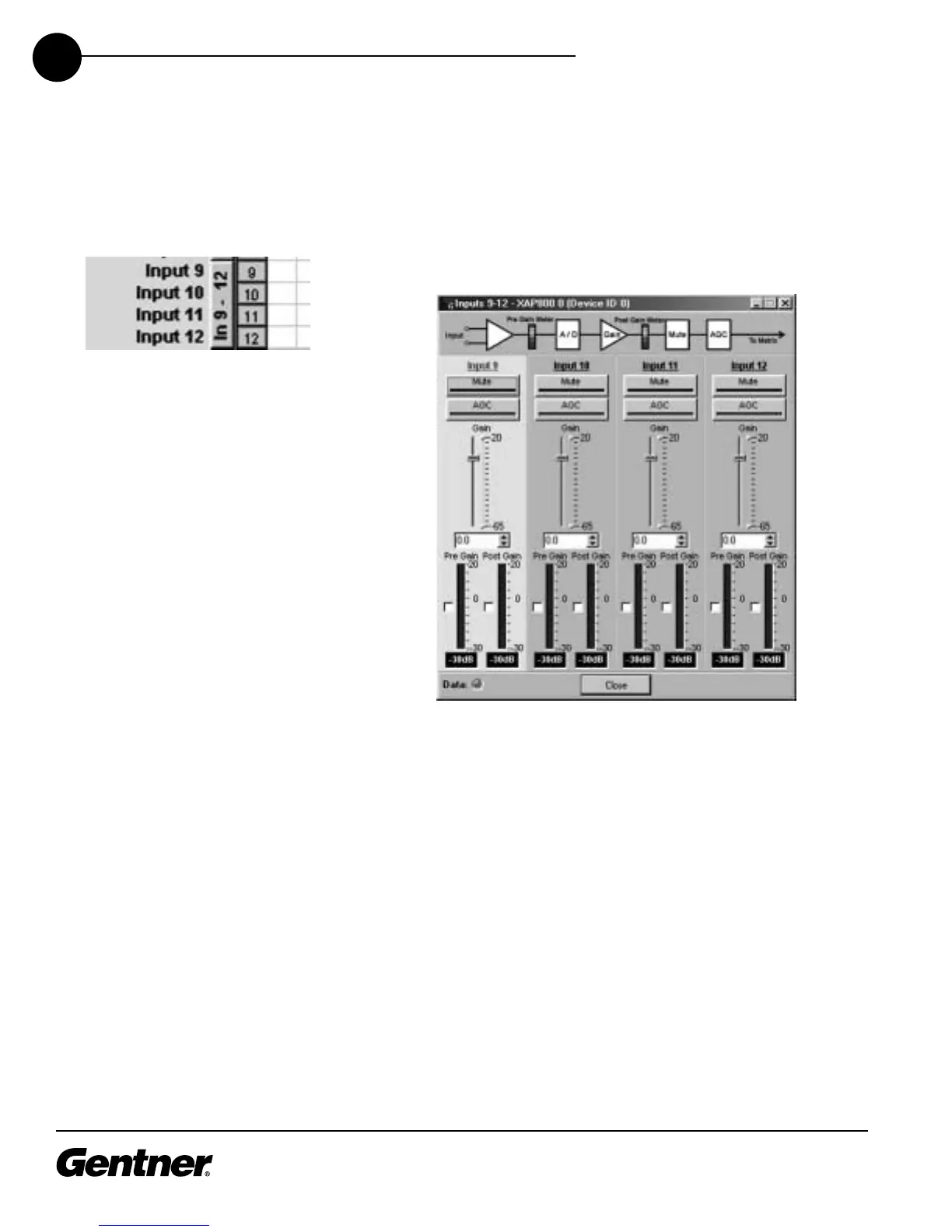
Inputs 9-12 Configuration
Configure Inputs 9-12 by clicking In 9-12 in the G-Ware Configuration
matrix window.
G-Ware Configuration Matrix Window, In 9-12
Button
Input 9-12 Configuration Window
Select the input you wish to modify, then configure each parameter.
These controls operate the same as those for Inputs 1-8, including the
procedure for labeling each input. However, note that there are no
phantom power, filter, gate, or coarse gain controls. Also, there are no
gated or non-gated meters. The AGC button opens the AGC window.
Note that there is no speech leveler function.
Adjusting the input gain levels for these inputs is the same as for Inputs
1-8. Notice the yellow and green upper and lower limit arrows on the
Gain slider scale. Adjust these to establish minimum and maximum gain
limits for the input. The limits you set affect the relative gain commands
you establish for the input. See Gain Structure on page 44 for
information about how to set the input gain.



 To Next Page