30
2.9 Controlling PTZ Cameras
The GV-Joystick can be connected to the GV-IP Decoder Box to control GV-PTZ010D,
GV-PT110D and GV-IP Speed Dome. The supported functions include zoom in, zoom out, tilt
(vertical movement), pan (horizontal movement), focus in, focus out and automatic focus.
Note:
1. GV-Joystick cannot control channels accessed through GV-Mobile Server or RTSP.
2. The Previous and Next buttons of GV-Joystick are not supported on GV-IP Decoder
Box.
3. The Focus In / Out buttons are not supported on GV-PT110D.
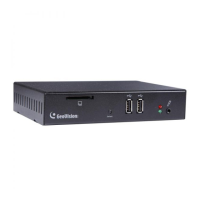
1. Connect a GV-Joystick to the USB port on the front panel. Once the GV-Joystick is
connected, the PTZ icon will appear on the channels that support the device.
Figure 2-28
2. If you have more than one channel under display, press the
key to lock the display
channel at the PTZ camera. See 2.8 Pausing the Looped View.
3. You can now start to control the camera using the GV-Joystick.
Tip: To automatically focus the channel view, press the Focus In and Focus Out buttons
on the GV-Joystick at the same time.



 To Next Page