81
Configuring the system on the DECT Manager
Gigaset N720 DECT IP Multicell System / engbt / A31008-M2314-L101-2-7619 / web-conf.fm / 06.02.2012
Version 2, 06.08.2010
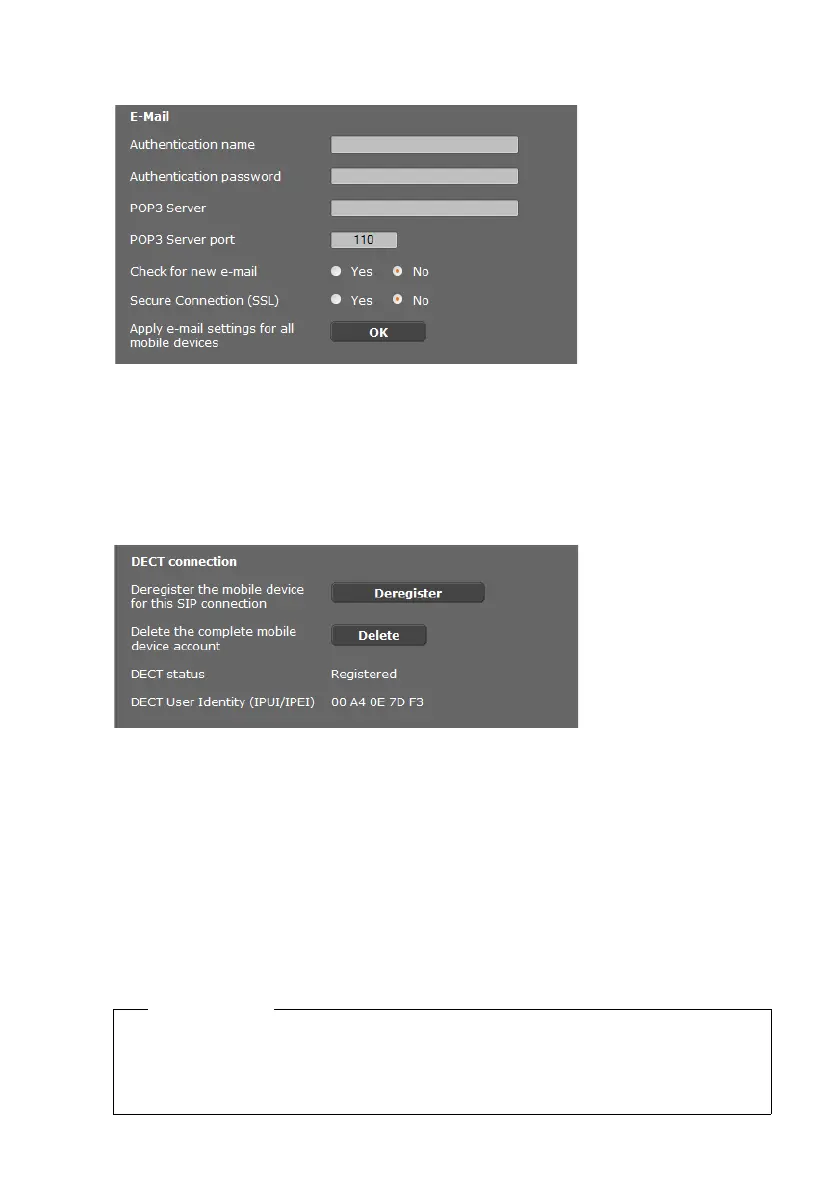
Receiving eMail
¤ If the DECT Manager is to check the receipt of eMails for the handset, enter the data for
the eMail account here.
¤ Activate the option Yes for Check for new eMail.
¤ Select whether the notification should be transmitted via a secure connection.
¤ If these settings are to apply to all configured handsets, click on OK.
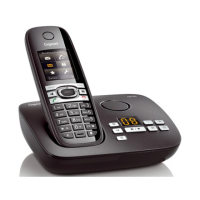
Deregistering and deleting handsets
If the handset for which you are currently editing the settings is registered with the DECT
Manager, you can:
Saving settings
¤ Click on Set to save your settings on the page.
Deregister Deregister the handset for this SIP connection.
The connection is interrupted but all data is retained.
Delete Delete the entire account for the handset on the DECT Manager.
This affects all settings on this page, the DECT registration and the VoIP
account.
Please note
If you have registered or deregistered all handsets, you should back up the DECT
Manager settings on the PC (
£ page 94). This ensures that the handsets and VoIP
accounts will still be assigned consistently if you need to restore the data at a later
date.


 To Next Page