38
10.4 Ventilation mode
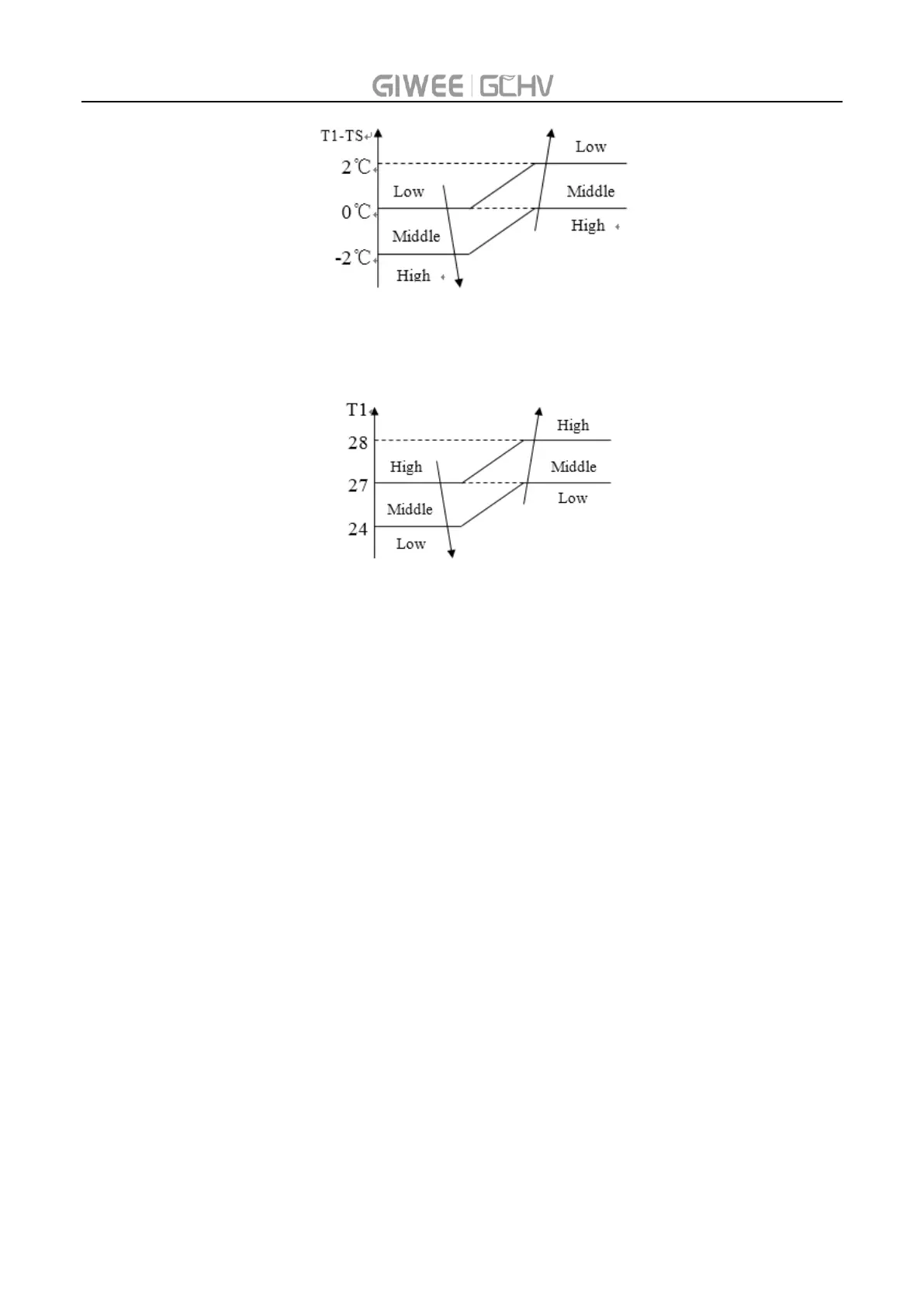
Auto fan speed in ventilation mode
10.5 TURBO mode
When press TURBO in wireless controller, the fan motor will work at high fan speed.
10.6 Sleep mode
The setting temperature will increase in cooling mode or decrease in heating mode by 1 degree
per hour and will not change after two hours.
The fan speed will set to low fan speed automatically and it can be changed.
After 8 hours, unit will exit sleep mode directly. Or turn off by remote controller.
10.7 Power-down memory function
It can be set in indoor unit PCB.
The content of power-down memory: on/off status, mode, fan speed, setting temperature, louver
position, swing status.
After the unit is powered on again, if the setting command has not been received, the memory
content will take effect after 30S; if the setting command is received before this time, the
memory content will not be read.
10.8 Forced cooling mode
Press the button in LED display panel, the unit will enter forced cooling mode. At this time, run
and protect light will flash.
The unit will run at a certain frequency and fan speed.



 To Next Page