EasyManua.ls Logo

Graco TI12552a - User Manual

Graco TI12552a
134 pages
Print Icon
To Next Page IconTo Next Page
Loading...
312779E
EN
Operation
ProMix
®
2KS
Plural Component Proportioner
Automatic system for proportional mixing of plural component coatings, with Wall Mount
Fluid Station or RoboMix Fluid Station. For professional use only.
Approved for use in explosive atmospheres (except the EasyKey).
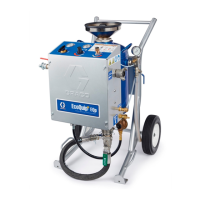
Automatic System with Wall Mount Fluid Station
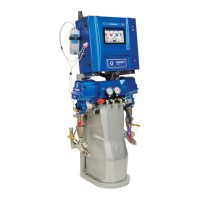
Automatic System with RoboMix Fluid Station
TI12553a
TI12552a
See pages 4-7 for model information, including maxi-
mum working pressure. Equipment approval labels are
on page 3. Some components shown are not included
with all systems.
Important Safety Instructions
Read all warnings and instructions in this
manual. Save these instructions.
#53
II 2 G0359
Get other manuals https://www.bkmanuals.com

Table of Contents

Other manuals for Graco TI12552a

Questions and Answers

  • A
    anthony37Sep 18, 2025
    What does the E-15 SYSTEM IDLE WARNING mean on my Graco Control Unit?
    • J
      jose20Sep 18, 2025
      The E-15 SYSTEM IDLE WARNING means that the mix input is high, but the gun has not been triggered for 2 minutes. If you are not painting, clear the alarm and resume operation. If you are painting, shut down and inspect the fluid meter and air flow switch.
  • D
    Donald WashingtonAug 25, 2025
    What to do if I get a potlife alarm on my Graco Industrial Equipment?
    • K
      Kylie SmithAug 26, 2025
      If the potlife time has been exceeded for the mixed material, press the Alarm Reset key to stop the audible alarm. Then, purge the system with solvent, fresh mixed material, or perform a color change. You can purge with solvent until the preset purge time is complete, switch to Mix mode and spray the required volume to restart the timer, or perform a color change.
  • S
    Samuel SawyerAug 26, 2025
    Why am I getting a RATIO_HIGH_ALARM on my Graco Industrial Equipment?
    • D
      davismorganAug 26, 2025
      A RATIO_HIGH_ALARM indicates there may be too little restriction in the system. Here's what you can check: * Ensure the system is fully loaded with material. * Verify the supply pump’s cycle rate is set correctly. * Confirm the spray tip/nozzle is properly sized and not worn. * Ensure the fluid regulator is set correctly. If the alarm occurs during start-up after purging, restrict gun needle travel to slow the initial fluid delivery rate. If it occurs after spraying for some time, adjust component A and B fluid supply regulator pressures until they are about equal. Also, ensure air pressure to the valve actuators is adequate (75-120 psi, with 120 psi recommended) and that there are no restrictions in the solenoid or tubing interrupting valve actuation air.
  • L
    Luke MunozAug 27, 2025
    What to do if I get a RATIO_LOW_ALARM on my Graco Industrial Equipment?
    • B
      Brandon BooneAug 27, 2025
      A RATIO_LOW_ALARM indicates there is too much restriction in the system. Check that the system is fully loaded with material, the supply pump’s cycle rate is set properly, the spray tip/nozzle is properly sized and not clogged and that the fluid regulator is set correctly. If the alarm occurs during start up, after purging, restrict gun needle travel to slow down the initial fluid delivery rate until fluid hoses are loaded with material. If the alarm occurred after you were spraying for some time, adjust component A and B fluid supply regulator pressures until they are about equal. Increase air pressure to the valve actuators to 75-120 psi (120 psi is recommended). Ensure there is no dirt or moisture in the air supply and adjust air and fluid pressure.
  • A
    Anthony MccartySep 18, 2025
    How do I fix the E-20 PURGE INITIATE ALARM on my Graco Control Unit?
    • J
      Joseph JenkinsSep 18, 2025
      If the system detects atomizing air to the gun when purge is selected, shut off gun air. For systems with a gun flush box, if the gun is not in the box when purge is selected, place gun in gun flush box and verify that gun flush box is operating properly. For systems with auto dump on, if the gun is not in the box when auto dump is initiated, place gun in gun flush box and verify that gun flush box is operating properly. For systems with a gun flush box, verify condition of fuse and replace if necessary if Fuse F2 is blown.
  • R
    Rodney AndersonNov 23, 2025
    What to do if the gauge reading doesn't change with % Open on Graco TI12552a Industrial Equipment?
    • B
      Brian McdonaldNov 23, 2025
      If the gauge reading on your Graco Industrial Equipment does not increase or decrease when the % Open value is changed, the issue is likely electrical. Here's what you can do: 1. First, measure the voltage to the regulator. You can do this either at J5 on the fluid control board (across the white and black wire connections) or at J2 on the flow control board of the module (across the red and black wire connections). The voltage at J5 should be in the range of 0-3.3 Vdc for 0%-100% Open, and at J2 it should be 0-21 Vdc for 0%-100% Open. 2. If there's no voltage, check fuse F2 on the fluid control board to see if it's blown. 3. If voltage is present, ensure the cable is properly connected to the module circuit board. 4. If the cable is connected correctly, try replacing the pressure con...
  • L
    Laurie JacksonSep 6, 2025
    What does REMOTE_STOP_ALARM mean on Graco Industrial Equipment?
    • T
      Thomas MorenoSep 7, 2025
      A REMOTE_STOP_ALARM indicates that automation has requested that the system abort all operations. Abort operations and troubleshoot the automation system.
  • A
    Amber HallSep 7, 2025
    What to do if I get a potlife alarm on my Graco Control Unit?
    • K
      Kimberly StokesSep 7, 2025
      If the potlife time has been exceeded for the mixed material, press the Alarm Reset key to stop the audible alarm. Then, purge the system with solvent, fresh mixed material, or perform a color change. For solvent purge, the system purges until the preset purge time is complete. For new mixed material purge, go to Mix mode and spray the required volume to restart the timer. To perform a color change, follow the procedure on page 69.
  • P
    Patrick JohnsonSep 2, 2025
    Why am I getting a COLOR/CATALYST_PURGE_ALARM on my Graco Industrial Equipment?
    • N
      ntaylorSep 2, 2025
      A COLOR/CATALYST_PURGE_ALARM indicates that the system detects no meter pulses, or a disruption in meter pulses lasting longer than 1 second throughout the Color/Catalyst purge time duration. Check that the meter cable is connected and clean or repair the meter.
  • T
    Thomas HoganAug 31, 2025
    How to resolve CAN_COMM_ERROR_ALARM on Graco TI12552a?
    • H
      Heather AtkinsonAug 31, 2025
      A CAN_COMM_ERROR_ALARM indicates an interruption in communication. Verify that the cable is correctly connected between the Color Change Module and the Fluid Station, or between the Booth Control and the Fluid Station. Also, check the fluid control board fuse and replace if necessary.

Graco TI12552a Specifications

General IconGeneral
BrandGraco
ModelTI12552a
CategoryIndustrial Equipment
LanguageEnglish

Related product manuals