EasyManua.ls Logo

Grizzly G1037Z - User Manual

Grizzly G1037Z
52 pages
Print Icon
To Next Page IconTo Next Page
Loading...
COPYRIGHT © JANUARY 2004 BY GRIZZLY INDUSTRIAL, INC.
WARNING: NO PORTION OF THIS MANUAL MAY BE REPRODUCED IN ANY SHAPE
OR FORM WITHOUT THE WRITTEN APPROVAL OF GRIZZLY INDUSTRIAL, INC.
#5698 PRINTED IN TAIWAN
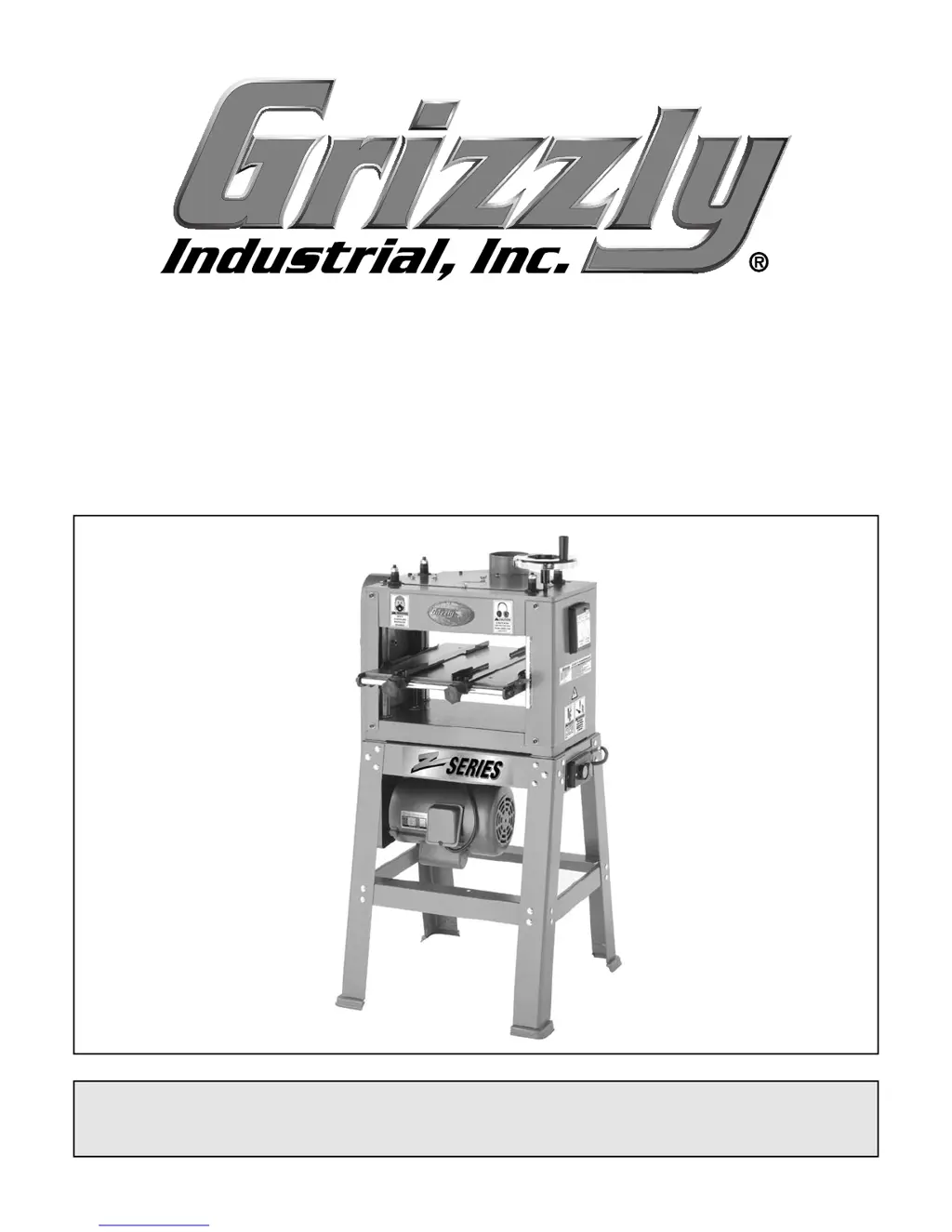
13" PLANER/MOULDER
MODEL G1037Z
INSTRUCTION MANUAL

Other manuals for Grizzly G1037Z

Questions and Answers

  • J
    James Lucas DVMAug 19, 2025
    How to troubleshoot a Grizzly G1037Z when the motor will not start?
    • L
      Lauren RivasSep 12, 2025
      If the motor of your Grizzly Planer won't start, it could be due to: * Low voltage. Check the power line for proper voltage. * An open circuit in the motor or loose connections. Inspect all lead connections on the motor for loose or open connections.
  • G
    Gloria VelasquezAug 21, 2025
    What to do if my Grizzly G1037Z motor stalls and the circuit breaker blows?
    • R
      Renee MartinezAug 21, 2025
      If your Grizzly Planer's motor stalls, won't start, and the fuses or circuit breakers blow, there are several potential causes: * There may be a short circuit in the line cord or plug. Inspect the cord or plug for damaged insulation and shorted wires. * There may be a short circuit in the motor or loose connections. Inspect all connections on the motor for loose or shorted terminals or worn insulation. * Incorrect fuses or circuit breakers in the power line. Install correct fuses or circuit breakers. * Low voltage. Correct the low voltage conditions. * The motor may be overloaded. Reduce the load on the motor.
  • J
    Justin MorrisAug 23, 2025
    Why does my Grizzly G1037Z Planer motor overheat?
    • S
      Samuel ValenciaAug 25, 2025
      Your Grizzly Planer motor may overheat due to: * The motor being overloaded. Reduce the load on the motor. * Restricted air circulation through the motor. Clean out the motor to provide normal air circulation.
  • C
    Christopher EscobarAug 26, 2025
    What to do if my Grizzly Planer slows down during operation?
    • C
      cgallagherAug 26, 2025
      If your Grizzly Planer slows down while operating, consider the following: * The feed rate may be too high. Try feeding the workpiece slower. * The depth of cut may be too great. Reduce the depth of cut. * The knives may be dull. Sharpen the knives.
  • P
    Pamela LeonAug 27, 2025
    Why am I getting chipped grain when planing with my Grizzly G1037Z?
    • J
      John WallaceAug 27, 2025
      Chipped grain when planing or molding with your Grizzly Planer can occur because: * You are planing against the grain. Flip the board and plane the other side. * The knives are dull. Sharpen or replace the knives.
  • D
    Debbie ScottAug 29, 2025
    How to fix a loud noise coming from my Grizzly G1037Z?
    • C
      Carla RiveraAug 29, 2025
      A loud, repetitious noise from your Grizzly Planer could be caused by: * Missing or loose pulley setscrews or keys. Inspect keys and setscrews, and replace or tighten if necessary. * The motor fan hitting the cover. Tighten the fan or shim the cover. * A defective V-belt. Replace the V-belt.
  • K
    Keith CardenasSep 1, 2025
    What causes fuzzy grain when planing with my Grizzly G1037Z?
    • A
      Amy SmithSep 1, 2025
      Fuzzy grain when planing or molding with your Grizzly Planer can be attributed to: * Lumber with high moisture content. If the moisture content is higher than 20%, sticker the lumber and allow it to dry. * Dull knives. Sharpen or replace the knives.
  • A
    Aaron KellySep 3, 2025
    How do I control snipe on my Grizzly G1037Z?
    • N
      ntorresSep 3, 2025
      If you cannot control snipe on your Grizzly Planer, it may be because long or heavy boards sag as they enter and exit the cutter-head. Lift up on the unsupported end of the board as it enters and exits the cutter-head.
  • Z
    Zachary MartinezSep 5, 2025
    What causes chatter marks when planing with my Grizzly G1037Z?
    • B
      billytaylorSep 5, 2025
      Chatter marks when planing or molding with your Grizzly Planer can be caused by feeding narrow lumber through at the ends of the cutterhead. Feed lumber through the center of the cutterhead.
  • M
    Melvin BoothSep 7, 2025
    Why is my Grizzly G1037Z Planer leaving a wavy surface?
    • T
      Toni RuizSep 7, 2025
      A wavy surface when planing or molding with your Grizzly Planer can be due to unequal knife height adjustment. Reset the knives.

Summary

SECTION 1: SAFETY

Safety Instructions and Precautions

Essential safety guidelines for operating power tools and specific planer/moulder precautions.

SECTION 2: INTRODUCTION

General Introduction and Contact Info

Overview of the machine, company contact details, and website information.

SECTION 3: CIRCUIT REQUIREMENTS

Electrical Specifications and Setup

Details on amperage draw, circuit breakers, grounding, and wiring for 110V/220V.

SECTION 4: MACHINE FEATURES

Machine Components and Terminology

Identification of machine parts and definitions of common woodworking terms.

SECTION 5: SET UP

Unpacking, Inventory, and Hardware Guide

Steps for unpacking, identifying parts, and recognizing hardware during assembly.

Site Prep, Cleanup, and Stand Assembly

Guidance on preparing the workspace, cleaning the machine, and assembling the stand.

Mounting Unit, Switch, V-Belts, and Pulleys

Procedures for mounting the unit, installing the switch, V-belts, and pulley cover.

Dust Hood and Handwheel Installation

Attaching the dust hood and installing the handwheel for table adjustment.

Test Run and Recommended Adjustments

Performing initial tests and verifying factory settings for optimal performance.

SECTION 6: OPERATIONS

General Operation and Planing Tips

Overview of safe operation and best practices for planing wood accurately.

Wood Species, Depth of Cut, and Power Feed

Information on wood types, controlling cut depth, and using the power feed system.

Thickness Planing and Moulding Operations

Procedures for thickness planing, setting up moulding fences, and performing moulding.

SECTION 7: MAINTENANCE

Safety, General Checks, and Table Care

Safety rules for maintenance, pre-use checks, and table protection instructions.

Cleaning, Lubrication, and Belt Maintenance

Guidelines for cleaning, lubricating specific parts, and maintaining V-belts.

SECTION 8: SERVICE ADJUSTMENTS

Service Overview, Gauge Blocks, and Knife Inspection

Introduction to adjustments, using gauge blocks, and inspecting planer knives.

Knife Sharpening, Setting Jig, and Knife Setting

Procedures for sharpening knives, assembling and using the setting jig.

Feed Roller and Thickness Scale Adjustments

How to adjust feed roller height/pressure and calibrate the thickness scale.

Chip Deflector Adjustment

Steps for adjusting the chip deflector for effective chip and dust management.

SECTION 9: REFERENCE INFO

Aftermarket Accessories and Data Sheet

Overview of reference sections, available accessories, and machine specifications.

Warranty and Returns Information

Details regarding product warranty, coverage, and the process for returns.

Grizzly G1037Z Specifications

General IconGeneral
TypeBenchtop Planer
Cutterhead Speed10, 000 RPM
Number of Knives3
Maximum Cutting Height6 in
Maximum Cutting Depth1/8"
Feed Rate26 ft/min
Table Length24"
Motor2 HP, 120V, single-phase

Related product manuals