18
6
5
1
2
4
7
3
1
5
6
2
7
1
3
2
4
5
1
2
3
© Guldmann GB/US-02/2021 • # 550216_19
© Guldmann GB/US-02/2021 • # 550216_19
2.03 Operation
Hand control
The GH3 is switched on automatically when
a button on the hand control is pressed.
The GH3 is switched o automatically after
approx. 8 minutes without activation.
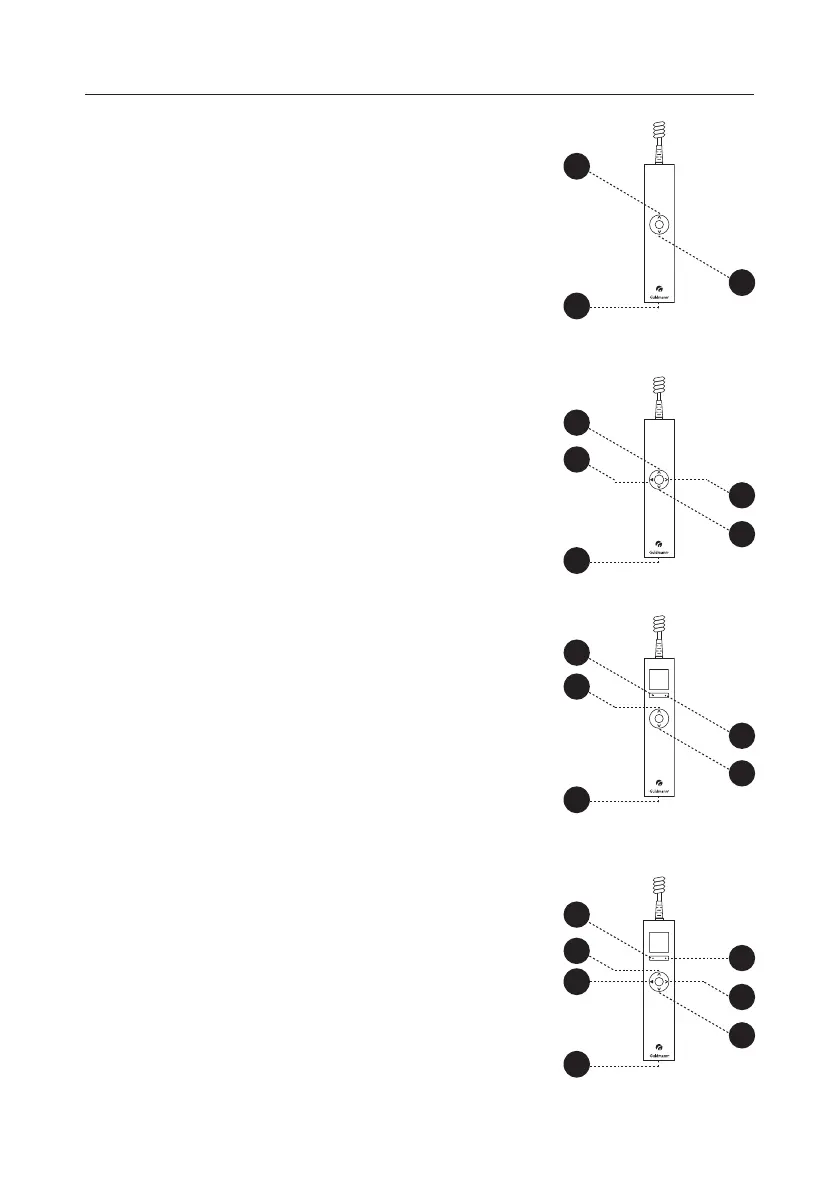
GH3
1. Lift
2. Lower
3. PDA interface (micro USB)
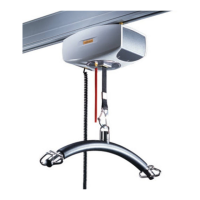
GH3 with horizontal drive motor
1. Lift
2. Lower
3. Movement in the direction of the arrow
on the GH3 information panel (section 2.00).
4. Movement in the direction opposite to
the arrow on the GH3 information panel
(section 2.00).
5. PDA interface (micro USB)
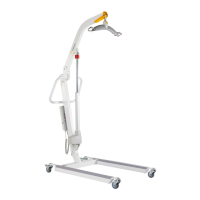
GH3+
1. Lift
2. Lower
5. Function selection button
(section 2.05, supplementary modules)
6. Function selection button
(section 2.05, supplementary modules)
7. PDA interface (micro USB)
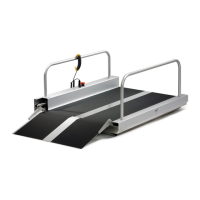
GH3+ with horizontal drive motor
1. Lift
2. Lower
3. Movement in the direction of the arrow on
the GH3 information panel (section 2.00).
4. Movement in the direction opposite to
the arrow on the GH3 information panel
(section 2.00).
5. Function selection button
(section 2.05, supplementary modules)
6. Function selection button
(section 2.05, supplementary modules)
7. PDA interface (micro USB)


 To Next Page