26
Item Description
Enable PTZ
Click the box to Enable/Disable PTZ function for each channel.
Protocol Set up the protocol of PTZ cam. The supported protocol are PELCO-P,
PELCO-D, and KND
PTZ ID
Click or press ◀ ▶ to set up PTZ ID. The valid ID value is from 1 to 64.
Baud Rate
Select Baud Rate for PTZ from 2400、4800、9600
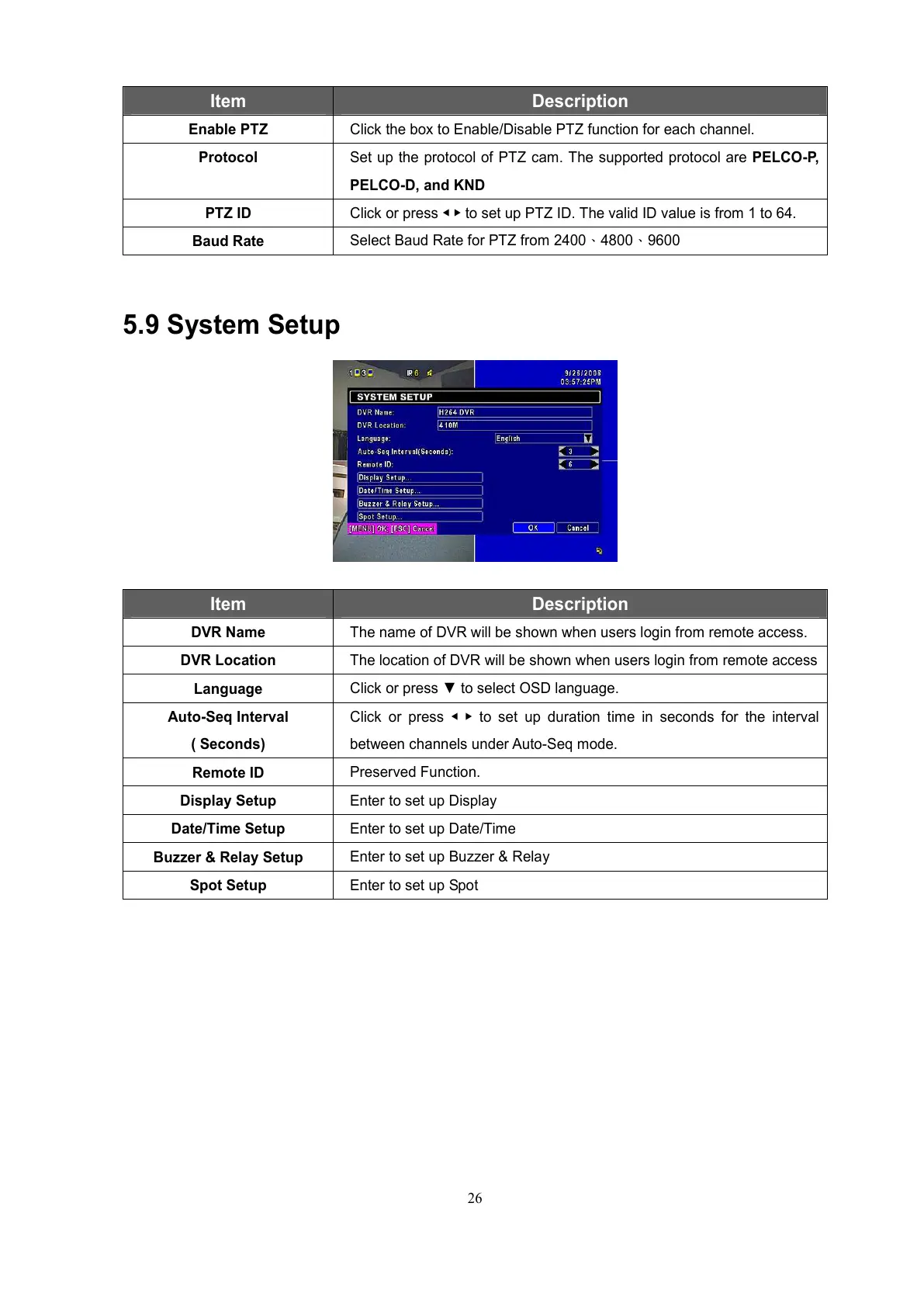
5.9 System Setup
Item Description
DVR Name
The name of DVR will be shown when users login from remote access.
DVR Location
The location of DVR will be shown when users login from remote access
Language
Click or press ▼ to select OSD language.
Auto-Seq Interval
( Seconds)
Click or press ◀ ▶ to set up duration time in seconds for the interval
between channels under Auto-Seq mode.
Remote ID
Preserved Function.
Display Setup
Enter to set up Display
Date/Time Setup
Enter to set up Date/Time
Buzzer & Relay Setup
Enter to set up Buzzer & Relay
Spot Setup
Enter to set up Spot
All manuals and user guides at all-guides.com



 To Next Page