Chapter 3 LOCATION AND CONTROL
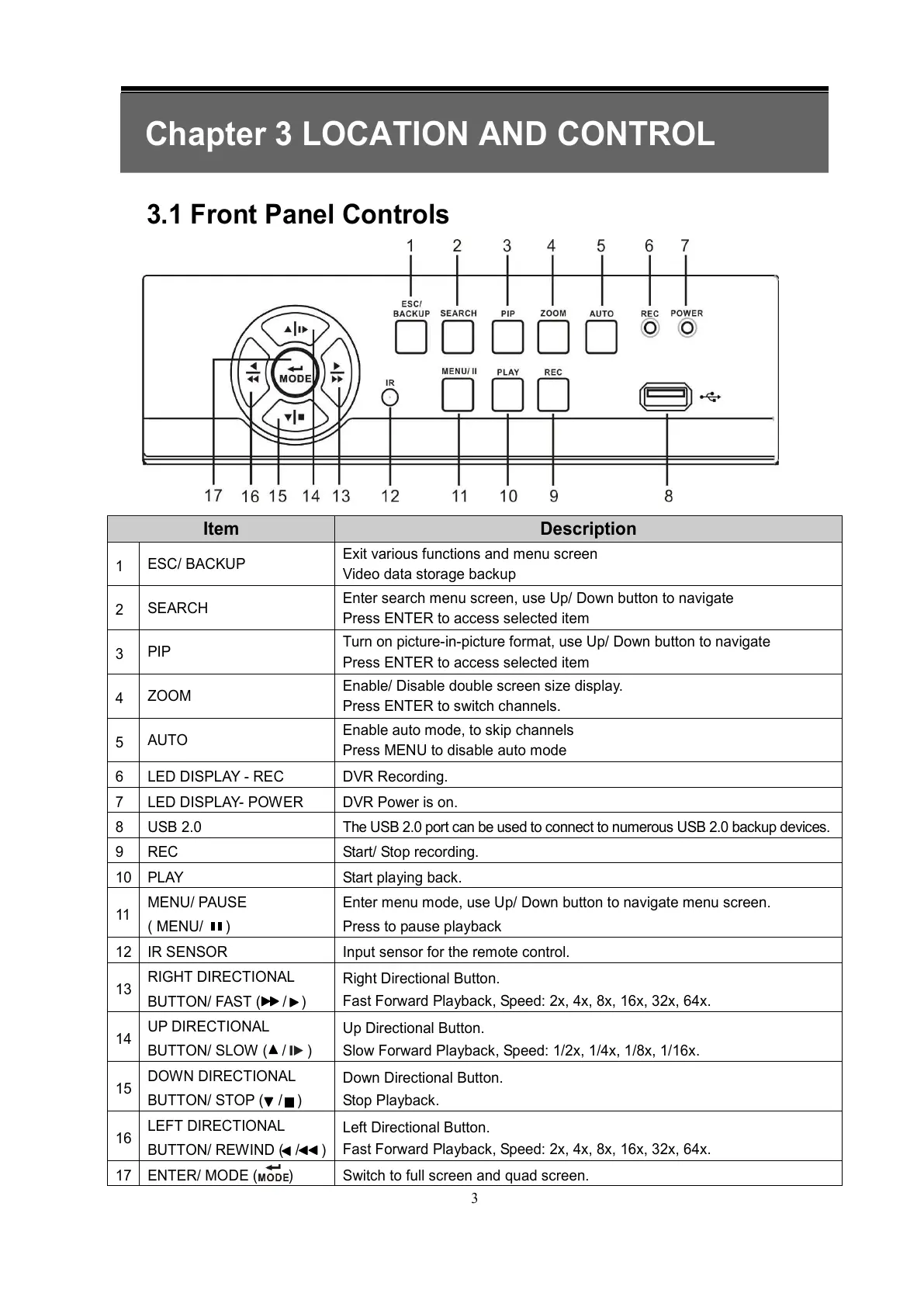
3.1 Front Panel Controls
Item Description
1
ESC/ BACKUP
Exit various functions and menu screen
Video data storage backup
2
SEARCH
Enter search menu screen, use Up/ Down button to navigate
Press ENTER to access selected item
3
PIP
Turn on picture-in-picture format, use Up/ Down button to navigate
Press ENTER to access selected item
4
ZOOM
Enable/ Disable double screen size display.
Press ENTER to switch channels.
5
AUTO
Enable auto mode, to skip channels
Press MENU to disable auto mode
6 LED DISPLAY - REC DVR Recording.
7 LED DISPLAY- POWER DVR Power is on.
8 USB 2.0 The USB 2.0 port can be used to connect to numerous USB 2.0 backup devices.
9 REC Start/ Stop recording.
10
PLAY Start playing back.
11
MENU/ PAUSE
( MENU/ )
Enter menu mode, use Up/ Down button to navigate menu screen.
Press to pause playback
12
IR SENSOR Input sensor for the remote control.
13
RIGHT DIRECTIONAL
BUTTON/ FAST ( / )
Right Directional Button.
Fast Forward Playback, Speed: 2x, 4x, 8x, 16x, 32x, 64x.
14
UP DIRECTIONAL
BUTTON/ SLOW ( / )
Up Directional Button.
Slow Forward Playback, Speed: 1/2x, 1/4x, 1/8x, 1/16x.
15
DOWN DIRECTIONAL
BUTTON/ STOP ( / )
Down Directional Button.
Stop Playback.
16
LEFT DIRECTIONAL
BUTTON/ REWIND ( / )
Left Directional Button.
Fast Forward Playback, Speed: 2x, 4x, 8x, 16x, 32x, 64x.
17
ENTER/ MODE ( ) Switch to full screen and quad screen.
All manuals and user guides at all-guides.com



 To Next Page