25
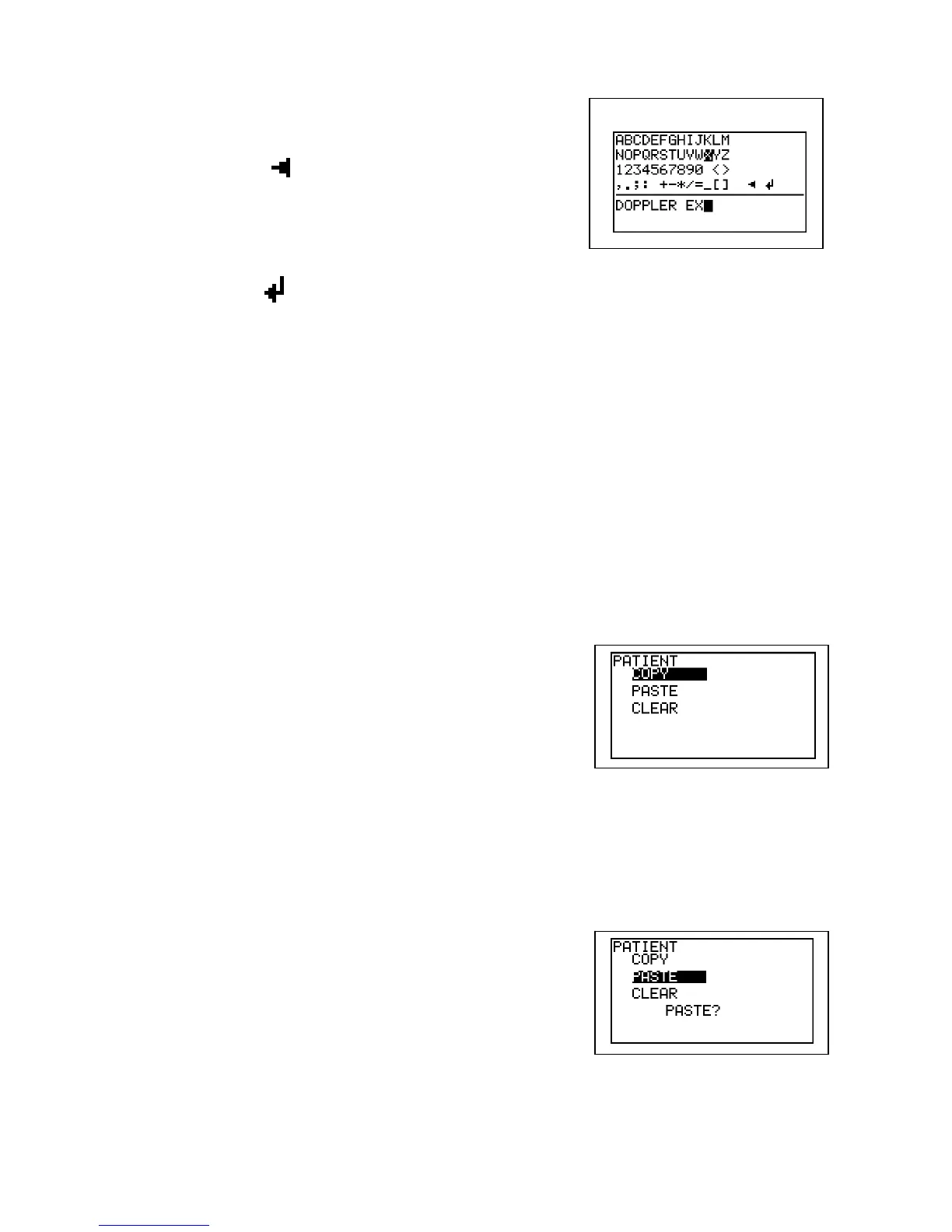
(2) Scroll to the letter you wish and press Enter to
type it. Pressing Back Button or entering
Backspace ( ) deletes the letter you typed
previously.
(3) After entering the data, press and hold
Print/Back for longer than 1 sec to save the data
or scroll to (Back) and press Enter to do it.
(4) Press Left to get out of Patient Data screen.
When using external PS2 keyboard:
(1) Press any key on the keyboard to open Patient Data screen.
(2) Use cursor keys to select item and input the data by typing letters.
(3) Press Esc or End to save the data and get out of Patient Data screen.
Copy / Paste / Clear of the data
You can copy and paste the patient data to the other patient data area when on FREEZE
mode mainly for your convenience.
(1) Press Back Button while Patient Data screen is
displayed.
(2) Scroll to the edit command and press Enter.
(3) COPY will copy all items of the patient data to
clipboard.
(4) PASTE will paste the clipboard data to the other
patient data area. It overwrites the existing data.
All items except DATE will be pasted at once.
(5) CLEAR will delete the patient data.
(6) PASTE and CLEAR commands require the
confirmation as shown right. Press Enter to
proceed or press Left to cancel.
(7) Press Back Button to go back to Patient Data.
Screen keyboard



 To Next Page