EasyManua.ls Logo

hager TKP100A - Page 22

hager TKP100A
45 pages
Print Icon
To Next Page IconTo Next Page
To Previous Page IconTo Previous Page
Loading...
Page 22/45
installer_07-2017
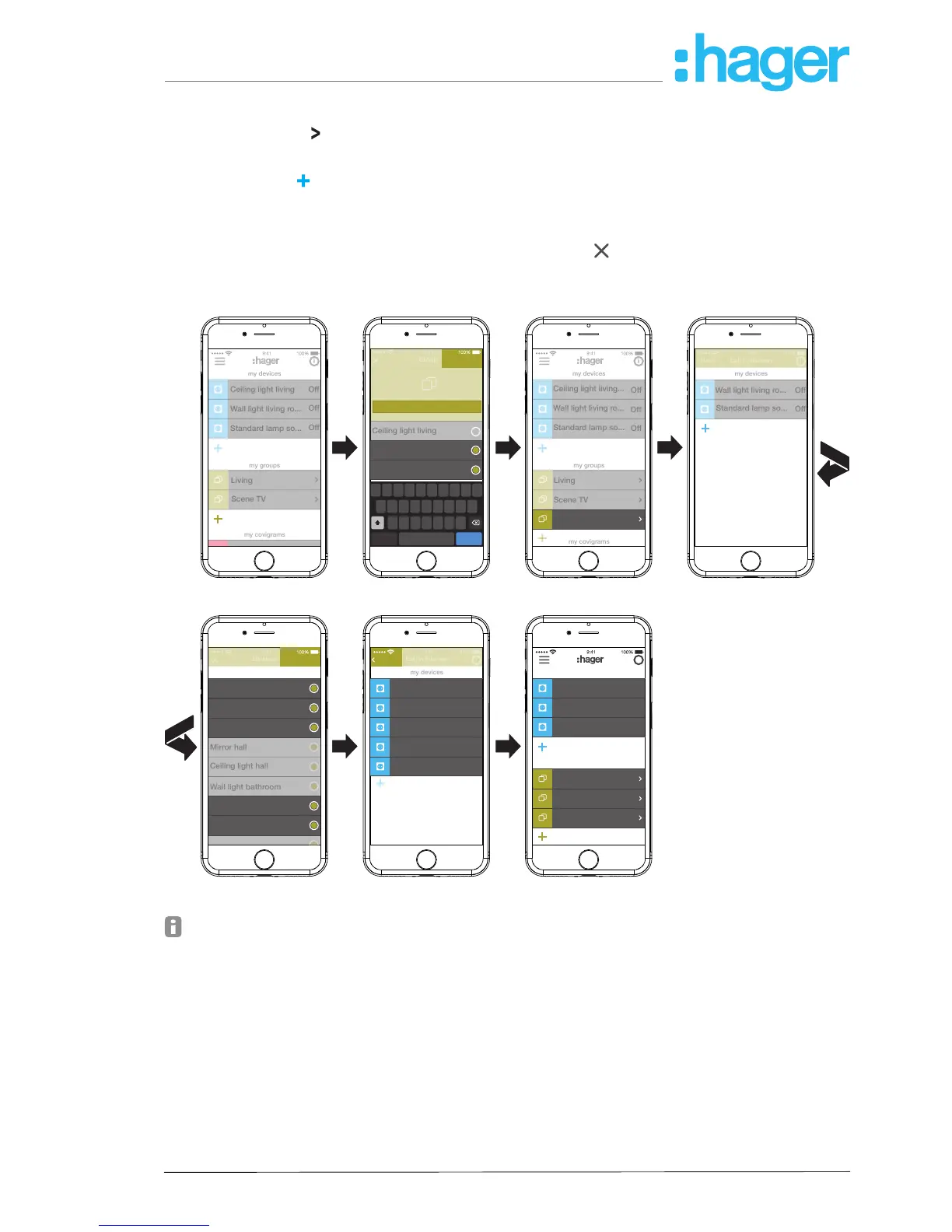
Devices can be added to a group at any time.
To do this, press
on the group.
The combined devices in the group are displayed.
Press the blue
button.
All devices not yet added to this group are displayed.
Select the devices to be added via the checkbox.
Assign the devices to the group with Save or discard via
.
The added devices are displayed in the device list of the group.
Go back to the main menu via Back.
i
my devices
my groups
my covigrams
Off
Off
Off
Living
Scene TV
Wall light living ro...
Ceiling light living
Standard lamp so...
i
Off
my devices
Off
Off
my groups
my covigrams
Wall light living ro...
Living
Scene TV
Eat-in kitchen
Ceiling light living...
Standard lamp so...
Q
W E R T Y U I O
A S D F G H
Z X C V B N M
J K L
P
.?123 return.?123.?123
Group
Save
space
Eat-in kitchen
Ceiling light living
Wall light living room
Standard lamp sofa
i
Off
my devices
Off
Back
Wall light living ro...
Standard lamp so...
Eat-in kitchen
i
my devices
Off
Off
Off
Back
Ceiling light kitchen
Ceiling light living
Workplace light kit...
Blind kitchen
Blind living room
Eat-in kitchen
Devices
Save
Ceiling light living
Ceiling light kitchen
Workplace light kitchen
Mirror hall
Ceiling light hall
Wall light bathroom
Blind kitchen
Blind living room
i
Off
my devices
Off
Off
my groups
Wall light living ro...
Eat-in kitchen
Ceiling light living
Standard lamp so...
Living
Scene TV
Figure 19: Create group, add group
The combining of devices for heating control such as thermostats in a zone takes place in
the same way as with a group and is initiated by selecting Add hot water zone. A zone is
also displayed in the main menu under my groups.

hager.com
coviva smartbox

Other manuals for hager TKP100A