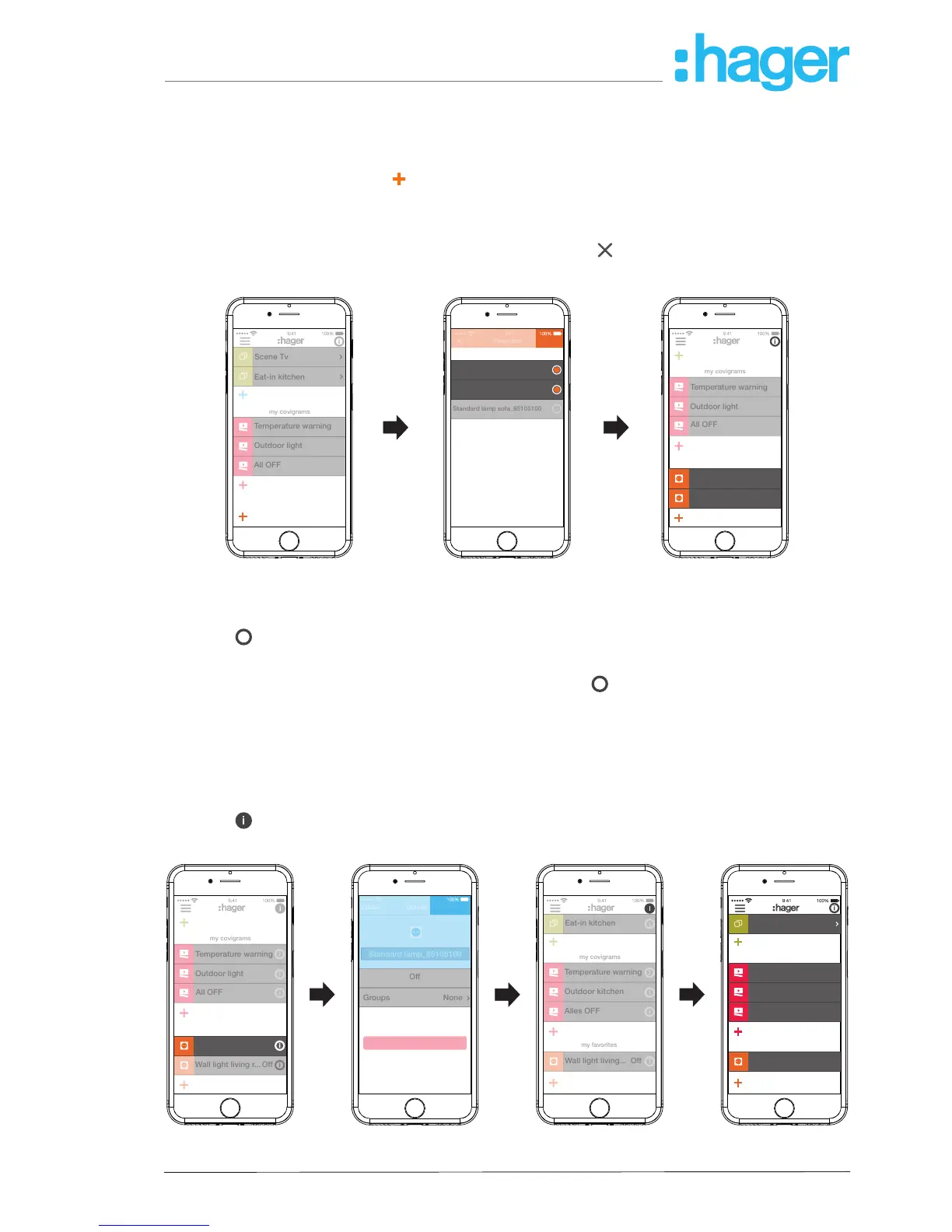
Add device to the favourites list (Figure 26)
Devices, whose connected loads are frequently operated, can be added for fast access under
my favorites.
To do this, press the orange
button.
A list with all devices that have not yet been dened as favourite is displayed.
Add devices to my favorites by activating the checkbox.
Dene the devices as favourites with Save or discard via
.
The favourites are displayed in the main menu.
Figure 26: Dene favourites
Remove device from the favourites list (Figure 27)
Press
i
in the top right corner of the main menu.
All elements in the main menu are switched to edit mode.
Select the device in the favourites list to be removed via
i
on the relevant device.
Details about the device, such as the switching state and the groups in which the device is
integrated, are displayed.
Press the Remove from Favorites button.
With Save remove the device from my favorites or discard via Back.
The removed device is no longer displayed in the main menu under my favorites.
Press
in the top right corner of the main menu to exit the edit mode.
Additional devices can be added to or removed from the favourites list in the same way.



 To Next Page