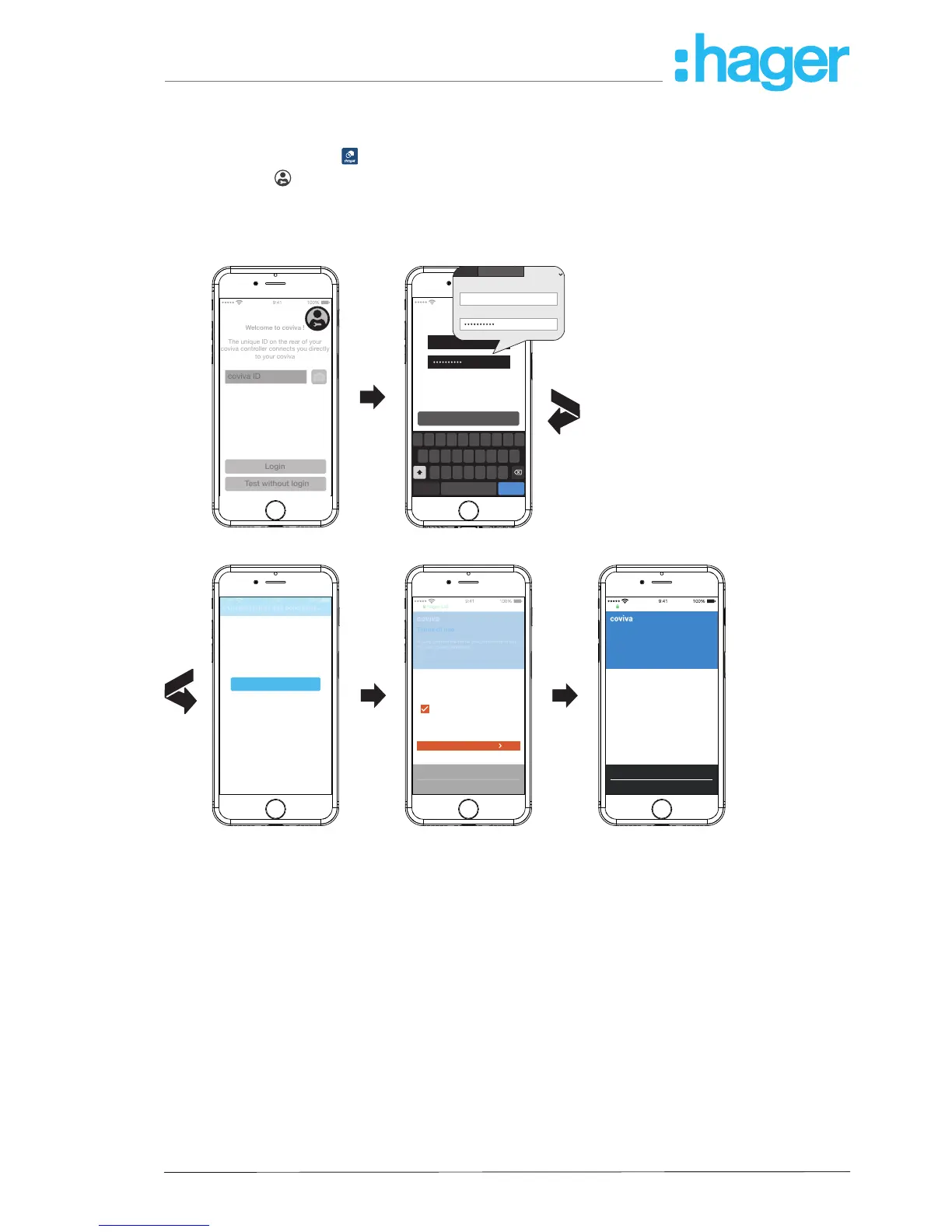
The rst Login (Figure 6)
The (mobile) end device is online.
Open the coviva app
.
Switch with
to login as an installer.
Enter e-mail address and password of the myHager account and log in with Login.
The access data is validated online against the myHager account. A message conrms the
successful Login.
Welcome to coviva !
The unique ID on the rear of your
coviva controller connects you directly
to your coviva
myHager ANB
In order to use the coviva app, you
must accept the general terms and
conditions of use for your myHager
account. Please press the
“myHager ANB” button to continue
General terms and conditions...
Q W E R T Y U I O
A S D F G H
Z X C V B N M
J K L
P
Login
email@hager.com
myHager
E-Mail (User name)
Password
email@hager.com
return
space
.?123
Terms of use
Please confirm the terms and conditions of use
for your coviva Smartbox.
Personal data
coviva terms and conditions of use *
I accept the coviva terms and
conditions of use of dated 31/01/2017.
* Mandatory fields
Hager Ldt.
Save
Publication details Data privacy Cookie policy
Terms of use
Please confirm the terms and conditions of use
for your coviva Smartbox.
Thank you
We have saved your consent in your myHager
account.
Please now re-open the coviva app on your
smartphone or tablet, navigate back to the login
form and enter your myHager password again.
You should be able to activate the app
immediately.
Hager Ltd.
Publication details Data privacy Cookie policy
Hager Ltd.
Figure 6: First Login
If the General Term of Use (GToU) for the coviva app have not yet been accepted in the my-
Hager account, the corresponding web page must be accessed at this point.
To do this, press the myHager GToU button.
Accept the GToU via the checkbox and complete the operation via Save.
Afterwards, log in again to the app.



 To Next Page