EasyManua.ls Logo

hager TKP100A - Page 26

hager TKP100A
45 pages
Print Icon
To Next Page IconTo Next Page
To Previous Page IconTo Previous Page
Loading...
Page 26/45
installer_07-2017
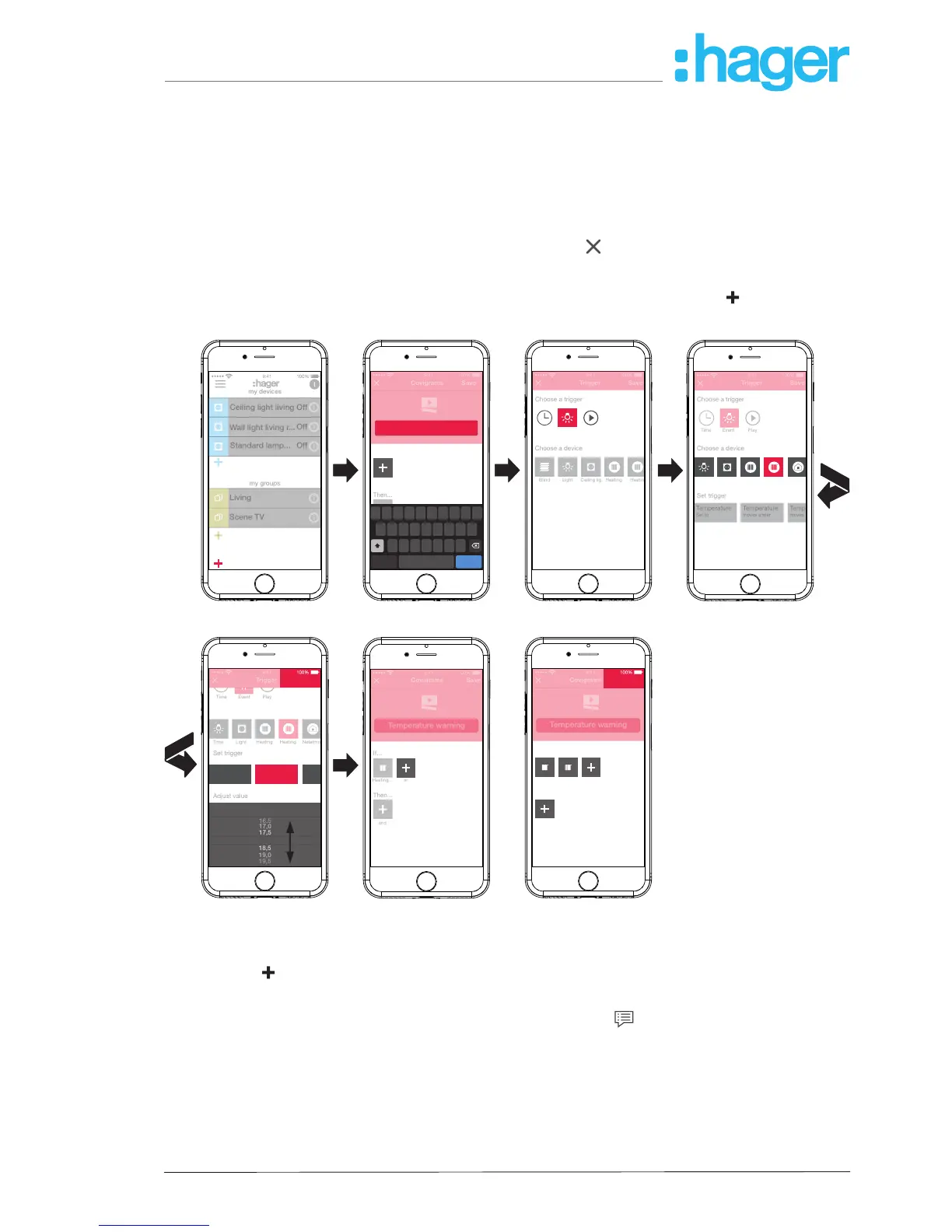
Select the device by pressing the symbolic button, in the example Heating bedroom.
Possible triggers are displayed.
Select the trigger by pressing the symbolic button, in the example Temperature Moves
under.
The button of the trigger is highlighted in red.
Set the desired minimum temperature using the scroll wheel, in the example 18 °C.
Finish the setting of the trigger with Save or discard via
.
The trigger is displayed under Covigramm.
Add another trigger in the same way if required, which is OR linked, via the
button, in the
example Heating children's room.
Save
Trigger
Choose a device
Choose a trigger
Time
Event
Play
Set trigger
Set to
Temperature
moves under
Temperature
moves
Temp
Time Light Socket Heating Weather
my devices
my groups
my covigrams
Off
Off
Off
Wall light living r...
Living
Scene TV
Ceiling light living
Standard lamp...
Save
Trigger
Choose a device
Time
Event Play
Choose a trigger
Blind
Light
Ceiling lig.
Heating
Heatin.
Q
W E R T Y U I O
A S D F G H
Z X C V B N M
J K L
P
Covigrams
Save
return
.?123
space
Temperature warning
or
Then...
If...
< 18,0°C
18,0
17,5
18,5
19,0
19,5
17,0
16,5
Save
Trigger
Time
Event
Play
Set trigger
< 18,0°C
Set to
Temperature
moves under
Temperature
moves
Temp
Adjust value
Temperature
Time
Light
Heating
Heating
Netatmo
Covigrams
Save
return
.?123
save
Heating... Heating...Heating... Heating...
and
or
Then...
If...
Temperature warning
Covigrams
Save
return
.?123
save
Temperature warning
Heating...
and
or
Then...
If...
...
Figure 21: Covigram for example 1: Trigger
Dene action
Press the
button under Then … ….
The page for dening an action opens.
Select the type of action, in the example Push notication
(Figure 22).
The button of the action type is highlighted in red. Only a possible action is displayed in the
example.
Select the action by pressing the symbolic button, in the example Notication sent to every
user.
The button of the action is highlighted in red. The keypad and an input eld for the message
opens.
hager.com
coviva smartbox

Other manuals for hager TKP100A